How Sourcing Auditability Works
Topic
Authors:
Kirill Gaiduk, Cille Schliebitz
Changed on:
3 Sept 2026
Overview
Sourcing Auditability gives you an immutable record of every sourcing decision. These articles explain how the audit model captures the sourcing profile and version applied, each strategy considered, the pass or fail result of every condition, and per-location criteria scores and positions, so you can compare any considered location against the one selected. Implementing partners gain a faster way to test, debug and validate sourcing logic; businesses gain the traceability their operations, support, analytics and compliance teams need. Applies to the Responsive Sourcing Framework only.Sourcing Auditability Overview
Author:
Kirill Gaiduk
Changed on:
1 Sept 2026
Overview
Sourcing Auditability records why the Responsive Sourcing Framework made each sourcing decision. For each Sourcing Request, it records the inputs evaluated and the outcome reached, so you can review the decision later.It helps teams understand:- Which Strategies and Conditions were evaluated
- Which Locations were considered and how they scored against their Criteria
- The Location(s) selected, and why
- What Sourcing Auditability captures and why it matters
- What you can see and answer with it
- Where audit data appears, and where to find interface and API detail
Key points
- Prerequisites: You should have knowledge of the Responsive Sourcing Framework and How Sourcing Utilities work
- A Sourcing Audit is an immutable record of a single Sourcing Request, created at the end of each completed sourcing attempt
- Recording an audit never changes the sourcing outcome - if an audit cannot be recorded, the sourcing result still proceeds
- Audit records are shown only to users who hold the appropriate permissions
- Sourcing Auditability keeps the detailed Location scoring for the Sourcing Strategy that produced the Fulfillments
What Is Sourcing Auditability?
Responsive Sourcing lets you build advanced, dynamic sourcing logic. Before Sourcing Auditability, teams had limited visibility into why the Framework made a given decision, what influenced it, and how a change to the logic affected outcomes.Sourcing Auditability closes that gap. It makes sourcing decisions transparent, traceable, and easy to explain, in four parts:- Capture - the Framework collects the key inputs, evaluation results, and outcome of each Sourcing Request as it runs
- Retain - it keeps each Sourcing Request as an audit record
- Access - audit records are available through the Sourcing Auditability GraphQL API
- Review - audit records appear in the Fluent Order Management System (OMS) Web App, in a new Sourcing tab
Value Proposition
Sourcing Auditability addresses operational and governance needs that grow with sourcing complexity:- Explain any decision. See:
- Which Strategies were evaluated or skipped
- Which Conditions passed or failed
- Which Locations were considered
- How each Location scored against each Criterion
- The Location(s) selected, and why
- What each considered Location could not fulfill
- Reduce time to resolution. Operations and customer service teams can investigate an unexpected sourcing outcome directly, instead of piecing it together by hand
- Validate change. Product and engineering teams can confirm how a change to Sourcing Profiles, Strategies, Conditions, or Criteria affected real outcomes
- Support governance and analytics. Immutable, access-controlled records support compliance requirements and provide detailed data for downstream analytics
How It Works
The following diagram shows where Sourcing Auditability fits and how audit data reaches the people who review it:In practice:- The Responsive Sourcing Framework generates an audit as each Sourcing Request completes, from within the Sourcing Utilities
- Recording the audit never affects the sourcing outcome
- You review audits in the OMS Web App Sourcing tab, or retrieve them through the Sourcing Auditability GraphQL API
What Gets Captured
Each audit describes one Sourcing Request. It records:- The Sourcing Request and its overall outcome - Fully Sourced, Partially Sourced, or Not Sourced
- The Sourcing Profile and version used for the decision
- The items the request was sourcing
- Each Strategy considered, in priority order, and whether it was:
- Skipped - a Condition on the Strategy failed, so the Strategy did not run
- Evaluated - the Strategy's Conditions passed and it was evaluated
- Not Considered - an earlier Strategy already produced the required Fulfillments, so this Strategy was not reached
- For the Strategy that produced the Fulfillments - the Locations considered, how each scored against the Criteria, the Location(s) selected, and what each considered Location could not fulfill
Reviewing Audits in the OMS Web App
Audit data appears in a new Sourcing tab on the Order Detail screen of the Fluent OMS Web App. The tab is read-only and appears only for users with the required permissions.For each Sourcing Request, you can review the request summary, the items sourced, how each Strategy was evaluated, the Locations considered and how they scored, and the Location(s) selected. Location Comparison lets you compare the selected Location against another candidate the same Strategy evaluated.For the full walkthrough of the tab, see Sourcing Audits in Fluent OMS Web App.Explanation Through an Example
Consider a Sourcing Request for an order with two items, using a Sourcing Profile that has two Primary Strategies:- The first Strategy - Skipped. The Strategy has a Condition requiring the delivery state to be one of a configured set. The order's delivery state is not in that set, so the Condition fails and the Strategy is skipped. No Location detail is recorded for it.
- The second Strategy - Evaluated. The Strategy's Conditions pass, so it is evaluated. The Framework scores the candidate Locations against the Strategy's Criteria and selects the best-ranked Location that can fulfill the items.
- Outcome. One Location fulfills both items, so the Sourcing Request is Fully Sourced. Because the second Strategy produced the Fulfillment, the audit records its full Location detail - the considered Locations, their Criteria scores, and what each could not fulfill.
- Review. In the Sourcing tab, an operations user opens the order, sees that the first Strategy was skipped because the delivery-state Condition failed, sees the second Strategy's ranked Locations and scores, and uses Location Comparison to confirm why the selected Location was chosen over the others.
Related content
Sourcing Utilities Overview
Authors:
Holger Lierse, Kirill Gaiduk
Changed on:
10 Sept 2026
Overview
The`util-sourcing` library is a comprehensive collection of utility functions designed to minimize the overhead and complexity of writing sourcing logic in your Fluent Commerce rules.Key points
- Prerequisites: This article assumes you're familiar with Java, Maven, and JUnit
- Sourcing Orchestration (
`SourcingUtils`): Orchestrates the sourcing process and provides helper methods to load a Sourcing Profile - Context Management (
`SourcingContextUtils`): Loads and manages Sourcing Context - Order Helper (
`OrderUtils`): Performs order-specific operations such as fulfillment creation - Location-Based Optimization (
`LocationUtils`): Provides location-based helpers including distance calculations and caching - Fulfillment Options Support (
`FulfilmentOptionsUtils`): Creates fulfillment plans with available quantity tracking and ETA calculation - Sourcing Conditions and Criteria Management: Provides functions, registration, and execution logic for tailoring Sourcing Strategies to the specific needs of customers
- Sourcing Auditability: Captures a Sourcing Audit of each sourcing decision (strategies, conditions, considered locations and their ratings, and the resulting fulfillments) and submits it through the
`createSourcingAudit`mutation
Value Proposition
- Eliminate Manual Sourcing: Pre-built utility methods handle complex inventory allocation and location selection logic
- Faster Implementation: Common sourcing patterns are abstracted into reusable, tested components
- Reduced Complexity: Standardized approaches prevent common sourcing errors and edge cases
- Extensibility: Custom sourcing strategies can be easily implemented.
- Consistent Patterns: Enforce best practices across your sourcing rule implementations
Explanation through an Example
Let's walk through a simple real-world scenario to understand how Sourcing Utilities work in practice.Imagine you're running an online store that receives an order for:- 2x Gaming Laptops (high-value items)
- 3x Wireless Mice (medium-value items)
- 1x Gaming Headset (high-value item)
- Main Warehouse (New Jersey) - Has all items in stock
- Local Store (Manhattan) - Has laptops and mice, but no headset
- Regional DC (Boston) - Has all items but higher shipping costs
How Sourcing Utilities Help
What Happens Behind the Scenes
- Inventory Analysis: System checks real-time inventory at all locations
- Distance Calculation: Calculates delivery times and costs for each location
- Strategy Evaluation: Applies business rules (proximity, cost, speed)
- Optimization: Finds the best combination of locations to fulfil the order
- Audit Capture: Records the sourcing decision (evaluated strategies, conditions, considered locations and their ratings, and the resulting fulfillments) as a Sourcing Audit and submits it through
`createSourcingAudit`for later review
Related content
Sourcing Utils
Authors:
Holger Lierse, Kirill Gaiduk
Changed on:
10 Sept 2026
Overview
The`SourcingUtils` class in the `util-sourcing` bundle is the main utility class that orchestrates the entire sourcing process within a rule. It provides core helper methods such as loading a sourcing profile, initializing the sourcing context, and executing the sourcing logic configured in the profile. Each stage supports multiple customization points. It can also capture a Sourcing Audit of the decision and submit it through the `createSourcingAudit` mutation.Key points
- Main Orchestrator: Central utility class that coordinates all sourcing operations from a rule
- Strategy Evaluation: Evaluates and applies sourcing strategies based on business rules
- Plan Generation: Generates sourcing plans for order fulfillment
- Chunk Loading: Locations are evaluated in incremental chunks to support large sourcing networks. An early availability check skips expensive permutation search when the order cannot be fully sourced from the available stock
- Multi-Attempt Sourcing:
`getPlanFinder`provides a single entry point for primary and fallback sourcing, generating multiple ranked plans without reloading data - Sourcing Auditability: sourcing captures a Sourcing Audit of the decision (strategies, conditions, considered locations and their ratings, and the resulting fulfillments) and submits it with
`captureAudit`
Core Methods
`getPlanFinder()`
The preferred single entry point for running primary or fallback sourcing from the same parameters object. Returns a `SourcingPlanFinder` that exposes:`nextFullPlan()`for primary-strategy sourcing`nextFallbackPlan()`for fallback-strategy sourcing
`findPlanBasedOnStrategies()`
Finds the best sourcing plan for an order based on sourcing strategies defined in a sourcing profile.Location evaluation uses a `ChunkLoadingPlanFinder` that loads locations in incremental chunks sized proportionally to the order's item count. - A single-location search is run after each chunk
- A multi-split search runs across the full evaluated set if no single-location plan is found
- An early availability check is performed before entering permutation search - if any item cannot be covered by the combined quantities across candidate locations, permutation search is skipped
`getBasedOnStrategiesPlanFinder()`
Returns a `SourcingPlanFinder` configured for primary sourcing strategies.`findPlanBasedOnStrategies(SourcingExecutionParameters)` is equivalent to `getBasedOnStrategiesPlanFinder(sourcingExecutionParameters).nextPlan()`.Use this when you need to call `findPlanForAllItems` multiple times without reloading sourcing data from scratch - for example, when generating a ranked list of fulfillment plans.`findPlanBasedOnFallbackStrategies()`
Finds the sourcing plan for unfulfilled items using fallback sourcing strategies when no primary strategy fully satisfies the sourcing request.- Only one fallback strategy is used, specifically the first that satisfies the sourcing conditions
- Supports partial sourcing, where fulfillments may not completely satisfy the order
- Location ratings are recalculated after each allocation iteration using remaining unfulfilled items, ensuring each location selection reflects actual demand at that point in the iteration
`getBasedOnFallbackStrategiesPlanFinder()`
Returns a `SourcingPlanFinder` configured for fallback sourcing strategies.`findPlanBasedOnFallbackStrategies(SourcingExecutionParameters)` is equivalent to `getBasedOnFallbackStrategiesPlanFinder(sourcingExecutionParameters).nextPlan()`.Wrap the returned finder (for example, for multi-attempt location exclusion) before calling `findPartialFulfilmentPlan` in a loop.`buildRejectedFulfilment()`
Builds a rejected fulfillment for all remaining unfulfilled items in the sourcing context.`captureAudit()`
Submits the completed Sourcing Audit at the end of a Sourcing Request. Call it after Fulfillments are created: it stamps the applied Sourcing Profile onto the plan's audit and queues the `createSourcingAudit` mutation.Pass the `sourcingContext` so the audit is recorded against the sourced entity, for example it supplies the Fulfillment Choice id and reference stored on the audit.When building a custom rule with the utilities, enable capture by supplying a `DefaultSourcingAuditRecorder` through `SourcingExecutionParameters.auditRecorder(...)`; when no recorder is supplied the call is a no-op.`DefaultSourcingAuditRecorder`captures the decision during plan-finding and posts the audit. Create a new instance per rule invocation; it is stateful, so never share it across rules or store it on a rule field`NoOpSourcingAuditRecorder`is the default when`auditRecorder`is not set. It ignores every capture call, so an un-instrumented sourcing path pays no cost
Supporting Methods
`findPlanForAllItems()`
This helper method is used by the `findPlanBasedOnStrategies` method to identify a plan for an order based on the sourcing strategies. It ranks candidate locations using the provided sourcing criteria, and searches for the best combination of locations that can cover the full order within the allowed split limit. Fewer-location plans are always preferred.Before entering permutation search, an early availability check sums available quantities for each required item across all candidate locations. If any item cannot be covered, permutation search is skipped. If no valid combination exists, it returns an empty plan.`findHighestValuePartialFulfilment()`
This helper method is used by the `findPlanBasedOnFallbackStrategies` method to find the highest-value partial fulfillment. It filters out excluded locations, compares each candidate's rating based on the remaining unfulfilled items at that iteration, and checks whether the location can cover at least part of the remaining items. The method returns the best fulfillment found or none if no positive-value option exists.`findPartialFulfilmentPlan()`
Builds a greedy partial fulfillment plan by repeatedly calling `findHighestValuePartialFulfilment` until the `maxSplit` limit is reached or all unfulfilled items are covered. Location ratings are recalculated after each allocation iteration.Use `getBasedOnFallbackStrategiesPlanFinder` to obtain a pre-loaded `SourcingPlanFinder`, then wrap it (for example, for multi-attempt location exclusion) before calling `findPartialFulfilmentPlan` in a loop.`loadPositions()`
Loads virtual positions for sourcing operations. This method is used by both core methods (`findPlanForAllItems` and `findPlanBasedOnFallbackStrategies`) to load inventory.`loadSourcingProfile()`
Loads the sourcing profile for the current context.`getUnfulfilledItems()`
Computes outstanding order items after accounting for allocated but non-rejected quantities.`getNetworkRef()`
Gets the network reference from a sourcing profile or strategy.`getVirtualCatalogueRef()`
Gets the virtual catalog reference from a sourcing profile or strategy.`getMaxSplit()`
Gets the maximum split value from a sourcing profile or strategy.`getSourcingPlanAudit()`
Returns the `SourcingPlanAudit` attached to a plan. It is always non-null and carries the full decision: the overall status (`FULLY_SOURCED`, `PARTIALLY_SOURCED`, or `NOT_SOURCED`), the sourcing type (`PRIMARY` or `FALLBACK`), the evaluated strategies, the applied Sourcing Profile, the requested Items, and the considered location count.Related content
Sourcing Auditability GraphQL API Overview
Authors:
Kirill Gaiduk, Alexey Kaminskiy
Changed on:
10 Sept 2026
Overview
This article provides technical users with information about the Sourcing Auditability GraphQL API, which writes and reads Sourcing Audit records within the Responsive Sourcing Framework.Key points
- Prerequisites: You should have knowledge of: GraphQL API, Responsive Sourcing Framework, and the Sourcing Auditability Overview
- The API exposes two operations: the
`createSourcingAudit`mutation (write) and the`sourcingAudits`query (read) - Specific permissions are required:
`SOURCINGAUDIT_CREATE`for the mutation,`SOURCINGAUDIT_VIEW`for the query, and`SOURCINGPROFILE_VIEW`to resolve the Sourcing Profile on a returned record - The write path enforces one payload limit - at most 100 Locations for the Strategy that produced the Fulfillments - so records stay bounded
- The query returns a Relay-style connection with
`cursor`pagination; the default page size is 10 and each`cursor`is an opaque Base64 pagination token - Positional quantity arrays align to the master
`items`list by 0-based index:`missingItemQuantities`(per Location) and`itemQuantities`(per Fulfillment) each carry one entry per Item
What is the Sourcing Auditability GraphQL API for?
The Sourcing Auditability GraphQL API lets technical users work with the Sourcing Audit records that the Responsive Sourcing Framework produces:- Write a completed Sourcing Audit record with the
`createSourcingAudit`mutation
The Sourcing Rules call this at the end of a sourcing execution - Read the Sourcing Audit records for an Order or Fulfillment Choice with the
`sourcingAudits`query
How the API Works
The following diagram explains the Sourcing Auditability GraphQL API behavior:- The Sourcing Rules generate an audit at the end of each completed Sourcing Request
- The write path validates the payload and enforces the write limit before persisting the record
- The read path checks permission on the parent entity before returning any data, then returns only the records for the requested page - for an
`ORDER`request, the records for the Order and all its Fulfillment Choices
Data Model
The following data model outlines the Sourcing Auditability entities:Entities
The core Sourcing Auditability entities are:| Entity | Description |
`SourcingAudit` |
|
`SourcingAuditItem` |
|
`SourcingAuditStrategy` | The evaluation detail for one Sourcing Strategy considered during the request:
|
`SourcingAuditStrategyLocation` |
|
`SourcingAuditStrategyFulfilment` | A Fulfillment produced by the successful Strategy:
|
`SourcingAuditConnection` / `SourcingAuditEdge` |
|
Relationship Details
The following relationships define the Sourcing Auditability data model:| Relationship | Type | Description |
| Connection to Edges | One `SourcingAuditConnection` to many `SourcingAuditEdge` |
|
| Edge to Audit | One `SourcingAuditEdge` to one `SourcingAudit` | Each edge wraps a single `SourcingAudit` in its `node`, with an opaque `cursor` used for pagination |
| Audit to Items | One `SourcingAudit` to many `SourcingAuditItem` |
|
| Audit to Strategies | One `SourcingAudit` to many `SourcingAuditStrategy` | The Strategies considered during evaluation, held in priority (execution) order |
| Audit to Profile | One `SourcingAudit` to one `SourcingProfile` |
|
| Strategy to Locations | One `SourcingAuditStrategy` to many `SourcingAuditStrategyLocation` |
|
| Strategy to Fulfillments | One `SourcingAuditStrategy` to many `SourcingAuditStrategyFulfilment` | The Fulfillments the Strategy produced, each paired with the Location selected for it |
| Fulfillment to selected Location | One `SourcingAuditStrategyFulfilment` to one `SourcingAuditStrategyLocation` |
|
Condition and Criteria Results
The`conditions` and `criteria` fields use the `Json` scalar and hold compact, positional arrays. Their object shapes are:| Field | Shape (one entry per element) | Description |
`conditions` (on `SourcingAuditStrategy`) | `{ "p": boolean, "a": value }` - one entry per Condition, in evaluation order |
|
`criteria` (on `SourcingAuditStrategyLocation`) | `{ "n": number, "a": value }` - one entry per Criterion, aligned to the Criteria on the corresponding Strategy |
|
Operations
The Sourcing Auditability GraphQL API exposes one write operation and one read operation - the`createSourcingAudit` mutation and the `sourcingAudits` query - each governed by its own permission. The mutation stores a record; the query returns the stored records for an entity.Permissions
The following permissions apply to the Sourcing Auditability GraphQL API:| Permission | Applies to | Purpose |
`SOURCINGAUDIT_CREATE` | `createSourcingAudit` mutation | Write a Sourcing Audit record |
`SOURCINGAUDIT_VIEW` | `sourcingAudits` query | Read Sourcing Audit records for an entity |
`SOURCINGPROFILE_VIEW` | `sourcingAudits` query |
|
Mutation
`createSourcingAudit` writes a completed Sourcing Audit record. The Sourcing Rules call it at the end of a Sourcing Request; it is not part of a typical integration flow.- Permission:
`SOURCINGAUDIT_CREATE` - Input:
`CreateSourcingAuditInput!`
Example
Query
`sourcingAudits` retrieves the Sourcing Audit records for an Order or Fulfillment Choice. - Permission:
`SOURCINGAUDIT_VIEW`(plus`SOURCINGPROFILE_VIEW`to populate`profile`) - Complexity cost:
`@complexityCost(value: 400)` - Returns:
`SourcingAuditConnection`
Inputs
| Argument | Type | Required | Description |
`entityType` | `String!` | ✅ | The audited entity type:
|
`entityId` | `ID!` | ✅ | The audited entity identifier |
`first` | `Int` | ❌ |
|
`after` | `String` | ❌ | Cursor to page forward from |
`last` | `Int` | ❌ | Relay backward pagination - number of records before `before` |
`before` | `String` | ❌ | Cursor to page backward from |
Example
Related content
Sourcing Audits in Fluent OMS Web App
Authors:
Kirill Gaiduk, Uladzislau Baranau
Changed on:
3 Sept 2026
Overview
The Sourcing tab on the Order Detail screen shows how and why an order was sourced. It reads the order's Sourcing Audit records and presents each Sourcing Request that the Responsive Sourcing Framework ran, together with the Strategies that were evaluated or skipped, the Locations that were considered and how they scored, and the Location(s) that were selected.The tab is read-only and appears only for users who hold the required permissions.Use it to investigate an unexpected sourcing outcome, confirm how a change to a Profile or Strategy behaved, or explain a fulfillment decision.Key points
- Prerequisites: Understand what Sourcing Auditability captures and how audit records are stored. See the Sourcing Auditability Overview
- The tab appears only for users who hold
`SOURCINGAUDIT_VIEW`. The resolved Sourcing Profile is shown only to users who also hold`SOURCINGPROFILE_VIEW` - Sourcing Audit records are immutable and cannot be changed from the interface
- Each row in the Sourcing Requests list is one Sourcing Request. A single order can produce more than one Sourcing Request
- The tab retrieves audit data through the
`sourcingAudits`query for the current Order and its Fulfillment Choices
Where to Find the Sourcing Tab
Open Order Management, select an order from the Orders list, then open the Sourcing tab on the Order Detail screen. The tab sits in the tab bar alongside Details, Fulfillments, Transactions, Attributes, Returns, Comments, and Activity.
Permissions
Access to the Sourcing tab and its data is controlled by two permissions:`SOURCINGAUDIT_VIEW`- required to see the Sourcing tab and read Sourcing Audit records`SOURCINGPROFILE_VIEW`- required to see the resolved Sourcing Profile and version on each request
`SOURCINGAUDIT_VIEW` do not see the Sourcing tab.Sourcing Requests
The Sourcing Requests list shows one row for each Sourcing Request. Each row summarizes the request:| Column | Description |
| Entity Type | The type of entity the request sourced - `ORDER` or `FULFILMENT_CHOICE` |
| Entity Ref | The reference of that entity |
| Requested At | When the Sourcing Request ran |
| Strategy Type | `PRIMARY` or `FALLBACK` |
| Sourcing Profile | The resolved Sourcing Profile and version, shown only with `SOURCINGPROFILE_VIEW` |
| Active Strategy | The Strategy that produced the Fulfillments |
| Items | The number of items the request sourced |
| Fulfillments Allocated | The number of Fulfillments the request produced |
| Status | `FULLY_SOURCED`, `PARTIALLY_SOURCED`, or `NOT_SOURCED` |

Request Summary
When you expand a Sourcing Request, a set of summary tiles reports its headline figures:- Fulfillments Allocated - the number of Fulfillments produced
- Locations Considered - the number of distinct Locations evaluated across all Strategies
- Strategies Skipped - the number of Strategies skipped because a Condition failed
- Strategies Evaluated - the number of Strategies whose Conditions passed and that were evaluated

Items for Sourcing
The Items for Sourcing table lists the items the request tried to source:| Column | Description |
| Order Item Ref | The order item reference |
| Product Ref | The product reference |
| Product Name | The product name |
| Quantity | The quantity requested |

Strategy Evaluation
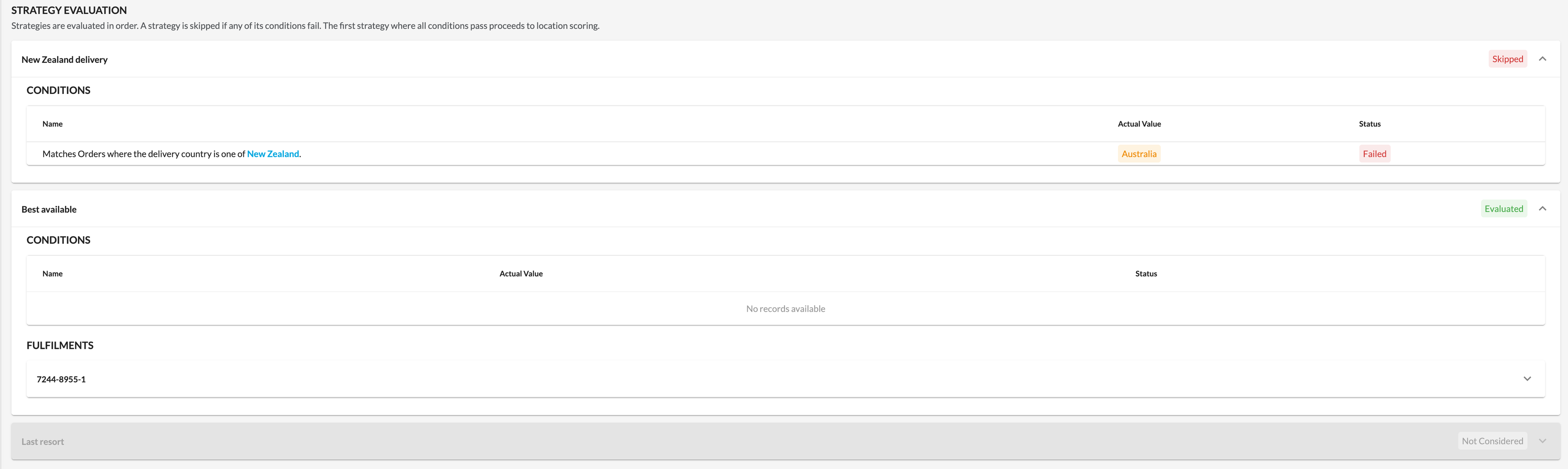
The Strategy Evaluation section lists the Strategies in the order they were evaluated. Strategies run in priority order, a Strategy is skipped if any of its Conditions fail, and the first Strategy whose Conditions all pass proceeds to Location scoring.Each Strategy shows its outcome:- Evaluated - the Strategy's Conditions passed and the Strategy was evaluated
- Skipped - at least one Condition failed, so the Strategy did not run
- Not Considered - an earlier Strategy already passed its Conditions, was evaluated, and created Fulfillment(s), so this Strategy was not reached
Fulfillments and Location Comparison
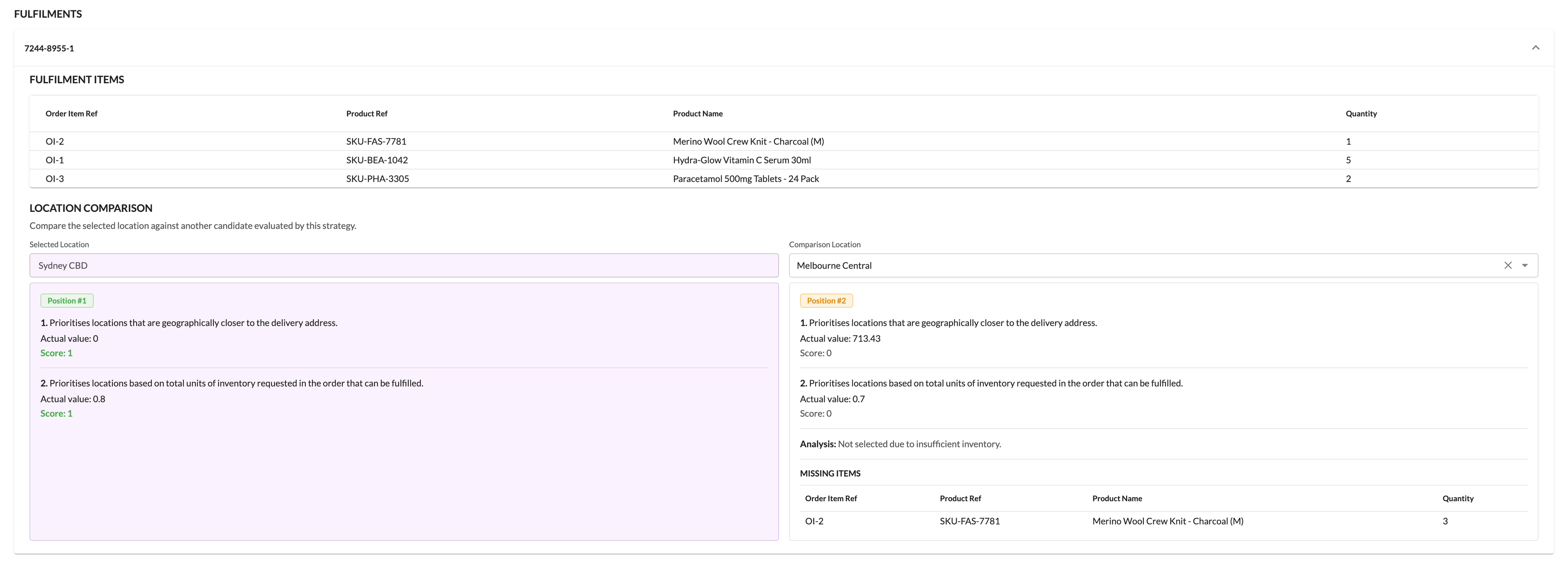
For the Strategy that produced the Fulfillments, the tab lists each Fulfillment by reference. Expand a Fulfillment to see the items it covers and to compare the Locations the Strategy evaluated.Location Comparison lets you compare the selected Location against another candidate that the same Strategy evaluated.For each Location, the comparison shows:- Its ranking position within the Strategy's candidate list
- Each Criterion, its Score (the normalized value), and, where available, the Actual value before normalization
- Any missing items the Location could not fulfill