
Location Comparison Component
UI Component
Changed on:
7 Sept 2026
Overview
The Location Comparison is a Mystique content component that shows two locations side by side - the location a Sourcing Strategy selected and another candidate the user chooses - so operators can see why one location was chosen over another.For each location it displays the sourcing criteria scores, highlights which location scored higher, and lists any items a location could not fulfill.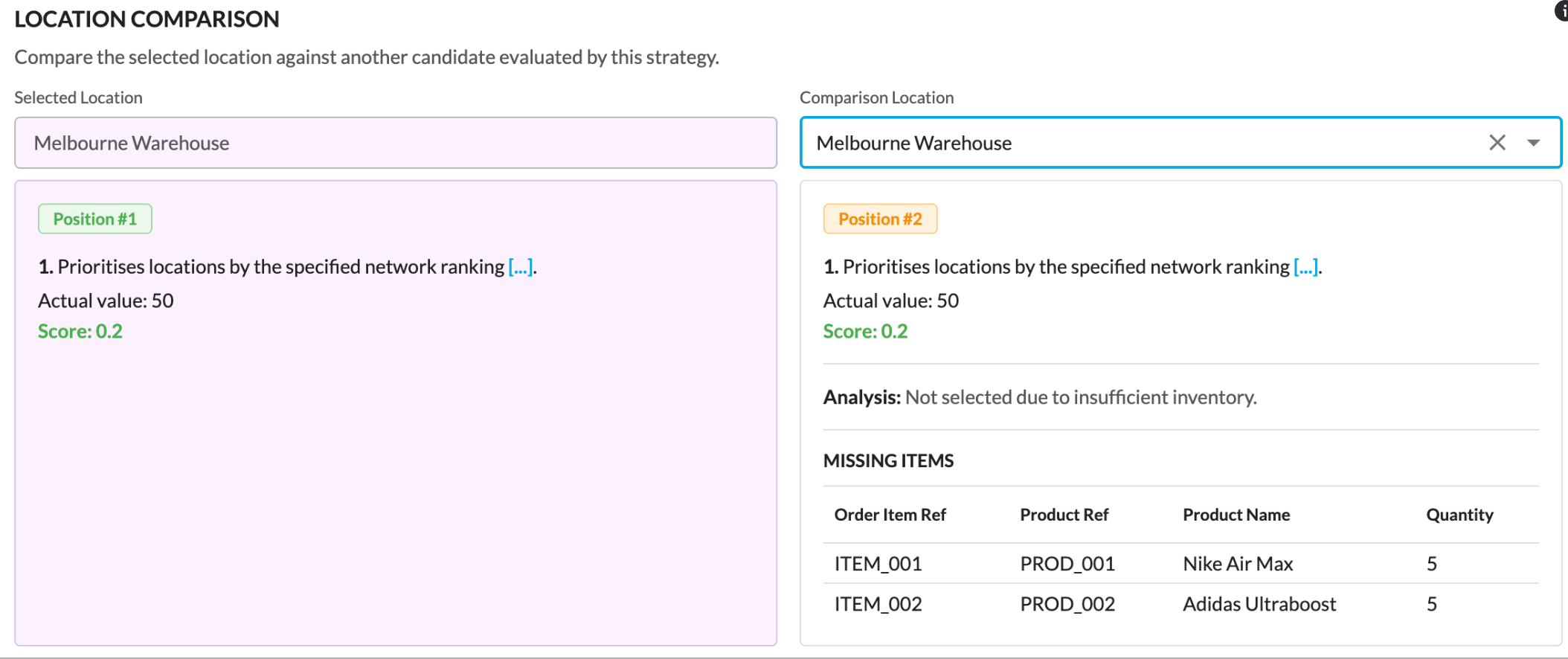
| Plugin Name | OMS |
|---|
Alias
fc.location.comparison
Detailed technical description
How It Renders
The Location Comparison lays out two locations side by side, under a title and subtitle:- Selected location (left) - the location the strategy selected, shown in a read-only field with a green Position badge showing its 1-based rank in the candidate list
- Comparison location (right) - chosen by the user from a searchable, clearable dropdown of the candidate locations, shown with an amber Position badge (its 1-based rank) once selected
Criteria
Each panel lists the location's sourcing criteria, one row per criterion:- The criterion description, rendered as formatted text
- The actual value, shown only when the criterion has one
- The normalized score - highlighted in green on whichever panel scored at least as high as the other for that criterion
Analysis
Once a comparison location is selected, an analysis line explains the outcome:- If the comparison location is short of stock for one or more items, it reports that the location was not selected due to insufficient inventory
- Otherwise, it reports that the selected location ranked higher
Missing Items
When the comparison location cannot fulfill every item, a table lists those items, with columns for:- Order item reference
- Product reference
- Product name
- Quantity
Behavior
- Reads its data from the
`data`property (it renders no child components of its own) - Choosing or clearing the comparison location updates only this component
The component is registered under
`category: content`Explanation Through an Example
An order needs 4 units of a Crew Neck T-Shirt (Black, M). A strategy ranked three candidate locations against two criteria, applied in order - distance to the delivery address, then inventory availability - producing the dataset below. The`locations` list is ordered best-ranked first.1{
2 "selectedLocationPosition": 1,
3 "location": {
4 "locationRef": "ALEXANDRIA",
5 "locationName": "Alexandria Store",
6 "criteria": [
7 {
8 "type": "fc.sourcing.criterion.locationDistance",
9 "name": "locationDistance",
10 "description": "Prioritises locations that are geographically closer to the delivery address.",
11 "normalisedValue": 0.8,
12 "actualValue": 8
13 },
14 {
15 "type": "fc.sourcing.criterion.inventoryAvailability",
16 "name": "inventoryAvailability",
17 "description": "Prioritises locations based on total units of inventory requested in the order that can be fulfilled.",
18 "normalisedValue": 1
19 }
20 ]
21 },
22 "locations": [
23 {
24 "locationRef": "BONDI_JUNCTION",
25 "locationName": "Bondi Junction Store",
26 "criteria": [
27 {
28 "type": "fc.sourcing.criterion.locationDistance",
29 "name": "locationDistance",
30 "description": "Prioritises locations that are geographically closer to the delivery address.",
31 "normalisedValue": 1.0,
32 "actualValue": 5
33 },
34 {
35 "type": "fc.sourcing.criterion.inventoryAvailability",
36 "name": "inventoryAvailability",
37 "description": "Prioritises locations based on total units of inventory requested in the order that can be fulfilled.",
38 "normalisedValue": 0,
39 "actualValue": 0.25
40 }
41 ],
42 "missingItemQuantities": [
43 {
44 "orderItemRef": "OI-1",
45 "productRef": "TSHIRT-CREW-BLK-M",
46 "productName": "Crew Neck T-Shirt Black M",
47 "quantity": 3
48 }
49 ]
50 },
51 {
52 "locationRef": "ALEXANDRIA",
53 "locationName": "Alexandria Store",
54 "criteria": [
55 {
56 "type": "fc.sourcing.criterion.locationDistance",
57 "name": "locationDistance",
58 "description": "Prioritises locations that are geographically closer to the delivery address.",
59 "normalisedValue": 0.8,
60 "actualValue": 8
61 },
62 {
63 "type": "fc.sourcing.criterion.inventoryAvailability",
64 "name": "inventoryAvailability",
65 "description": "Prioritises locations based on total units of inventory requested in the order that can be fulfilled.",
66 "normalisedValue": 1
67 }
68 ]
69 },
70 {
71 "locationRef": "MARRICKVILLE",
72 "locationName": "Marrickville Store",
73 "criteria": [
74 {
75 "type": "fc.sourcing.criterion.locationDistance",
76 "name": "locationDistance",
77 "description": "Prioritises locations that are geographically closer to the delivery address.",
78 "normalisedValue": 0,
79 "actualValue": 20
80 },
81 {
82 "type": "fc.sourcing.criterion.inventoryAvailability",
83 "name": "inventoryAvailability",
84 "description": "Prioritises locations based on total units of inventory requested in the order that can be fulfilled.",
85 "normalisedValue": 1
86 }
87 ]
88 }
89 ]
90}- The selected location is
`Alexandria Store`.`selectedLocationPosition`is a zero-based index into`locations`, so the value`1`points to the second entry. The Position badges display a 1-based rank (the index + 1), so the selected`Alexandria Store`shows Position #2, and when picked as the comparison,`Bondi Junction Store`(the first entry) shows Position #1.`Bondi Junction Store`ranks first but was short on stock, so the strategy chose`Alexandria Store`- the next-ranked location that could fulfill the whole order - The comparison dropdown lists the candidate locations to compare against - here,
`Bondi Junction Store`or`Marrickville Store` - Selecting
`Bondi Junction Store`: it ranks higher on distance, so its distance score shows green, while`Alexandria Store`shows green on inventory availability. The analysis line reports that Bondi Junction was not selected due to insufficient inventory, and a Missing Items table shows the 3 units of`TSHIRT-CREW-BLK-M`it was short - Selecting
`Marrickville Store`: it can fulfill the order but ranks below Alexandria, so the analysis line reports that the selected location was higher ranked than this location
Properties
| Name | Type | Required | Default | Description |
`data` | `LocationComparisonData` | Yes | None |
|
Configuration example
1{
2    "component": "fc.sourcing.result.enricher",
3    "descendants": [
4        {
5            "component": "fc.location.comparison",
6            "props": {
7                "data": {
8                    "locations": "{{strategies.0.locations}}",
9                    "location": "{{strategies.0.fulfilments.0.location}}",
10                    "selectedLocationPosition": "{{strategies.0.fulfilments.0.selectedLocationPosition}}"
11                }
12            }
13        }
14    ]
15}Version History
Recommended Placement
Use the Location Comparison in the Sourcing tab to let operators compare the location a strategy selected against another location it considered.Place it within a Sourcing Result Enricher and give it a single strategy's evaluation - the selected location as
`location`, all the locations it considered (including the selected one) as `locations`, and the selected location's position as `selectedLocationPosition` - so the criteria scores and missing items are ready to display.