Configure Multi-Country Sourcing Logic
How-to Guide
Author:
Kirill Gaiduk
Changed on:
2 Oct 2025
Key Points
- Use the Responsive Sourcing Framework to implement sourcing logic that prioritize country-level constraints
- Use the
`createSourcingProfile`mutation to create new versions of Sourcing Profiles, which are immutable - Activate relevant Sourcing Profiles versions with the
`activateSourcingProfile`mutation - Reference Sourcing Profiles within the corresponding Workflows
Prerequisites
Steps
 Create Networks
1. Use the
`createNetwork` mutation to create the Warehouse (`WH`) Network for your Sourcing Profile, including all the Locations from `UK_WH`, `BEL_WH`, `FRA_WH` Networks.2. Configure your Network using the `CreateNetworkInput` fields:- Use a unique
`CreateNetworkInput.name`value (it is saved in the`Network.ref`field). - Use the
`network`query to get the list of Location Ids by Network Reference.
`UK`with Locations from`UK_LS`and`WH``EU`with Locations from`BEL_LS`,`FRA_LS`, and`WH`
Create Sourcing Profile
1. Use the
`createSourcingProfile` mutation to create a new Sourcing Profile, including its:- Primary Sourcing Strategies with their
- Sourcing Conditions and Criteria
`CreateSourcingProfileInput` fields:- Assign a unique Reference for the Profile (e.g.,
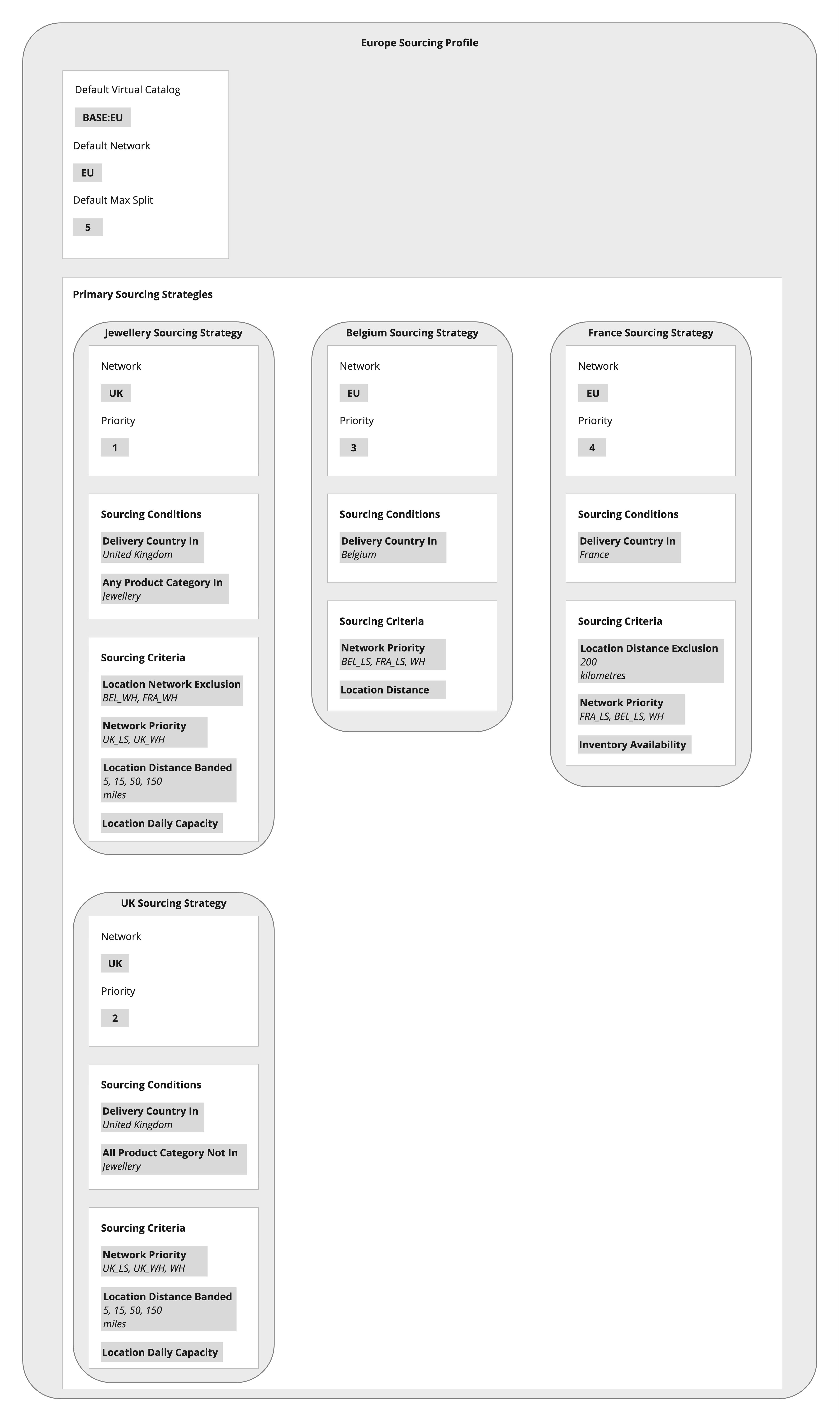
`Europe`) - Set Default Virtual Catalog to
`BASE:EU`(or as required) - Set Default Network to
`EU` - Set Default Max Split to 5 (or as required)
- U.K. Jewellery Strategy: Restricts Jewellery Category to the U.K. Networks (
`UK_LS`,`UK_WH`) to comply with import restrictions - U.K. General Strategy: Prioritizes U.K. local stores, applies distance banding and daily capacity ranking
- Belgium Strategy: Prioritizes Belgian local stores (
`BEL_LS`), then French stores if Belgian stock is insufficient - France Strategy: Prioritizes French local stores (
`FRA_LS`), then Belgian stores when needed
`"sourcingStrategies": []` array to reflect the priority order:- Priority 1 →
`Jewellery`(U.K.) - Priority 2 →
`UK`(general) - Priority 3 →
`Belgium` - Priority 4 →
`France`
`deliveryCountryIn`to bind each Strategy to its country`anyProductCategoryIn`or`allProductCategoryNotIn`to apply product-specific sourcing (e.g., Jewellery)
`networkPriority`to prefer local stores before cross-border or warehouse sourcing`locationDistanceBanded`or`locationDistanceExclusion`to enforce distance rules`locationDailyCapacity`to manage fulfillment limits by capacity`inventoryAvailability`to ensure fulfillment only from stocked Locations
Sample createSourcingProfile Payload
Update your Workflow
Ensure the Sourcing Profile
`ref` is specified in the `sourcingProfileRef` parameter of the CreateFulfilmentWithSourcingProfile Rule.