Fluent Commerce can post standard webhooks to a configured endpoint so that the third-party system can be notified or react to the provided event. For example, common webhook scenarios include order status updates and shipping notifications.
Key points
A webhook is a way for Orchestrated Workflow Logic to call back to an external application.
Fluent Commerce provides some standard webhooks as Rules within the Rule Library for common third-party integrations.
Since the payload and HTTP request cannot be customised, it is rarely necessary to implement a custom rule to send a webhook
Note
Only standard webhook ports 80 and 443 are supported.
A webhook is a way for Orchestrated Workflow Logic to call back to an external application, such as a notification provider, client middleware, or ERP system. The Fluent Orchestration Engine can post an event to a configured endpoint so that the third-party system can be notified or react to the provided event. For example, common webhook scenarios include order status updates and shipping notifications.Webhooks provide the ability for external systems to rely on receiving the event in real-time rather than having to poll the Fluent APIs for information.
When To Use a Webhook
Webhooks form part of the integration patterns provided by the Fluent Platform, and should be used when appropriate.
Use Case
Webhook?
Event API?
Examples
Real-time Updates
✅
❌
Webhooks are perfect for individual orchestrated changes such as Order Status Updates, Shipping Notifications, etc.
Bulk / High Load Batch Orchestration
❌
✅
Webhooks must NOT be used under high-load bulk orchestrations such as Inventory Batches. If required, the Event API may be used to query for information.
Polling
❌
Rarely
Webhooks should not be used to poll any third party or external system, ever! We do not recommend polling the Fluent Platform via the Event API; however, if required, this should be done as optimally as possible and not too frequently.
Standard Webhooks
Fluent Commerce provides some standard webhooks as Rules within the Rule Library for common third-party integrations.
SendWebhook Rule - see below.
Email provider hook
SMS provider hook
Carrier aggregator hook
Courier hook
Default SendWebhook Rule
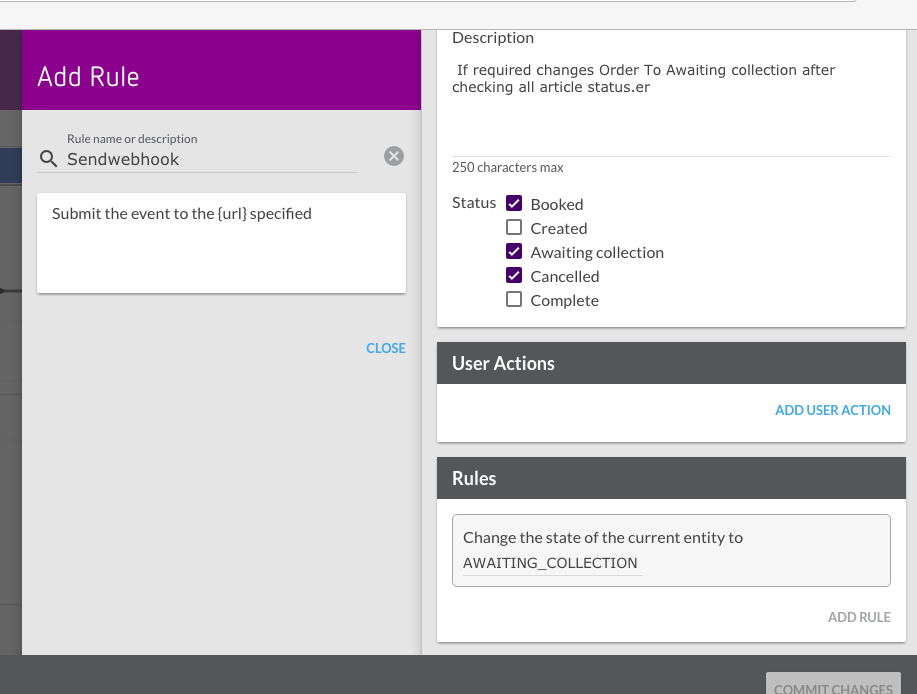
`SendWebhook` is a standard rule that can be added to any Ruleset in a workflow. The `SendWebhook` is used to post the corresponding event message to any endpoint that is specified.The rule only accepts one parameter, which is the URL.
The Orchestration Editor can be used to add the rule to the Ruleset in the workflow that is triggered by the specific event that needs to be captured:
Custom Webhooks
Since the payload and HTTP request cannot be customised, it is rarely necessary to implement a custom rule to send a webhook. Rather, the recommended approach is to add a Ruleset to your workflow, naming the specific webhookaction required, and simply add the SendWebhook rule to that Ruleset, configured with the target URL. This will take the event received by the Ruleset and post it to the target URL.Should you wish to enforce more validation on the Event interface for a particular webhook, you can add rules that define required Event Attributes to be present prior to executing the webhookrule itself.Example Ruleset:
SendOrderStatusUpdateToEcom
ValidateEventAttribute
ValidateEventAttribute
ValidateEventAttribute
SendWebhook
Should you wish to perform any additional custom logic not available with composition of existing rules, you may wish to build your own webhookrule using the Fluent SDK, and creating a custom plugin. The custom webhookrule will have access to an Action called `postWebhook`.For information on Fluent SDK, please check out the pages below.
By default, when a Webhook in a custom Rule fails it reverts back to the default Webhookaction logic. To prevent this and use the logic set up in the custom Rule, add the following Setting to any Workflow containing a custom Webhook.`"settings": {"fc.rubix.sdk.webhook.retry.method":"preserve-event-details"}` Learn more about adding settings to a Workflow.
Webhook Sample payload
All webhooks posted by the Fluent platform use the standard Event Model. This is the same as the Event API payload. More information can be found under Event APIThe following is a sample payload for a webhook:
Additional attributes can be sent as part of a Webhook, however, we recommend a lightweight Webhook approach for the following reasons:
avoid stale data - if the booking takes some time to process (say, because the carrier API is down for maintenance) and the customer happens to change their address details in the meantime, the old address isn't baked into the payload
simplicity of updates - if the carrier API updates and now requires more information, rather than having to update both the rule and the connector to send the additional parts, only the connector needs to be updated to fetch them.
Instead of sending data with the Webhook body, the Webhook should just notify your external system. If the system needs data it should use the Fluent Platform APIs to retrieve what they need.For example, instead of booking a shipment in an external shipping platform with a Webhook call containing all the shipping information, have your Webhook notify the external shipping platform of the booking and task it use Fluent APIs to retrieve shipment details.
HTTP Response Code Handling
Understanding how the Fluent Platform handles HTTP response codes from your webhook endpoint is critical for designing reliable integrations.
Recommendation: Always Return HTTP 200
Your webhook endpoint should always return a 200 OK response for successfully received webhooks.Returning any other 2xx code (including 202 Accepted) or non-2xx code has specific platform implications described below. Design your endpoint to acknowledge receipt with a 200 immediately, then process the payload asynchronously
Http Code
Meaning
Platform Behaviour
200 OK
Success (recommended)
Webhook delivery recorded as successful. Response body, headers, response code, and reason are all saved to the orchestration audit log.
202 Accepted
Async acknowledgement
Treated as an asynchronous webhook acknowledgement. The platform does not save the response body, response headers, response code, or response reason. This is by design.
4xx Client Error
Client-side failure
Delivery considered failed. No automatic retries are attempted. Monitor using the Events API for Send Webhook audit events and check for non-200 responses.
5xx Server Error
Server-side failure
Delivery considered failed. No automatic retries are attempted. Use the Events API or entity status monitoring to detect and manually retry failed deliveries.
Monitoring Non-200 Responses
Since 4xx and 5xx responses do not trigger automatic retries, proactive monitoring is essential. Two approaches are available:
Option A: Events API monitoring
Poll the Events API for `Send Webhook` audit events nd identifying any that return responses other than `200` by parsing the JSON (see this sample JSON non-`200` response): `curl --location 'https://{{accountId}}.sandbox.api.fluentretail.com/api/v4.1/event?eventType=ORCHESTRATION_AUDIT&name=Send%20Webhook&category=ACTION&from={{fromDateTime}}&to={{toDateTime}}' --header 'Authorization: bearer {{token}}' --header 'Accept: /'`
Option B: Entity status monitoring
Monitor periodically entities stuck in a particular status in their lifecycle for longer than they should be. Check this topic on setting up business monitoring. Once a failed webhook has been identified by one of the above methods, then it can be retried manually using this approach: Manual Event with Run-Once Workflow.
Webhook Retries
There are two options for retry schedules, Exponential Back-off and 2 Second Intervals.
Option A: Exponential Back-off (Recommended)
Error / Exception Type
Retries
Connection Timeout
Read Timeout
Retry Interval
Retry Fallback Schedule
Retry Max Attempts
Connection Timeout
✅
10 seconds
10 seconds
Exponential
Immediate, 1 minute, 1 hour, 1 day
4
HTTP 4xx
❌
-
-
-
-
-
HTTP 5xx
❌
-
-
-
-
-
All others
❌
-
-
-
-
-
If the Webhook request fails due to a connection timeout, the Workflow Engine will automatically reattempt the Webhook request four times.The "Retry Delay" for every retry is as follows:
Immediate: for random errors
1 minute: for short-term issues like rate limiting
1 hour: for scheduled downtimes
1 day: for production outages on the target environment
How to enable Exponential Back-off
To enable Exponential Back-off, add the following setting to the Settings Object in your Workflow:`"settings": {"fc.rubix.sdk.webhook.retry.schedule":"exponential"}`To learn how to enable Workflow Settings like this, see the adding a setting to a Workflow guide.To learn more about available settings, see the Workflow Settings page.
If the Webhook request fails due to a connection timeout, the Workflow Engine will automatically reattempt the Webhook request three times.The "Retry Delay" for every retry is calculated using the Retry Fallback Formula as below:
Total Retry Delay after all 3 retries = 2 + 4 + 8 = 14 seconds.
How to enable 2 Second Intervals
This option is set as default and does not need to be enabled.
Webhook id
The event that is sent as part of the webhook requires the id field to ensure that the webhook retries are executed correctly. For example, the following code has randomUUID set as id.
If the Webhook request fails more than the maximum amount of failures based on the chosen retry schedule, it will audit a `RetriesExceededException`, and create an event named `<RuleName> Exception`. This event can be used to execute a custom Ruleset in your workflow to act on this issue, such as sending an email or SMS notification.
Note
Exceptions from Webhook Actions are not returned to the Rule that created the Action. This is because Actions are queued and only executed at the end of the existing event queue for the existing execution context.
Non-retry-able Webhook Exceptions
If the WebhookAction failed due to an issue in generating the digital signature for the request, then it will not retry since this is not considered a transient exception. Instead, this will be audited as an `ActionException` in the orchestration audit events.For more info on Webhook Signing, see Signature Validation.