
Inventory Sync - Adobe Commerce Connector
Essential knowledge
Intended Audience:
Technical User
Author:
Fluent Commerce
Changed on:
30 June 2026
Overview
Explains how the Adobe Commerce Connector processes aggregate availability data from Fluent Order Management virtual catalogs into storefront networks. Partners will learn to establish Multi-Source Inventory mappings and align automated update crons. For the business, this real-time synchronization prevents overselling and guarantees precise stock values during checkout.Note: This article forms part of the inbound pipeline category, where data flows into the Adobe Commerce environment from an external source.Key points
- Core Functionality & Outcome: You will learn how this framework synchronizes aggregate stock data from Fluent to Adobe Commerce using an asynchronous 4-step message queue workflow triggered via Full CLI sync, Manual Admin sync, or background Delta sync (running every 5 minutes by default).
- Critical Configuration Constraint: If you skip the text, you must know that the framework relies on Adobe's Multi-Source Inventory (MSI) and requires a strict naming convention for per-website Sources (
`SOURCE_PREFIX_RETAILER_ID`) and Stocks (`STOCK_PREFIX_RETAILER_ID`) to ensure accurate data isolation. - Unified Service Architecture: To maintain processing consistency, all entry points (cron, admin UI, and CLI) utilize a single, centralized
`StockUpdate`service that leverages a builder pattern to fetch API data and push inventory messages into the queue.
Data Pipeline Execution
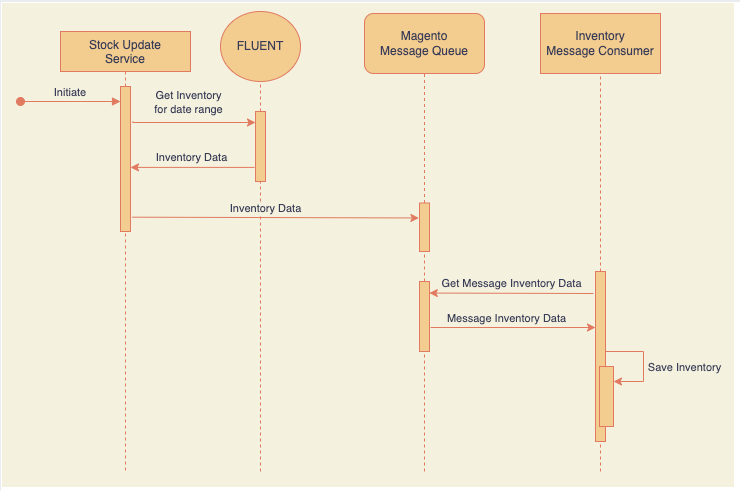
The inventory synchronization framework updates storefront availability using a multi-layered execution lifecycle across three primary entry points.
1. Ingestion & Synchronization Triggers
Depending on the business state, inventory collection initiates via three distinct operational execution profiles:| Sync Profile | Trigger Mechanism | Chronological Fetch Window | Operational Use Case |
| Full Synchronization | CLI Command:`bin/magento fluent:stock_full:update` | `1970-01-01` to `NOW + 5 minutes` | Initial post-installation provisioning or global emergency synchronization resets. |
| Manual Synchronization | Admin Console UI Action | `SPECIFIED_DATE` to `NOW + 5 minutes` | Targeted administrative corrections for known multi-tenant system deltas. |
| Delta Synchronization | Scheduled PHP Cron Engine (Default: Every 5 minutes) | `LAST_EXECUTION_TIME` to `NOW + 5 minutes` | Routine background updates to maintain day-to-day storefront inventory parity. |
2. Service Processing & Queue Ingestion
Once an ingestion trigger executes, data transitions through a standardized 4-step message processing loop to offload heavy database tasks from front-facing storefront nodes:- API Request: The connector requests aggregate inventory datasets from Fluent Commerce matching the calculated date-time window.
- Platform Ingest: Fluent Commerce returns the filtered inventory payload back to the connector.
- Queue Publication: Adobe Commerce accepts the raw payload and immediately publishes individual item records to the internal asynchronous message queue.
- Asynchronous Consumption: The native inventory message consumer pulls payloads off the queue, processing item availability changes in the background.
Data Storage & MSI Schema Mapping
Because this framework relies completely on Adobe's native Multi-Source Inventory (MSI) engine, synchronization runs independently per website workspace. Implementing partners must structurally map inventory sources and stocks to isolate datasets across multi-retailer footprints:- Inventory Source Setup: Create an independent inventory source for each individual retailer.
- Format Naming Convention:
`SOURCE_PREFIX`+`_`+`RETAILER_ID` - Example Value:
`FL_SO_1`
- Format Naming Convention:
- Inventory Stock Setup: Create a corresponding inventory stock record per website and assign the previously generated source directly to it.
- Format Naming Convention:
`STOCK_PREFIX`+`_`+`RETAILER_ID` - Example Value:
`FL_AG_1`
- Format Naming Convention:
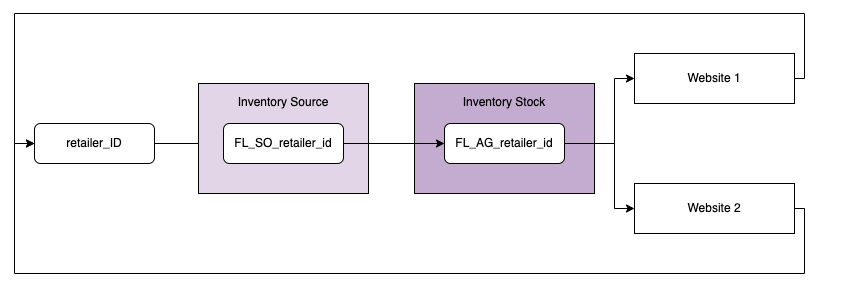
Configuration Guardrail
Adhering strictly to this naming matrix is mandatory. This structural paradigm guarantees that each storefront website isolates transactional stock records, rendering availability exclusively for its specific retailer context.Connector Architecture
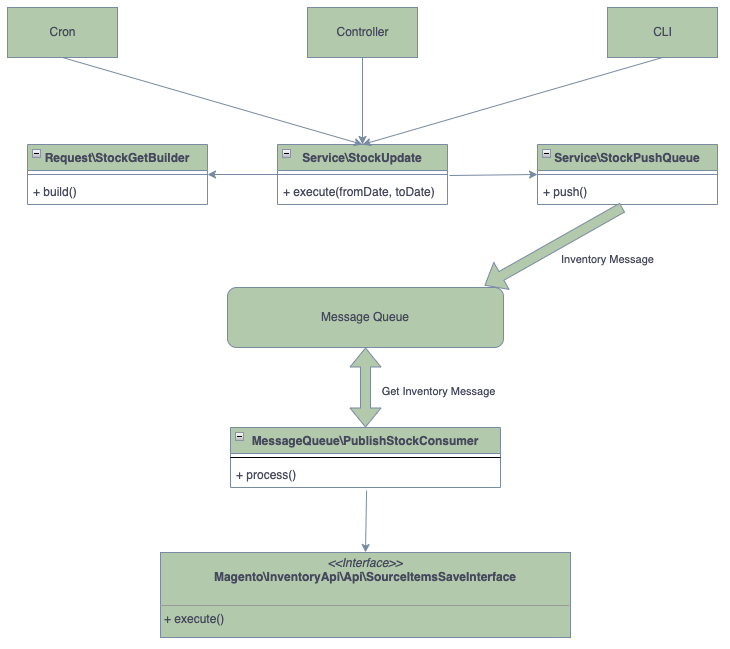
To eliminate logic divergence, the extension consolidates backend actions into decoupled, reusable classes. The execution of this inbound pipeline is governed by the following core architecture:`StockUpdate`: The single, centralized service used as the exclusive entry point for the cron, admin controller, and CLI layers.- Request Builder Pattern: An internal builder component within the
`StockUpdate`service responsible for compiling the programmatic API request variables sent to Fluent. - Queue Publisher Service: A specialized transport service that intercepts the incoming platform payload and streams individual inventory messages directly into the application's native processing queue.
Developer Extension Points
To allow technical implementation teams to adapt the framework without altering core files, developers can leverage native Adobe Commerce Dependency Injection (`di.xml`) mechanics to override or extend the execution layout:- Query & Payload Customization: Because the core service uses a strict builder pattern to compile platform API requests, developers can plug custom arguments or alternative date definitions into the request builder arguments via
`di.xml`. - Queue Handler Overrides: Implementing teams can swap out or supplement the default message consumer logic by registering alternative handler dependencies against the native inventory queue topic configuration.

