
Consignment - Adobe Commerce Connector
Essential knowledge
Intended Audience:
Technical User
Author:
Fluent Commerce
Changed on:
30 June 2026
Overview
Explains how the Adobe Commerce Connector ingests inbound consignment updates from Fluent Order Management to update storefront shipments. Partners will learn to manage asynchronous validation chains, message queues, and tracking details. For the business, this automation creates precise full or partial customer shipments and provides real-time carrier tracking links.Note: This article forms part of the inbound pipeline category, where data flows into the Adobe Commerce environment from an external source.Key points
- Core Functionality & Outcome: You will learn how this pipeline intercepts Fluent consignment webhooks to automatically create and update full or partial shipments, including tracking codes, in Adobe Commerce.
- Global Scope & Trigger Constraints: If you skip the text, you must know that this framework can only be activated globally across all websites, and shipment generation relies entirely on a configurable, comma-separated list of specified Fluent statuses.
- Asynchronous Validation Flow: Inbound webhooks undergo a strict multi-step validation chain (verifying accounts, retailer IDs, and entity types) before being offloaded to an asynchronous message queue (
`fluentcommerce.consignment.updater`) for safe, decoupled processing. - Architecture & Customization: Developers can extend or override webhook handlers, validation rules, and processing commands using standard Adobe Commerce Dependency Injection (DI) (
`di.xml`) or tap into two dedicated event hooks (`before`/`after`processing).
Data Pipeline Execution
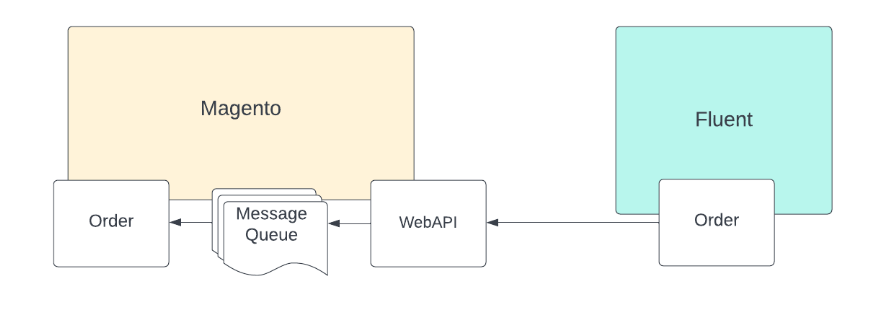
1. Ingestion - Webhook
The framework adds a new handler to the order update webhook (provided by the order reference module) to accept and process incoming consignment updates.The configuration below demonstrates how the handler is mapped to a Fluent Webhook message name. It is possible through Adobe Commerce DI to add more or override the default settings:1<type name="FluentConnector\General\Api\WebHook\HandlerFactoryInterface">
2 <arguments>
3 <argument name="handlers" xsi:type="array">
4 <item name="ConsignmentStatusChanged" xsi:type="string">FluentConnector\Consignment\Handler\ConsignmentHandler</item>
5 </argument>
6 </arguments>
7</type>2. Validation Chain - di.xml
Before actual webhook processing begins, a series of validations are executed. These validations are part of a validation chain configured in the`di.xml` file as follows:1<virtualType name="consignmentValidatorChain" type="FluentConnector\General\Model\WebHook\MessageValidatorChain">
2 <arguments>
3 <argument name="validators" xsi:type="array">
4 <item name="consignmentEnableValidator" xsi:type="object">consignmentEnableValidation</item>
5 <item name="consignmentEntityTypeValidator" xsi:type="object">consignmentEntityTypeValidator</item>
6 <item name="orderStatusValidator" xsi:type="object">FluentConnector\Consignment\Model\WebHook\Validator\OrderValidator</item>
7 </argument>
8 </arguments>
9</virtualType>Queue Processing - `fluentcommerce.consignment.updater`
Upon successful validation, the webhook execution adds the message to a queue to be processed asynchronously.- Topic Name:
`fluentcommerce.consignment.updater` - Message Content Payload:
`retailerId`(Retailer ID)`entityId`(Fluent Consignment ID)`rootEntityRef`(Adobe Order increment ID)
- Consume messages from the queue.
- Fetch the consignment entity by ID from Fluent Commerce, including articles.
- Run an initial validation check to make sure this consignment and fulfillment are related to active orders and items (verifies that the order exists and matches the queued item, the order item exists in the platform, and order items are available for shipment).
- Create an order shipment for fulfillment items (supporting partial or fully shipped lines) using Command patterns for data processing if the consignment status matches your configurations.
- Add a shipping tracking code. This tracking code can only be added to existing shipments and utilizes command patterns for data processing.
1<virtualType name="consignmentProcessCommandPool" type="FluentConnector\Consignment\Model\Command\CommandPool">
2    <arguments>
3        <argument name="commands" xsi:type="array">
4            <item name="shipment" xsi:type="string">FluentConnector\Consignment\Model\Command\Order\Shipment</item>
5        </argument>
6    </arguments>
7</virtualType>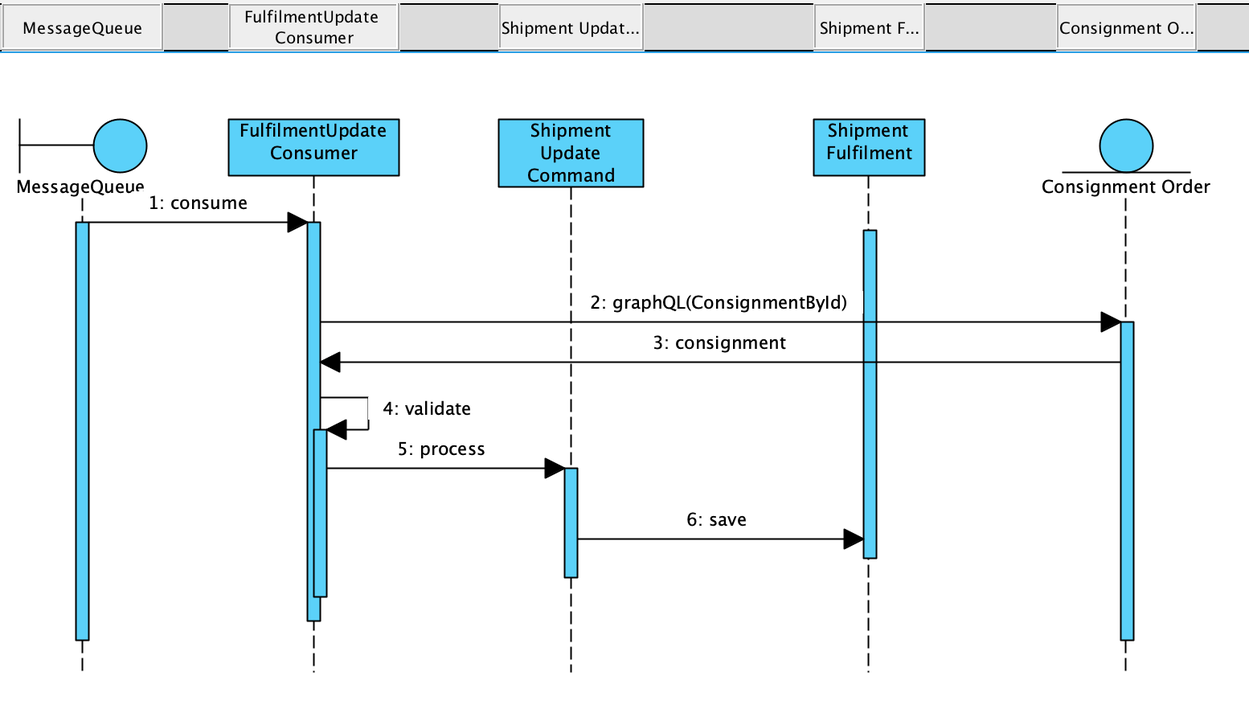
Data Storage & Schema Mapping
Consignment vs Shipping Field Mapping Reference
The table below defines how fields map between incoming Fluent Consignment data and Adobe Commerce shipping properties:| Name | Parameters / Field Path | Description |
`rootEntityRef` | `order.increment_id` | Adobe Order increment ID |
`order_item_id` | `data.consignmentById.consignmentArticles.consignmentArticleEdges[].consignmentArticleNode.fulfilments.fulfilmentEdges.fulfilmentNode.items.fulfilmentItemEdges[0].fulfilmentItemNode.orderItem.ref` | Target order item ID |
`shipped_qty` | `data.consignmentById.consignmentArticles.consignmentArticleEdges[].consignmentArticleNode.fulfilments.fulfilmentEdges.fulfilmentNode.items.fulfilmentItemEdges[0].fulfilmentItemNode.filledQuantity` | Total shipped quantity |
`status` | `data.consignmentById.status` | The item's consignment status (e.g., `"status": "ACTIVE_LODGED"`) |
`fulfilment ID` | `data.consignmentById.consignmentArticleEdges[].consignmentArticleNode.fulfilments.fulfilmentEdges.fulfilmentNode` | Kept as an extension attribute |
Architecture
The following classes govern the execution of this inbound pipeline:`FluentConnector/Order/Handler/ConsignmentStatusUpdateHandler.php`: Handler to publish Consignment messages to the message queue.`FluentConnector/Order/Model/MessageQueue/Consumer/Data/ConsignmentUpdateMessage.php`: Data interface for the message queue.`FluentConnector/Order/Model/MessageQueue/Consumer/ConsignmentUpdateConsumer.php`: Consignment update consumer.`FluentConnector/Order/Model/Command/Order/Shipment.php`: Order item shipment command.`FluentConnector/Order/Model/Command/Order/ShipmentTracking.php`: Shipping tracking command.
Developer Extension Points
Two dedicated event hooks are provided, allowing custom code to execute alongside the core processing steps:`fluent_consignment_process_before`: Event fired before the consignment is processed. Parameters:`order`(of type`OrderInterface`),`consignment`(of type`array`).`fluent_consignment_process_after`: Event fired after the consignment is successfully processed. Parameters:`order`(of type`OrderInterface`),`consignment`(of type`array`).

