Store Locator - Adobe Commerce Connector
Essential knowledge
Intended Audience:
Technical User
Author:
Fluent Commerce
Changed on:
30 June 2026
Overview
Explains how the Adobe Commerce Connector pulls physical fulfillment locations—including retail stores, warehouses, and collection nodes—from Fluent Order Management. Partners will learn to configure manual, full, and delta background cron tasks that map data models. For the business, this feature provides accurate store listing directories to support omnichannel options.Note: This article forms part of the inbound pipeline category, where data flows into the Adobe Commerce environment from an external source.Key points
- Core Function & Outcome: You will learn how the integration service layer pulls multi-retailer location metrics from Fluent to update internal storefront database records using a four-step pipeline.
- Three Extraction Profiles: Data sets are sustained via command-line full synchronizations, custom administration interface date filters, or automated background cron runs.
- Infrastructure Dependencies: Because processing relies on native messaging queues and background chronologies, proper system execution configuration is vital to maintain accurate store profiles.
- Developer Customization: If you need to alter the default behavior, the framework provides eight distinct events to customize query payloads, request variables, and data models before they are saved.
Data Pipeline Execution
1. Ingestion - Webhook
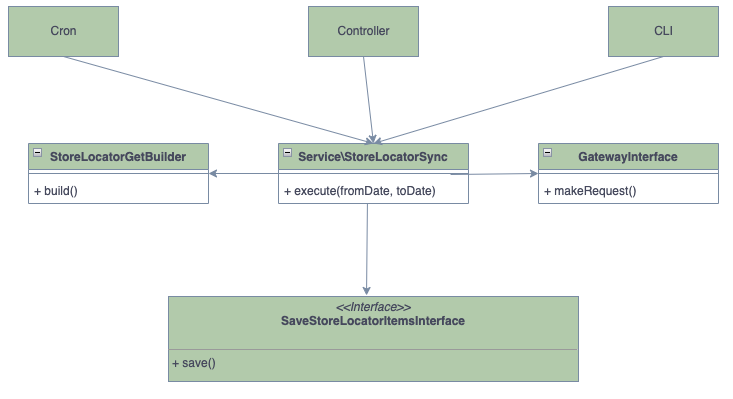
Unlike standard push-based webhooks, the Store Locator initiates ingestion by executing an outbound request to pull data from Fluent Commerce. This ingestion is triggered through three primary methods:- Full Synchronization (CLI): Used after installation to import all location information from Fluent to Adobe Commerce. It utilizes a location updated date range spanning from
`1970-01-01`to`NOW + 5 mins`. It can be run manually via the Magento CLI: Bash`bin/magento fluent:store_locator:sync` - Manual Synchronization (Admin UI): Allows fetching location changes from a specific date. This method is executed from the Adobe Commerce admin interface and utilizes a date range from
`SPECIFIED_DATE`to`NOW + 5 mins`. - Delta Synchronization (Automated Cron): An automated background process to keep Adobe Commerce locations up to date. It is executed by an Adobe Commerce cron job whose frequency is configured in the admin panel (running every day at midnight by default). It uses a date range from
`LAST_EXECUTION_TIME`to`NOW + 5 mins`.
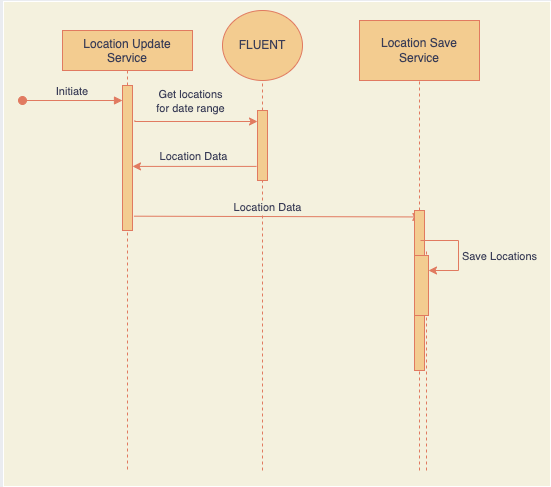
- The Adobe Commerce Update Location Service requests location data from Fluent Commerce for the specific date-time range.
- Fluent Commerce returns the appropriate location information to the service.
2. Validation Chain - di.xml
The validation check for the Store Locator is handled natively within the integration service layer. The platform enforces data integrity parameters by applying a strict, bounded time filter to the request payload (`START_DATE` to `NOW + 5 mins`). This programmatic constraint guarantees that only location updates modified within that valid execution window are accepted for staging.3. Queue Processing (fluentcommerce.store_locator.sync)
Once the location data is received and validated by the update service, it moves into an asynchronous queue to finalize processing:- Adobe Commerce publishes the received dataset directly into the internal Adobe Commerce message queue.
- The location message consumer fetches the published messages from the queue.
- The consumer parses the payload and saves the appropriate locations to the Adobe Commerce database models.
Developer Extension Points
The framework provides eight distinct events that allow developers to customize query payloads, request variables, and location data models before they are committed to the database:`fluent_before_save_store_locator`: Allows customization of the store locator model before save. Parameters:`store locator model`,`store locator response data`.`fluent_get_store_locator_query_build_after`: Allows customization of the payload of the get location request. Parameters:`request_data`(of type`StoreLocatorGetDataInterface`),`query`(of type`string`).`fluent_store_locator_prepare_variable`: Allows customization of variables used for request building. Parameters:`variables`(of type`array`),`request_data`(of type`StoreLocatorGetDataInterface`).`fluent_store_locator_prepare_request_fields`: Allows customization of fields used for request building. Parameters:`request_fields`(of type`DataObject`).`fluent_store_locator_email_prepare_request_variable`: Allows customization of filter fields used in email request building. Parameters:`field_list`(of type`DataObject`).`fluent_store_locator_email_prepare_variable`: Allows customization of variables used in email request building. Parameters:`variables`(of type`DataObject`),`request_data`(of type`StoreLocatorGetEmailDataInterface`).`fluent_store_locator_email_prepare_request_fields`: Allows customization of fields to be requested in email request building. Parameters:`request_fields`(of type`DataObject`).