
Category Sync - Adobe Commerce Connector
Essential knowledge
Intended Audience:
Technical User
Author:
Fluent Commerce
Changed on:
30 June 2026
Overview
Explains how the Adobe Commerce Connector exports category data outbound to Fluent Order Management to align master catalog trees across platforms. Partners will learn to use automated delta crons, administrative triggers, and code hooks to refine extraction profiles. For the business, this synchronization keeps catalog structures unified for accurate routing rule evaluations.Note: This article forms part of the outbound pipeline category, where data flows out of the Adobe Commerce environment to an external destination.Key points
- Core Functionality: You will learn how this framework exports category data from Adobe Commerce to Fluent, routing all data through Adobe's message queue and a dedicated consumer for asynchronous processing.
- Three Synchronization Methods: Category updates can be triggered via a full CLI command (recommended immediately after installation), a date-filtered manual push in the Admin Console, or an automated background cron job (Delta Sync).
- Payload Architecture: Uses a strict builder pattern (
`BuildCategoryPayload.php`) to construct API payloads, meaning any underlying data structure changes must align with this generation flow. - Developer Extensibility: Developers can modify category collections and payloads or intercept the sync process without rewriting core classes by utilizing four dedicated event hooks.
Data Pipeline Execution
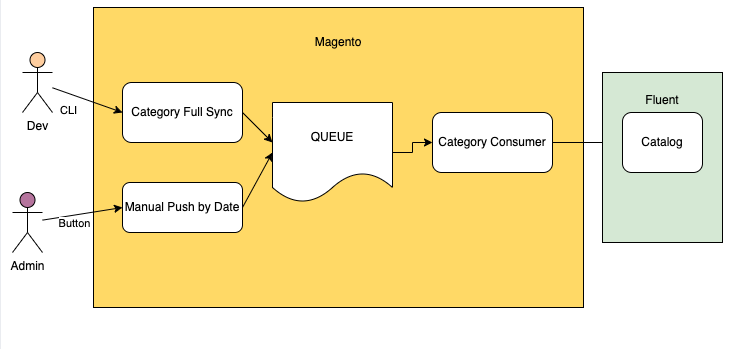
1. Application Triggers (Observers/Cron)
Category records are gathered and synchronized using three alternative trigger mechanisms:- Magento CLI Command: Run manually by technical teams to trigger a bulk extraction of all store categories. This is typically used immediately after installation to seed the platform: Bash
`bin/magento fluent:category_full:push` - Adobe Admin Console UI: A manual sync options panel inside the administrative dashboard. It extracts categories modified between a user-defined date and the current runtime.
- Automatic Delta Sync: An automated, background system process executed by a native Adobe Commerce cron job that looks for categories changed since the timestamp of the last successful synchronization.
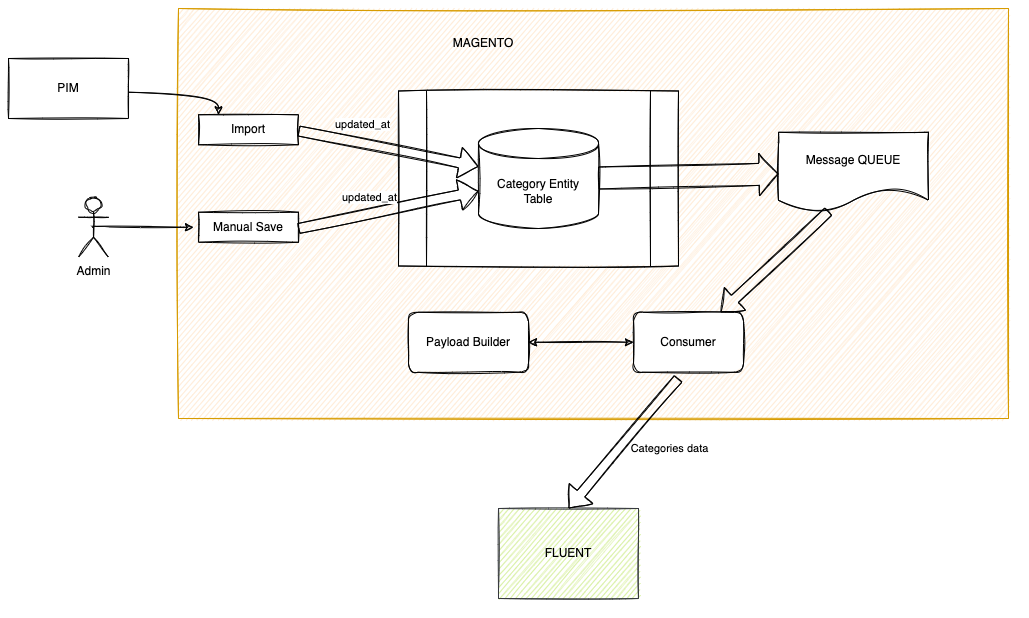
2. Validation Check
The active extraction path collects the target category IDs and passes them into Adobe Commerce's internal message queue framework. This layer checks configuration scopes to align data with multi-retailer and multi-website boundaries before processing.3. Payload Building
The framework implements a strict builder pattern to compile outbound data fields. The primary builder class (`FluentConnector\Category\Model\Request\BuildCategoryPayload.php`) passes execution down to a specialized data collector (`FluentConnector\Category\Model\Request\Data\Collector\Category.php`) to cleanly structure the category payload parameters.4. API Delivery
A background message consumer handles the final export phase. It reads the structured payload messages directly from the queue, opens an authenticated API pipeline, and streams the category data structures outbound into the Fluent platform.Developer Extension Points
Developers can leverage four built-in event definitions to modify category data pools dynamically before synchronization:| Name | Description | Parameters |
`fluent_send_category_data_prepare_before` | Allows customization of the category collection before payload building | `collection` |
`fluent_send_category_data_prepare_after` | Allows customization of a payload for a specific category entity | `category_info` of type `array` |
`fluent_send_categories_before` | Event fired immediately before categories are pushed to Fluent | `categoryIds` of type `array` |
`fluent_send_categories_after` | Event fired after categories are successfully pushed to Fluent | `categoryIds` of type `array` |

