
Fluent Store Web App Overview
Feature
Changed on:
17 June 2026
Overview
The Fluent Store Web Application is an in-store, responsive web application that provides retail staff with end-to-end order management capabilities. Built on the Fluent Order Management Experience (OMX) platform, this industry-tested application gives store associates a mobile-optimized interface to execute distributed fulfillment, handle customer pickups, coordinate store-to-store transfers, and manage reverse logistics directly on the retail floor.How it Works
Built on the Fluent Order Management Experience (OMX) Platform, Fluent Store offers Retailers a modern, industry-tested responsive web app experience that is highly configurable, delivering flexibility and extensibility to meet each of our client's unique needs.- Fully Configurable
- Fully Extensible
- Industry Tested UX
- Reduced Costs
- Tailored to Your Needs
- Fast to Implement
1. Storefront Fulfillment and Orchestration
- Store Overview Dashboard: Provides real-time visibility into daily store fulfillment tasks, pending pick waves, and incoming customer shipments.
- Pick and Pack Orchestration: Maximizes picking efficiency by allowing store staff to process items via individual order tracks (Single Order Pick, Pack, and Ship) or combine multiple orders into optimized batch paths (Multi-Order Pick, Pack, and Ship).
- Flexible Shipping Controls: Coordinates direct-to-consumer logistics natively from the storefront through Ship from Store, receives incoming stock via Ship to Store, and manages stock movements between locations using Store to Store Transfers.
- Logistics Dispatch: Simplifies carrier assignments and outbound handoffs through integrated Carrier Booking and Collections modules.
2. Customer Collection and Service Management
- Store Arrivals and Customer Collections: Streamlines the client experience for buy-online-pickup-in-store (BOPIS) orders by alerting staff to customer arrivals and managing the final handoff.
- Uncollected Orders: Monitors pickup aging thresholds and alerts staff to process abandoned or uncollected items back into active store inventory.
- Returns Service Module: Equips associates with the tools to look up customer order histories, evaluate item conditions, and execute customer returns immediately at the counter.
3. Core Platform Adaptability
The application architecture separates baseline data structures from user workflows, making the user interface highly configurable and extensible to align with specific corporate policies. Store operations teams can adjust field visibility, toggle operational rules, and extend layout components without modifying the underlying core application logic.Who is This Feature For?
This feature is best suited for:- Store Associates and Cashiers who require an intuitive, fast application to pick orders, verify incoming shipments, and manage customer collections on mobile devices or tablets.
- Store Managers and Retail Operations Directors looking to lower fulfillment costs, reduce order processing times, and turn physical store locations into active distribution hubs.
- Implementation Partners and Solutions Architects who need an extensible, ready-to-implement frontend application that integrates cleanly with backend order workflows.
What Problems Does it Solve?
- Reduced Operational Costs: Standardizing picking paths through multi-order batching minimizes employee foot travel inside stores, maximizing labor efficiency and lowering fulfillment expenses.
- Faster Implementation Timelines: Leveraging an industry-tested user experience (UX) based on established design systems removes the need to build a custom frontend application, accelerating project deployment schedules.
- Tailored Business Alignment: Because the application is fully configurable and extensible, business analysts can adapt screens, fields, and processes to match unique operational workflows and brand parameters.
- Centralized Inventory Accuracy: Integrating optional inventory modules allows associates to flag display models, customer demos, or damaged items as unsellable immediately, ensuring digital channels never expose inaccurate stock counts.
Technical Architecture and System Dependencies
To run the Fluent Store web application successfully, your platform environment must include specific core module dependencies and browser baselines:Module Requirements Matrix
The web application utilizes a pluggable modular structure, combining mandatory core records with optional feature extensions:| Module Name | Dependency Type | Operational Capability Provided |
| Core Reference Module | Required | Establishes baseline account security, location definitions, and identity settings. |
| Order Reference Module | Required | Connects parent order data models, line items, and transaction attributes to the UI. |
| Fulfillment Reference Module | Required | Powers pick lists, packing workflows, and carrier collection updates. |
| Service Module | Optional | Activates customer returns processing and store refund lodgement capabilities. |
| Availability | Optional | Enables cross-location availability lookups and endless aisle storefront browsing. |
| Inventory | Optional | Allows staff to change inventory status values (e.g., marking stock as damaged, display/demo, or unsellable). |
Browser, Device, and Language Standards
The following browsers have been tested:- Safari
- Chrome
- Firefox
- Tested Web Browsers: The application is formally tested and verified across
`Safari`,`Chrome`, and`Firefox`. - Localization Capabilities: The system contains a default language pack for
`en-AU`. Additional language packs are available out of the box to support multi-region deployments, including`en-GB`,`en-US`, and`fr-EU`. For more information on Supported Languages, see Localization.
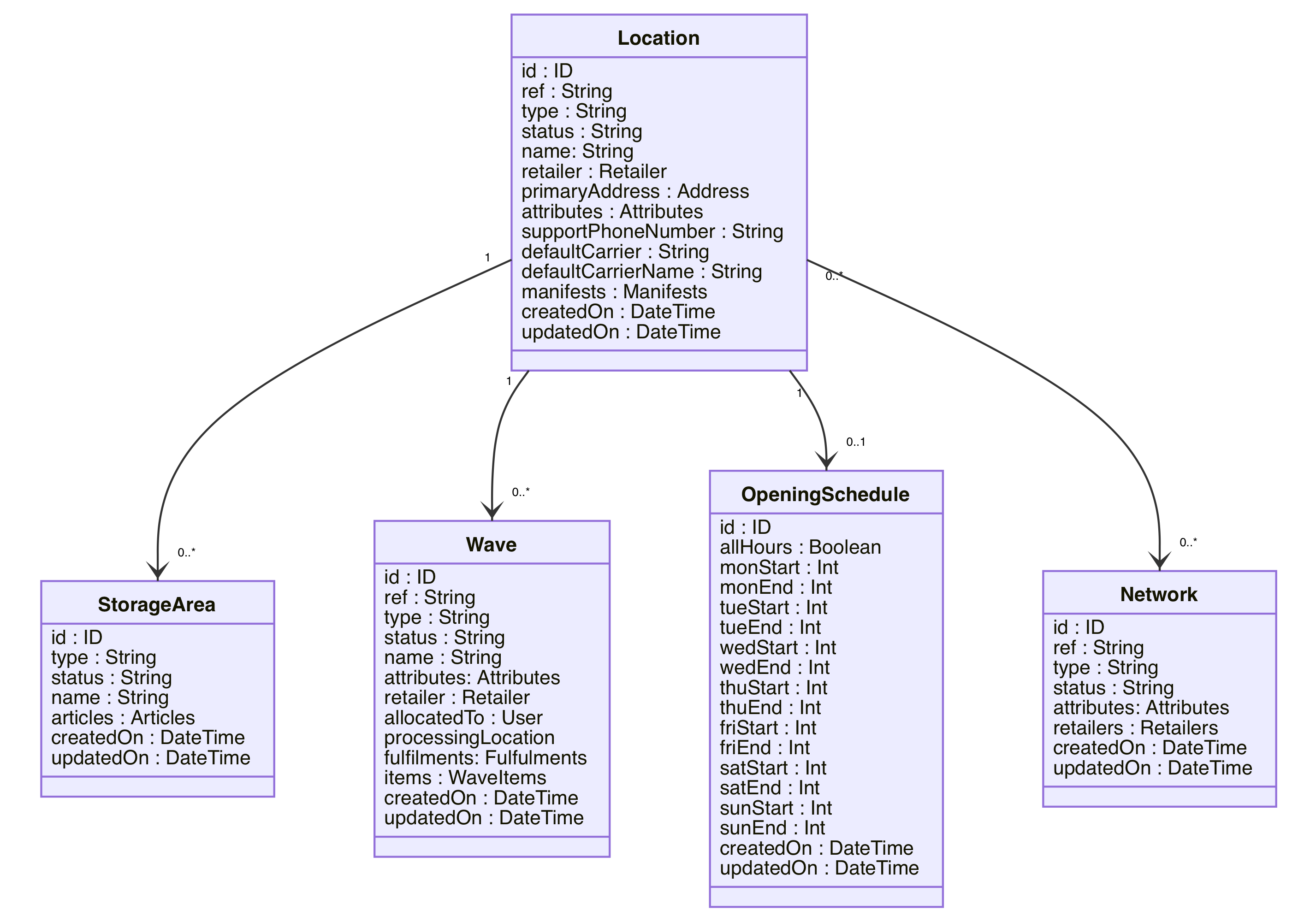
Data Model
Further Reading
- Learn how to Enable Fluent Store on an existing Account
- Learn how to Configure Fluent Store
- Learn how to Extend Fluent Store
- See the available User Guides for Fluent Store
