Fluent Commerce Logo
Docs

Tool Overview: LaunchPad v1

Essential knowledge

Authors:

Ankit Mehta, Cille Schliebitz, Anita Gu

Changed on:

4 Dec 2025
Overview

This page provides an overview of Fluent LaunchPad v1. It is a tool designed to streamline the setup of Fluent accounts for efficient order processing by leveraging Postman's advanced features to automate workflows, reducing manual effort and minimizing errors. LaunchPad ensures comprehensive account configuration, including dynamic authentication, retailer creation, inventory management, and fulfillment setup.

Key points

  • Fluent LaunchPad is a smart Postman workflow that quickly sets up a Fluent account to be ready for end-to-end order processing (retailers, locations, products, inventory, workflows).
  • It is a “guided engine”, using pre-/post-request scripts, variables, and execution control to improve on the more manual SDK Insomnia collection.
  • It covers dynamic auth, retailer creation, locations & networks, products, global inventory, and fulfillment/order-management configuration.

LaunchPad Introduction

Setup and Configuration - Tools overview

What is Fluent LaunchPad?

Fluent LaunchPad is a tool designed to simulate setting up an account so it is ready to process and fulfill an orderIt is a Postman collection that has been heavily scripted to allow users to provision a Fluent account quickly. It works by providing Data Files, which contain all the necessary information to fully provision an account for end to end functionality across the platform. It can be used via the Postman Runner UI, or via Newman, which is the Postman CLI.The standard SDK currently provides an Insomnia collection to help call the APIs, but the process contains a lot of copy/paste and step-by-step changes, so it's easy to get lost or make mistakes.LaunchPad improves on this by:
  • Using Postman’s advanced features:
    • Pre-request and test scripts (JavaScript before and after each request).
    • Control of execution order (decide which request runs next).
    • Reading responses and storing values (IDs, tokens, etc.) for later steps.
  • Turning the collection into a “Smart Postman collection” that can:
    • Orchestrate complex flows.
    • Reuse logic across folders/requests.
    • Automate large parts of the setup instead of relying on manual edits.
So instead of you pushing each API call like a button, Launchpad behaves more like a guided workflow engine inside Postman.

Postman, Collection Runner and Automation

Postman’s Collection Runner lets you attach a data file (CSV or JSON) to a run. This file is used to ingest sample data (e.g. retailers, locations, products) into the platform. It will execute the same set of API calls for each line in the CSV automatically, turning what would be hours of copy/paste into a few minutes of automated setup.Postman also offers Newman, which is a command-line runner for collections. It allows for more advanced automation, which makes it great for Fluent Account Setup. It makes use of Collection, Environment and Runtime Variables which allow for dynamic configuration of Requests. It also provides pre and post request Javascript Scripting capabilities, so requests and workflows can be controlled depending on responses.

LaunchPad Account Setup

Folder Structure
The collection is divided into several “Launchpad” steps:
  • LaunchPad 0 – Dynamic Authentication
    • Entry point for every run.
    • Checks what file you’re uploading (retailers, locations, categories, etc.).
    • Performs dynamic authentication (log in as the right user).
    • Routes the workflow: e.g. “This is a locations file → run Launchpad 2 next.”
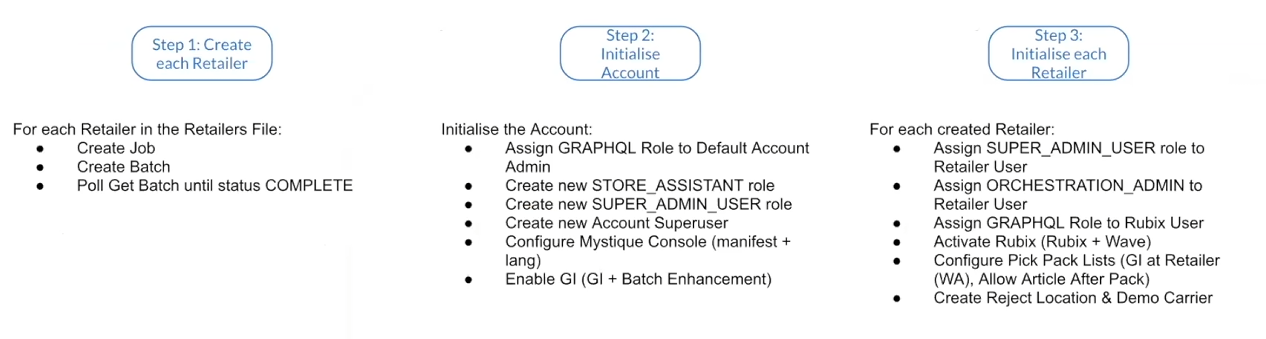
  • LaunchPad 1 – Retailer Creation & Account Initialization
    • Handles:
      • Creating retailers via batch REST APIs.
      • Initializing the account with the right roles and users.
No alt provided
  • LaunchPad 2 – Locations and Networks
    • Ingest locations and networks from a file.
    • Ensure required workflows exist if the entity is orchestrated.
  • LaunchPad 3 – Categories and Products
  • LaunchPad 4 – Global Inventory
  • LaunchPad 5 – Fulfillment & Order Management Configuration
    • Focused on attaching workflows/config for fulfillment options and order management.
GraphQL vs REST Batch API
In the current platform, there is a `createRetailer` GraphQL mutation, but it’s not usable as there’s no way to retrieve the created retailer properly afterwards.Instead, the supported approach is to use the REST batch API to create retailers. Even for a single retailer, you still use the batch process.The process LaunchPad follows is:

  • For each retailer in the CSV
    • Create a job.
    • Add a batch to create that retailer.
    • Poll the “get batch” endpoint until the status is complete (asynchronous processing).
  • Account initialization occurs only after all retailers in the file are created.
The reason for doing all retailer creation first is that Launchpad needs the IDs and references for those retailers. The IDs are then used to correctly link users, roles, and settings in the next steps.Another reason for using the REST Batch API is that when a fresh account is created, the default account admin user has no GraphQL permissions by default. There is a standard GraphQL role defined, but assigning roles to a user used to have a long caching delay (12–24 hours). That meant a role assigned now might not be usable until much later.Caching has since been improved (to ~5 minutes), but Launchpad still follows a defensive pattern designed for the old behavior. As such, the default admin account should only be used to assign a temporary set of permissions and create:
  • A Store Assistant role (for later use).
  • A Super Admin role with “god-mode” permissions.
  • A new Super User account that will become the main setup user.
Once this is done, all the roles and permissions are attached to the new Super User before that user ever logs in so permissions are cached on first login. This negates the “wait for cache” problem.This is the suggested approach, as you will get a clean “super user” identity distinct from the original account admin, and the account admin now doesn’t need to carry every possible permission.
Super User Initialization
Once the Super User exists and has all permissions, LaunchPad (using the Super User) loops back over each retailer and:
  • Updates the retailer admin user:
    • Assigns the Super Admin role at retailer level, so that user can administer that retailer.
    • Assigns an “orchestration admin” role to give access to the orchestration modeler in the console UI.
  • Updates the Rubix user for each retailer:
    • For every retailer, there is an internal Rubix user (used by orchestration workflows to call APIs).
    • Launchpad gives that user the GraphQL permissions it needs, so workflows can execute their API calls.
  • Applies retailer-level settings:
    • Activates Rubix for standard and wave orchestration.
    • Configures pack lists and settings needed for Global Inventory.
  • Creates helper entities for:
    • Reject location - A pseudo-location where unfulfillable fulfillments can be parked (this is not a real store, just a logical “sink”).
    • Demo carrier - A generic carrier (instead of a real DHL/UPS record). This is used in training workflows for Ship to Store, Home Delivery, etc.
After this process, each retailer is:
  • Created.
  • Wired into orchestration.
  • Accessible via console with the right admin users.
  • Equipped with a basic carrier and failover (reject) location.

Recap

  • What LaunchPad is for
    It takes you from an empty account to a working retail setup (retailers, locations, products, inventory, workflows) with minimal manual work.
  • How it works (Postman + data files)
    You feed LaunchPad data files (CSV/JSON) containing retailers, locations, products, etc.
    Using Postman’s Collection Runner (or Newman on the CLI), it runs the same API flow for each row, turning hours of copy/paste into a few minutes of automated setup.
  • LaunchPad folder steps (0–5)
    • LP 0 – Figures out what kind of file you provided and logs in as the right user.
    • LP 1 – Creates retailers in bulk via REST batch API and initializes the account (roles, users).
    • LP 2–4 – Load locations, networks, categories, products, and global inventory.
    • LP 5 – Wires up fulfillment and order management configuration.
  • Super User pattern
    Because the default admin starts with no GraphQL permissions (and role caching used to be slow), LaunchPad:
    • Uses the default admin only briefly to create roles and a Super User.
    • Gives the Super User full permissions before first login (so cache is correct from the start).
    • Then, as the Super User, it:
      • Updates retailer admins (Super Admin + orchestration access).
      • Grants the internal Rubix users the GraphQL permissions needed for workflows.
      • Applies key retailer settings (Rubix activation, pack list/Global Inventory config).
      • Creates helper entities like the reject location and demo carrier.
  • End state
    After LaunchPad runs, each retailer is:
    • Created and fully wired into orchestration
    • Usable in the console by the right admins
    • Ready for training/demo scenarios with a basic carrier and a safe “reject” location
