Platform Foundation
Setup and Configuration - Platform FoundationA textual summary of the Platform Foundation video is provided below. Sandbox vs Production Environments
Think of the platform as running in different “neighborhoods” (environments) around the world: Australia, Europe, the US, and more as needed.There are two main types that are provided to partners:- Sandbox environments
- Used for non-live work: development, SIT, UAT, training, partner demos, etc.
- Notably, the URL includes
`sandbox` as a subdomain (`https://<ACCOUNTID>.sandbox.<application>.fluentretail.com`) - Accounts hosted on sandbox include:
- Client UAT/SIT accounts
- Partner accounts (each partner gets one shared sandbox account)
- Short-lived training accounts (e.g. 30-day accounts for courses)
- Production environments
- Used only for live client production
- No
`sandbox` in the URL (`https://<ACCOUNTID>.<application>.fluentretail.com`) - No partner, demo, or training accounts will be hosted on production
All environments are multi-tenant, isolated, and autoscaling. That means many clients can share the same environment, but their data and configuration never mix. Dedicated environments are available upon request, but may incur additional costs.A standard client agreement will include 2 sandbox accounts, 1 production account.Fluent Accounts
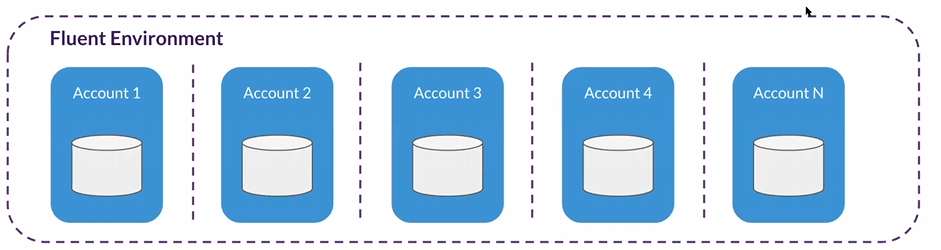
An account represents a single tenant on the platform.Each account has:- Its own data stores, application endpoints and the ability to install custom apps
An Account can manage multiple retailers.- The Account ID will form part of the URL, e.g.
`account-id.sandbox.api.fluentretail.com` - New Accounts come with an Account Admin User, which is used to begin the Setup Process
Retailers
Inside an account, you can define one or more retailers. A retailer is a logical division such as:- Different brands run by the same group
- Different countries or regions (e.g. Germany, France, UK)
- Typically aligned to different billing entities and different business processes
The following are not shared between retailers:- Customers
- Orders
- Billing accounts
- Workflows
However, within the same account, retailers can share:- Users
- Settings
- Locations and networks
- Products and inventory
Retailers separate commercial and operational flows, but you can still reuse shared assets (like locations or products) across them.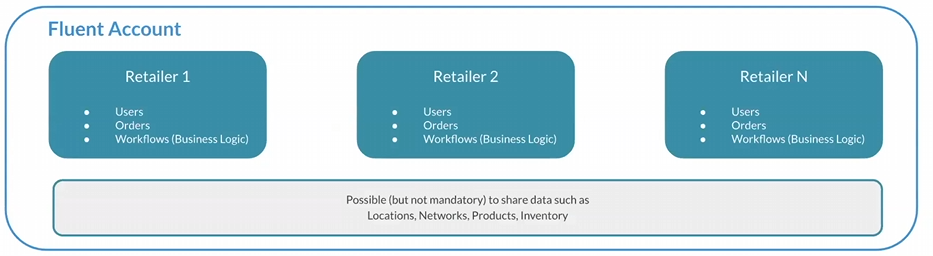
Locations
A location is any physical place, such as a store, warehouse, drop-ship vendor, etc.A network is a group of locations used for a particular purpose, such as:- A Click & Collect network (stores that offer pickup)
- A Home Delivery network (locations that ship orders)
A location can be in one network, multiple networks, or none, depending on requirements.They can be grouped by order type (e.g., C&C vs home delivery), fulfilment strategy (e.g., fast-ship hubs, overflow locations), geography (regions, cities), or store type (flagship vs standard).Networks provide a mechanism to share locations between retailers, and are used for global inventory / ATS (Available To Sell) calculations.Users, Roles, Permissions and Context
The platform has a flexible authorization model based on three building blocks:- User – the individual person logging in.
- Role – a named bundle of permissions (e.g. “Store Manager”, “Admin”).
- Permissions – fine-grained capabilities (view, create, update, etc).
A user can have multiple roles, where each role contains multiple permissions. When assigning a role to a user, you must also specify the context level:- Account level – applies to the whole account and all retailers/locations
- Retailer level – applies only within that retailer
- Location level – applies only within that location
For example:- “Admin” at account level → admin rights everywhere in that account.
- “Admin” at retailer level → admin only for that retailer.
- “Admin” at location level → admin only at that specific store/warehouse.
So the same role name can have very different reach depending on the context you assign it at.Settings and Feature Toggles
Settings are configuration values stored in the platform that can be used by:- The platform itself (Fluent’s own features)
- Implementers (your own custom logic and workflows)
Feature toggles
Used to turn features on/off per account/retailer/location. For example, when migrating from an older inventory model to Global Inventory, the Global Inventory is introduced behind a feature flag. Existing clients stay on the old model while the flag is off, but new clients have the flag enabled and use the new model.Platform configuration
By altering JSON configuration files, the admin console layout and localization settings can be modified. These will also define any settings for custom-built solutions such as rule logic or workflows.Like roles, settings are also scoped by context:- Account-level settings (global for that account)
- Retailer-level settings
- Location-level settings
This lets you vary behavior by account, retailer, or location by changing configuration.


