- Get Started
- Functionality
- Learning
- Extension
- Dev Tooling
- APIs
- Releases

Docs
Authors:
Ankit Mehta, Movyn John, Cille Schliebitz, Anita Gu
Changed on:
24 Oct 2025
`ORCHESTRATION` events trigger workflows, while `ORCHESTRATION_AUDIT` events log workflow execution details.`ORCHESTRATION_AUDIT` events describe what happened during that workflow execution. API events, such as `ORCHESTRATION_AUDIT` events, describe what happens within the system, rather than triggering any behavior.The Event API allows users and external systems to view and create events within the Fluent Platform.Here, we look at some Get/Post Event API operations.`/event/{eventId}` | Get an Event by IdReturns the Event identified by the `<eventId>` parameter. Returns a 404 HTTP Status code if not found.Authentication: Required |
`/event` | Finds all events for the given criteriaReturns a page of events filtered by the given combination of parameters. If no parameters are provided, the default page size, date range, and sort order will be applied, and the events for which your authenticated user is authorized will be returned.Authentication: Required |
`/event/async` | Creates a new Event in the Fluent PlatformCreates a new Event within the Fluent Platform to trigger a part or whole of a workflow.Authentication: Required |
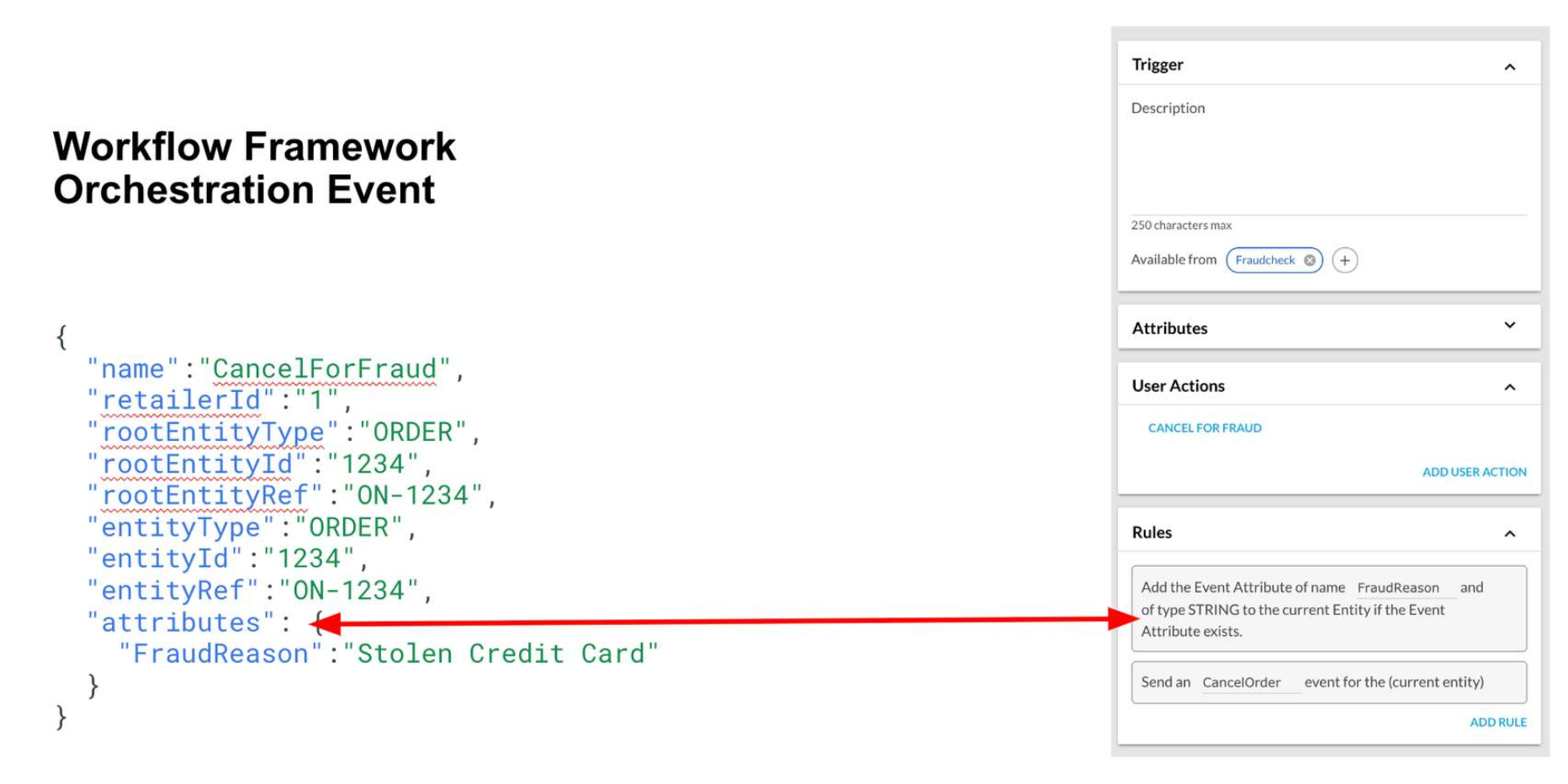 Following are the main fields of an event
`name`: This is the name of the event that matches with the ruleset in the respective workflow.`retailerId`: This is Fluent OMS's retailer ID.`entityType`: The entity against which the event is triggered. Example: `FULFILMENT`, `LOCATION`, `INVENTORY_POSITION`, etc. `entityId`: The ID of the entity against which the event is triggered. Example: `fulfilmentId`, `locationId`, etc.`entityRef`: The ref of the entity against which the event is triggered. Example: `inventoryPositionRef`, etc. `rootEntityType`: The root entity against which the event is triggered. Example: `ORDER`, `INVENTORY_CATALOGUE`, etc.`rootEntityId`: The ID of the root entity against which the event is triggered. Example: `orderId`, etc.`rootEntityRef`: The ref of the root entity against which the event is triggered. Example: `orderRef`, `inventoryCatalogueRef`, etc.`attributes`: The event attributes passed to the ruleset handling the event, these attributes are used by the rules of the ruleset. `https://<ACCOUNTID>.sandbox.api.fluentretail.com/api/v4.1/event/async`), unless there is a real-time action (user interaction, `fulfilment` options) in it. Common Integrations: Some common integrations that use the Events API are:Custom Inventory Integration: Events are used if the Batch API cannot meet the client's inventory mechanism or requirement. For example: Delta Inventory EventProduct Master Integration: External events from the Product Master (PIM) can be passed to the Fluent OMS to create Categories, Standard and Variant Products. WMS Integration-Inbound (Pick / Ship Confirmation): Any fulfillment updates, like Pick / Ship Confirmation, are sent to the Fluent OMS using events.Carrier Integration: Any updates from the Carrier provider around Consignment and Tracking Details are sent to the Fluent OMS through events.

Copyright © 2024-2026 Fluent Retail Pty Ltd (trading as Fluent Commerce). Unless otherwise expressly stated in a current written agreement with Fluent Commerce or any of its affiliates or on any single page of the docs.fluentcommerce.com site, use of the materials on this site is strictly limited to viewing by individuals over 18 years old for legitimate commercially appropriate reasons; and any downloading, copying or other actions or uses of any kind or by any means of the materials on this site, including by artificial intelligence tools, is strictly prohibited. All other rights reserved.
