
SKU Velocity (List View) Metric
Essential knowledge
Intended Audience:
Business User
Author:
Movyn John
Changed on:
16 Jan 2026
Overview
Learn about the SKU Velocity (List View) Metric in Fluent AnalyticsKey points
- High-velocity items require frequent replenishment and prime locations
- Low-velocity items may need promotional support or discontinuation
- Seasonal products show expected velocity variations
What it measures
Rate at which selected products are fulfilled over number of days within the time period.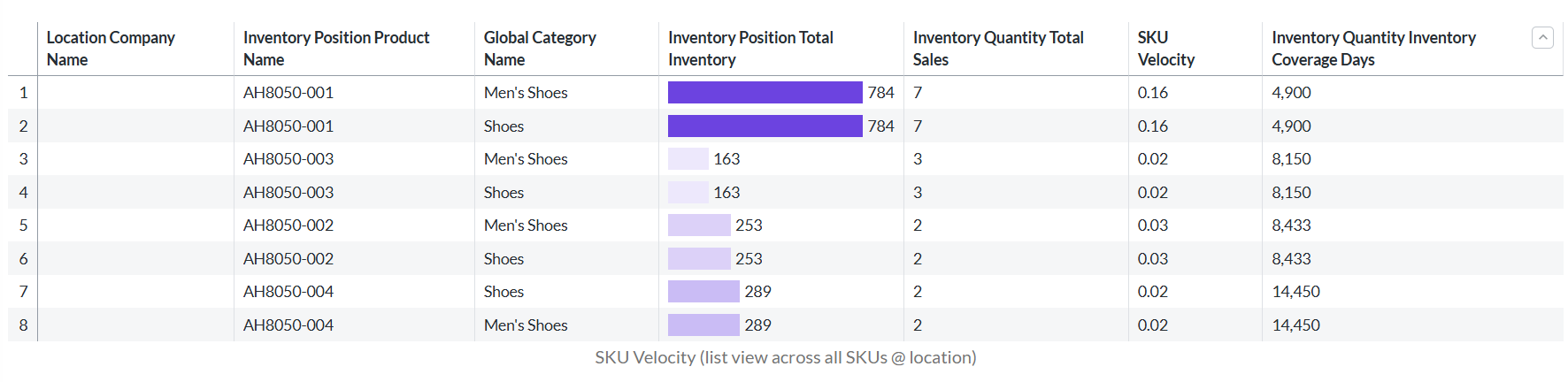
When to use this metric
- Identify fast and slow-moving products for inventory optimization
- Plan product assortment and merchandising strategies
- Optimize location layout and picking processes
- Guide purchasing and replenishment decisions
How to interpret
- Good performance: Velocity aligns with business expectations and margins
- Potential issues: Very low velocity indicates potential obsolescence
- Benchmark guidance: Varies significantly by product category and business model
Technical details
Domain:`inventory_quantity`Formula: SUM(inventoryQuantity.qty where type = {TYPE_SALE}) / number_of_days grouped by SKU within the selected time periodReference Filter Parameters:
`inventory_catalogue.ref`: Filters the metric to inventory for the selected inventory catalogue`inventory_position.product_ref`: Filters the metric to inventory for the selected product`inventory_quantity.created_date`: Filters the metric to inventory created within the selected time period`inventory_quantity.type`: {TYPE_SALE} - Type definitions for inventory quantity sales (default: SALE)`location.ref`: Filters the metric to inventory positions for the selected location`retailer.ref`: Filters the metric to inventory positions from the selected retailer

