
Total Expired Fulfillments Metric
Essential knowledge
Intended Audience:
Business User
Author:
Movyn John
Changed on:
21 May 2026
Overview
Learn about the Total Expired Fulfillments Metric in Fluent AnalyticsKey points
- Expired fulfillments often result in customer disappointment
- May trigger automatic reassignment to other locations
- Can indicate unrealistic SLA expectations or operational constraints
What it measures
Number of fulfillments that timed out (expired) before completion.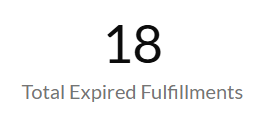
When to use this metric
- Identify capacity constraints and bottlenecks
- Monitor fulfillment SLA compliance
- Assess the need for operational process improvements
- Evaluate timeout threshold appropriateness
How to interpret
- Good performance: Low expired fulfillments % indicates healthy fulfillment location performance
- Potential issues: High expiration rates indicate capacity or process problems
- Benchmark guidance: Should trend toward zero; any pattern needs investigation
Technical details
Domain:`fulfilment`Formula: COUNT(fulfillments) where status = {EXPIRED} within the selected time periodReference Filter Parameters:`from_location.ref`: Filters the metric to fulfillments assigned to the selected location`fulfilment.created_date`: Filters the metric to fulfillments created within the selected time period`fulfilment.status`: Status definitions for expired fulfillments (default: EXPIRED)`retailer.ref`: Filters the metric to fulfillments from the selected retailer

