
Fulfilment - Adobe Commerce Connector
Essential knowledge
Intended Audience:
Technical User
Author:
Fluent Commerce
Changed on:
17 June 2026
Overview
This framework allows Adobe Commerce to receive fulfilment updates from Fluent and track these details against each order line.- Adds a new handler to the order update webhook to accept and process fulfilment updates.
- Currently only tracks the details at each order line. Does not drive any behavior in Adobe like status changes or updates to orders or shipments.
Key points
- Core Function & Outcome: You will learn how the Fulfillment framework captures webhook updates from Fluent and processes them asynchronously via Adobe Commerce's message queue to track line-item fulfillment details.
- Critical Operational Limitation: If you skip the text, you must know that only details at the individual order-line level are logged; it does not automate or drive standard Adobe workflow behaviors like order status changes or shipment updates.
- Data Storage & UI Visibility: Incoming fulfillment statuses and aggregated quantity metadata are saved into a new custom database entity (
`order_item_fulfilment`), which dynamically extends the native Admin Order Details view with real-time tracking notes. - CLI & Troubleshooting Tools: For manual interventions, the framework includes CLI commands to manually start the message consumer or force-update a specific order's fulfillment data directly from Fluent Commerce.
Data Pipeline Execution
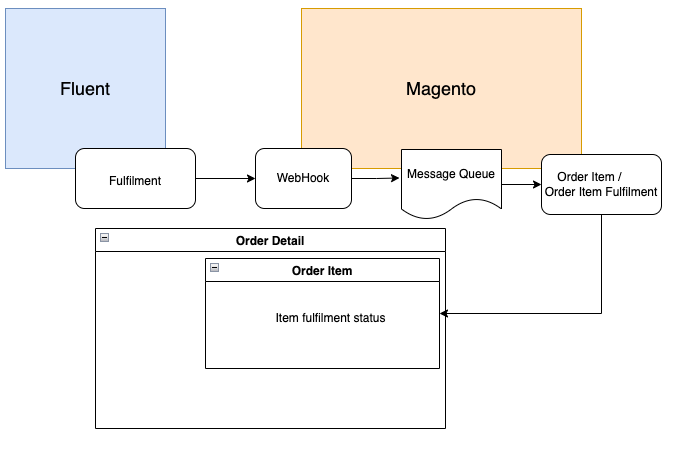
1. Ingestion - Webhook
The framework adds a new handler to the order update webhook (provided by the order reference module) to accept and process incoming fulfillment updates. The update from Fluent is intercepted via this endpoint.The configuration below demonstrates how the handler is mapped to a Fluent Webhook message name using Adobe Commerce Dependency Injection (DI). It is possible through DI to add more or override the default settings:1<type name="FluentConnector\General\Api\WebHook\HandlerFactoryInterface">
2 <arguments>
3 <argument name="handlers" xsi:type="array">
4 <item name="FulfilmentStatusChanged" xsi:type="string">FluentConnector\Fulfilment\Handler\FulfilmentHandler</item>
5 </argument>
6 </arguments>
7</type>2. Validation Chain - di.xml
Before actual webhook processing begins, a series of validations are executed. These validations run through a validation chain configured in the`di.xml` file as follows:1<virtualType name="fulfilmentValidatorChain" type="FluentConnector\General\Model\WebHook\MessageValidatorChain">
2 <arguments>
3 <argument name="validators" xsi:type="array">
4 <item name="fulfilmentEnableValidator" xsi:type="object">fulfilmentEnableValidation</item>
5 <item name="fulfilmentEntityTypeValidator" xsi:type="object">fulfilmentEntityTypeValidation</item>
6 <item name="orderStatusValidator" xsi:type="object">FluentConnector\Fulfilment\Model\WebHook\Validator\OrderValidator</item>
7 </argument>
8 </arguments>
9</virtualType>- Fluent account details are aligned with the configuration in Adobe Commerce (
`accountId`,`retailerId`). - The webhook
`entityType`matches`FULFILMENT`. - The target Order reference exists within Adobe Commerce.
3. Queue Processing - `fluentcommerce.fulfilment.updater`
Upon successful validation, the webhook execution adds the message to a queue to be processed asynchronously.- Topic Name:
`fluentcommerce.fulfilment.updater` - Message Content Payload:
`retailerId`(Retailer ID)`entityId`(Fluent Fulfillment ID)`entityRef`(Adobe Fulfillment ID)`rootEntityRef`(Adobe Order increment ID)
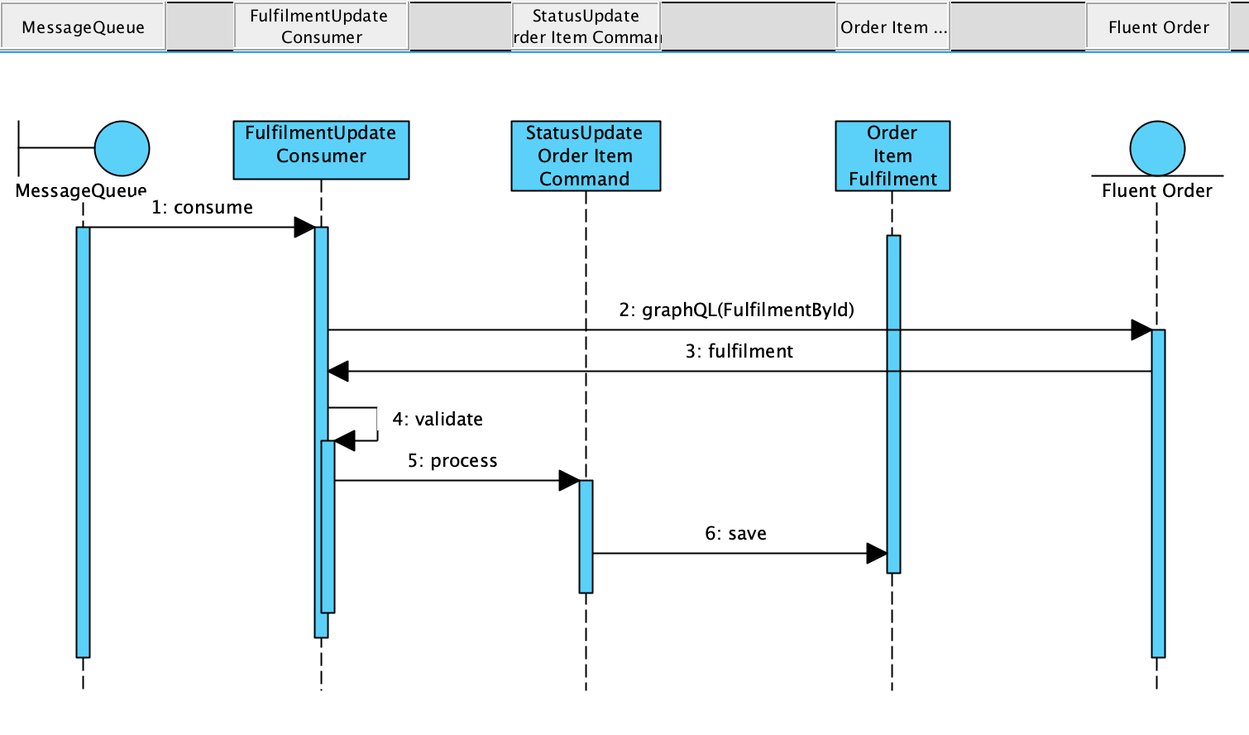
- Consume messages from the queue.
- Fetch the fulfillment entity by ID from Fluent Commerce.
- Run an initial validation check to make sure this fulfillment is related to active orders and items (verifies that the order exists, matches the queued item, and that the order item exists in the platform).
- Update the order item fulfillment status using Command patterns for data processing.
- Save and maintain the fulfillment details on a new entity (
`order_item_fulfilment`) linked to the standard order item.
Data Storage & Schema Mapping
Order Item Fulfillment Entity Structure
Tracks incoming statuses on a custom database entity structured as follows:| Column Name | Type | Description |
`entity_id` | INT | Auto-increment value |
`order_id` | INT | Order ID |
`order_item_id` | INT | Order item ID |
`sku` | STRING | Product SKU |
`name` | STRING | Product name |
`status` | STRING | The latest item fulfillment status (e.g., 'packing') |
`metadata` | JSON | Aggregated fulfillment statuses per quantities |
Data Mapping Reference
The table below illustrates how fields map from Fluent Commerce to the Adobe Commerce`order_item_fulfilment` entity:| Fluent Fulfillment | Adobe order_item_fulfilment | Description |
`order.ref` | `order_id` | Order ID mapping |
`items.fulfilmentItemEdges[].fulfilmentItemNode.orderItem.ref` | `order_item_id` | Order item ID mapping |
`items.fulfilmentItemEdges[].fulfilmentItemNode.orderItem.product.name` | `name` | Product name |
`fulfilmentById.status` | `status` | Latest status (e.g., 'packing') |
| Metadata Payload Structure | `metadata` | Aggregated positions per quantity, for example: `[{'status' : 'packing', 'quantity' : 1, 'fulfilment_id' : 123}]` |
Architecture
The following classes govern the execution of this inbound pipeline:`FluentConnector/Order/Handler/FulfilmentStatusUpdateHandler.php`: Handler to publish fulfillment messages to the message queue.`FluentConnector/Order/Model/MessageQueue/Consumer/Data/FulfilmentUpdateMessage.php`: Data interface for the message queue message.`FluentConnector/Order/Model/MessageQueue/Consumer/FulfilmentUpdateConsumer.php`: Fulfillment update consumer.`FluentConnector/Order/Model/Command/Order/Item/StatusUpdate.php`: Order item status update command.

