Getting Started with Reference Sourcing Conditions
How-to Guide
Author:
Kirill Gaiduk
Changed on:
3 Sept 2026
Key Points
- Master the Core Mechanism: Path Conditions extract values from the Sourcing Context, apply an operator, and evaluate them against configured value. Readers will understand how these checks return true/false outcomes that drive sourcing decisions
- Handle Arrays with Care: Always define a
`conditionScope`(ALL, ANY, NONE) when targeting collections. This ensures predictable results and prevents evaluation errors - Validate Parameters Rigorously: Use correct paths, operators, and value types. Misconfigured operators, unresolved paths, or type mismatches are the most common causes of Condition failures
- Know When to Customize: Path Conditions cover most scenarios, but complex multi-field or non-standard requirements may call for registering a custom Condition type
Prerequisites
Steps
 Core Concept
The Path Condition is a configurable function that evaluates data in the Sourcing Context and produces a true or false outcome. It extracts a value(s) from a specified path, applies an operator, compares it with a configured value, and, when necessary, aggregates results across arrays using a
`conditionScope`.During Strategy evaluation, the framework instantiates the reference implementation `DefaultSourcingCondition` for conditions of type `fc.sourcing.condition.path` and evaluates it through `evaluateWithResult`, which returns the pass or fail outcome together with the actual value for auditing. Its `evaluateWithContext` method delegates to the same `evaluateWithResult`, so custom Conditions that implement only the boolean method behave consistently.Internal Mechanics
The reference implementation processes Conditions through the following sequence:
- Resolves the JSON path with
`JsonUtils.getPath(sourcingContext, path)`to locate the node - Flattens arrays when multiple values exist, ensuring that nested arrays are evaluated consistently
- Applies the configured
`conditionScope`:- ALL: every element must satisfy the operator
- ANY: at least one element must satisfy the operator
- NONE: no element may satisfy the operator
- Compares the resolved values against the configured value using the operator retrieved from
`SourcingConditionOperatorRegistry` - Captures the resolved value(s) it evaluated as the Condition's actual value alongside the pass or fail outcome, which the framework records per Condition for the Sourcing Audit through
`evaluateWithResult`
Applying Path Conditions to Real Scenarios
Path Conditions are best suited for logic that depend on a single field or a collection within the Sourcing Context. Practical scenarios include:
- Checking Order timestamps (
`createdOn`) with`greater_than`,`less_than`, or`between` - Validating Customer attributes such as
`customer.attributes.byName.tier`with`in` - Filtering by delivery information, for example
`fulfilmentChoice.address.country`with`in`. - Evaluating Product or Item properties over arrays, such as
`unfulfilledItems.product.ref`combined with`ALL`or`ANY`.
Parameter Definitions
Each Path Condition instance relies on the following parameters:
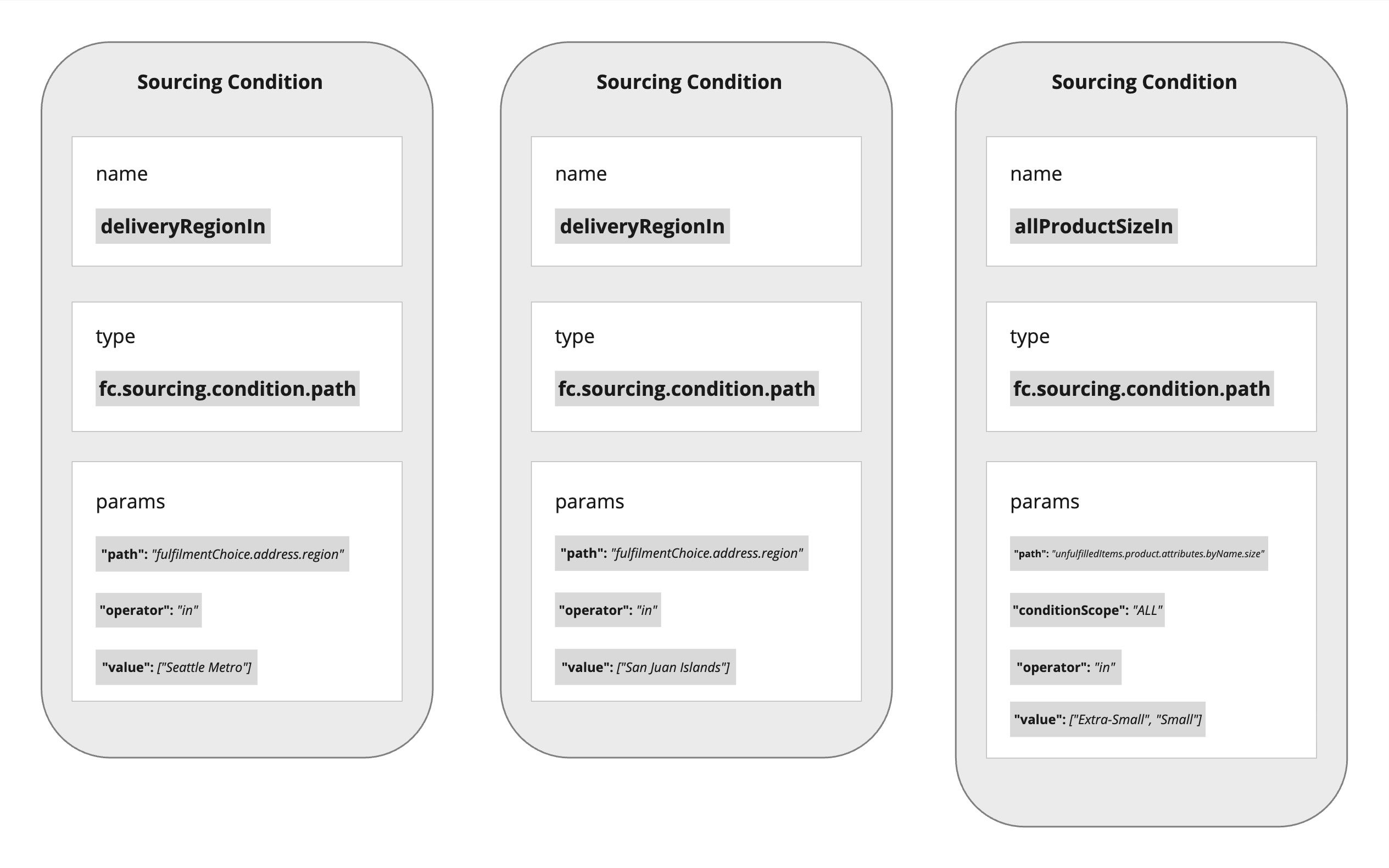
`path`(`String`): The JSON path in the Sourcing Context. Examples:`createdOn``fulfilmentChoice.address.country``unfulfilledItems.product.ref`
`operator`(`String`): The comparison method. Supported operators:- Equality/membership:
`equals`,`not_equals`,`in`,`not_in` - Comparison:
`greater_than`,`greater_than_or_equals`,`less_than`,`less_than_or_equals`,`between` - Existence:
`exists`,`not_exists`
- Equality/membership:
`value`(UI component enforces correct input type): The target value(s)- (optional)
`conditionScope`(`String`): Determines how array results are aggregated. Options (`SourcingConditionConstants`):`ALL``ANY``NONE`
Configuration in the UI
The reference schema in
`fc.rubix.order.sourcing.conditions` Setting defines templates for Path Conditions. Each template specifies the operator, UI component, and validation logic, ensuring accurate input during configuration.For account/retailer-specific adjustments, override Conditions in `fc.rubix.order.sourcing.conditions.custom`. When a Condition with the same `name` exists in both schemas, the custom schema takes precedence, allowing organizations to adapt global definitions to local business needs without breaking the baseline.Attaching Conditions to Strategies
Path Conditions are added to Primary or Fallback Sourcing Strategies via the Sourcing Profile GraphQL API.
Practical Examples
- Premium Customer tiers
- Path: customer.attributes.byName.tier
- Operator: in
- Value: ["PLATINUM", "GOLD"]
- Restricted SKUs
- Path: unfulfilledItems.product.ref
- Operator: in
- Value: ["SKU_1", "SKU_2", "SKU_3"]
- Scope: ANY
- Promotional date window
- Path: createdOn
- Operator: between
- Value: ["2025-09-01T00:00:00Z", "2025-09-30T23:59:59Z"]
Common Issues and Troubleshooting
- Non-value nodes: Adjust the path so it resolves to a scalar rather than an object
- Array mismatches: Add a
`conditionScope`when targeting collections such as Items or Categories - Operator errors: Ensure the operator string matches a registered operator in
`SourcingConditionOperatorRegistry` - Type mismatches: Provide values in the expected format (ISO dates, numbers, or exact strings)
- Range confusion: Confirm inclusivity rules when using between or comparison operators
Best Practices
- Use descriptive names that reflect business intent
- Start with reference templates before creating custom overrides
- Always define
`conditionScope`explicitly for array paths - Provide exact values and enforce strict types through schema-driven components
- Test boundary and edge cases thoroughly
- Apply overrides in
`fc.rubix.order.sourcing.conditions.custom`when tailoring conditions for specific Accounts / Retailers