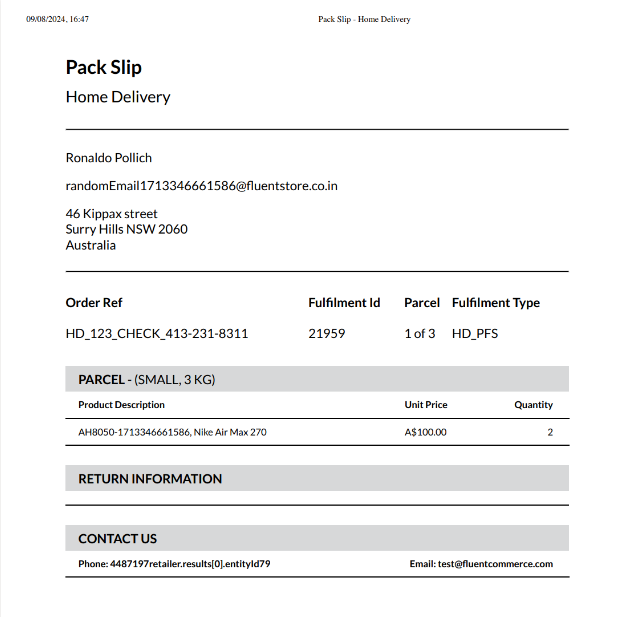
Configure Printable Pack Slips for assign items to parcels
How-to Guide
Author:
Yulia Andreyanova
Changed on:
15 May 2025
Key Points
- The Pack Slips can be customized using an HTML template.
- This guide outlines the setup and fragment modifications required for generated PDF customization.
Prerequisites
Steps
 Define the HTML Structure
Start by defining the basic HTML structure for your document. A base template is available for you to work with, which can be customized using your preferred HTML editor to match your specific layout requirements.
Configure the Page Query in the Pack Fragment.
To populate the Pack Slip with the necessary details, you need to define the required fields within the page query of the pack fragment. Here's an example:
Add the Page Break Property
To divide the content into separate pages when printing, apply the
`break-after` property in your CSS:This ensures that the content breaks correctly across pages when printed.Add the Supported Fields
When iterating over an array, you can use the following notation to loop through the data:Here’s an example of how to switch context when accessing different data levels:
Create a Setting 'fc.store.summary.print.pack.slip'
Define the setting for storing your HTML template. Here's how you can do it:
This configuration sets up the template for later use.
| Name | fc.store.summary.print.pack.slip |
| Value type | `LOB` |
| LOB value | `<..The HTML template, from Step 1..>` |
| Context | `RETAILER -or- ACCOUNT` |
| Context ID | `<RetailerID> -or- 0` |