
SCIM Connector - User Lifecycle and Access Control
Essential knowledge
Intended Audience:
Technical User
Author:
Fluent Commerce
Changed on:
8 June 2026
Overview
The SCIM (System for Cross-domain Identity Management) Connector establishes your Identity Provider (IdP) as the single authoritative source of truth for user access control. The module automates user provisioning, deactivation, and deletion across systems while translating complex IdP enterprise roles into native Fluent Order Management context roles to maintain consistent permissions.Key points
- Core Function & Outcome: You will learn how the connector automatically synchronizes user lifecycle identities, group-inherited permissions, and role assignments from your IdP directly into Fluent Order Management.
- Role Conversion & Mapping: The system supports both direct direct-role naming matches and configuration-driven dynamic mapping rules to convert complex IdP logical roles into lists of multiple Fluent roles.
- Strict Dependency Rules: To protect security governance, new or existing users will not be created or updated in Fluent Order Management if the system detects unmapped or unrecognized roles inside the incoming IdP payload.
- Testing Boundaries & Platform Scope: The connector implements standard SCIM protocol configurations but is tested exclusively against Azure Active Directory. Group endpoints are not supported due to the lack of a native user-group entity within the Fluent Commerce platform.
User Lifecycle and Group Provisioning Rules
The Identity Provider acts as the master source of user roles, distributing permissions either via direct assignment or through indirect assignment using logical application roles. User attribute modifications executing within the IdP synchronize downstream alongside role changes.User Provisioning Life Cycle States
- New User Ingestion: New accounts are created in Fluent Order Management with assigned roles provided they are new to the platform and every role assigned inside the IdP maps cleanly to a corresponding role in Fluent.
- User Attribute Updates: Existing accounts update their assigned profiles and roles provided that all security roles assigned in the IdP possess a respective matching role in Fluent.
- Unmapped Role Restrictions: Users are entirely blocked from creation or profile modification updates if they carry no roles within the IdP, or if the synchronization service identifies any role that lacks a respective counterpart inside Fluent.
- Deactivation Mechanics: Deactivating a user within the IdP hides all corresponding user roles within Fluent Order Management and flips the platform user status to
`Inactive`. Reactivating the account inside the IdP restores the user’s previous roles. Accounts containing zero active roles automatically default to an`Inactive`state inside Fluent. - Deletion Mechanics: Deleting a user profile within the IdP automatically triggers a account deactivation inside Fluent Order Management.
Group Membership Provisioning Constraints
While the connector interprets group-based role assignments from an IdP, actions follow strict inheritance behavior relative to directly assigned user roles:- Group Assignment Addition: Adding a user to an IdP group grants the user all associated group-level roles in addition to their directly assigned personal roles.
- Group Assignment Removal: Removing a user from a group strips away the group-specific roles, but leaves directly assigned roles untouched. Example: If Role D is assigned directly to user X, and user X belongs to a group carrying Role D, removing user X from that group leaves Role D active on their personal account.
- Group Attribute Modifications: When an IdP group updates its member lists or internal roles, those configuration changes propagate to all active members, with the exception of any roles assigned directly to individual user accounts.
- Group Role Extensions: Appending a new role to an IdP group pushes that role out to all group members during the next active provisioning cycle.
- Group Member Additions: Assigning a new member to an IdP group instantly provisions them with all roles mapped to that group entity.
- Group Role Reductions: Removing an internal role from an IdP group strips that role from all corresponding group members.
- Group Member Exclusions: Removing a member from an IdP group strips all associated group roles from that specific user.
- Group Entity Deletion: Deleting an entire group configuration removes those group roles across all previous members, leaving only their directly assigned individual account roles intact.
App Role Naming Convention
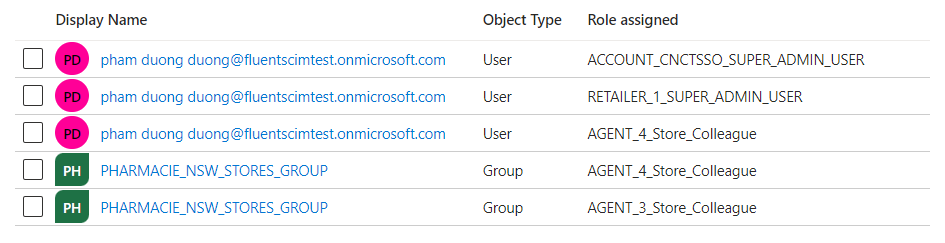
To provision a user successfully, application roles defined inside your Identity Provider must conform to a rigid, standardized string structure to ensure correct parsing by the connector:`<FLUENT_CONTEXT_TYPE>_<FLUENT_CONTEXT_ID>_<FLUENT_ROLE_ID or IDP_LOGICAL_ROLE_ID>`The naming convention decomposes into three mandatory technical properties:
`<FLUENT_CONTEXT_TYPE>`: The active user context envelope. Supported types are restricted to:`ACCOUNT`,`RETAILER`, or`AGENT`.`<FLUENT_CONTEXT_ID>`: The specific identity token matching the context type. For`RETAILER`contexts, this maps to the primary Retailer ID; for`AGENT`contexts, it resolves to the physical Location ID; for`ACCOUNT`contexts, it defines the parent Account ID string.`<FLUENT_ROLE_ID IDP_LOGICAL_ROLE_ID or>`: The functional target value. This represents either a direct native Fluent role value (`FLUENT_ROLE_ID`) or an internal application role defined within the IdP (`IDP_LOGICAL_ROLE_ID`) mapped to change into multiple downstream platform permissions.
Dynamic Role Mapping Configuration
The connector provides a mechanism to translate a single logical role defined inside your IdP into an explicit collection of multiple functional roles inside Fluent Order Management. For example, assigning logical App Role`A` inside your IdP can be configured to provision a user with both roles `B` and `C` inside the core platform.- Execution Order: Dynamic role conversion rules execute immediately before direct role mapping workflows run, ensuring custom roles transform into standard platform permissions prior to finalizing account provisioning.
- Storage Location: The mapping rules reside entirely within the Fluent platform environment as a system setting (not inside the IdP configuration parameters).
- Configuration Key:
`fc.connect.scim-connector.provisioning.pipeline.config`
`rules`, where each individual rule pairs an optional condition with a mandatory execution action. If no configuration is stored against this key, the SCIM connector assumes no dynamic mapping rules exist and defaults exclusively to direct direct-role mapping behaviors.Platform Scope and System Limitations
Before initiating a deployment, integration engineers must account for the following architectural constraints and platform disclaimers:- Tested Identity Ecosystems: The SCIM connector framework developed by the Fluent team is formally tested and validated only on Azure Active Directory.
- Group Provisioning Restrictions: The service does not support group provisioning endpoints because the Fluent Commerce platform lacks an internal user-group structural concept. No group endpoints adhering to the SCIM protocol are developed as part of this service layer.
- IdP Feature Constraints: The service supports essential core provisioning and user role assignment functions. Because individual IdPs implement proprietary user management behaviors, the connector does not guarantee compatibility with specialized provisioning sub-features, including:
- Provisioning a group on-demand within Azure Active Directory.
- Deactivating or reactivating an isolated group entity.
- Revoking deleted users inside an Azure Active Directory tenant (currently untested).
Provisioning Scenarios Matrix
The following reference matrix maps specific Identity Provider states to the resulting account states generated within Fluent Order Management following the execution of a provisioning synchronization job:Contextual Assumptions for Matrix Mapping:- IdP Role
`X`can represent a direct name-match to a Fluent role, or a logical role name mapped to multiple Fluent roles inside platform settings. - IdP Role
`C`is dynamically configured to map to Fluent roles`F`and`G`. - IdP Group
`G`is configured to map to Fluent roles`M`and`N`. - Roles
`A`and`B`represent invalid or unmapped roles lacking a corresponding entity inside Fluent.

| No. | Identity Provider (IdP) Account State | Fluent Commerce State (Post-Sync Job) |
| 1 | A new user is created without any role assigned. | User is not created in Fluent. |
| 2 | A new user is assigned to Role `D`. | User is created in Fluent with Role `D`. |
| 3 | A new user is assigned to Role `C`. | User is created in Fluent with roles `F` and `G`. |
| 4 | A new user is assigned to roles `C` and `D`. | User is created in Fluent with roles `D`, `F`, and `G`. |
| 5 | A new user is assigned to roles `A` and `B`. | User is not created due to unmapped roles `A` and `B`. |
| 6 | A new user is assigned to roles `A`, `B`, and `C`. | User is not created due to unmapped roles `A` and `B`. |
| 7 | A new user is assigned to roles `A`, `B`, `C`, and `D`. | User is not created due to unmapped roles `A` and `B`. |
| 8 | A new user is assigned to roles `A`, `B`, `C`, `D`, `E`, and added to Group `G`. | User is not created due to unmapped roles `A` and `B`. |
| 9 | An existing user is assigned to roles `A` and `B`. | User record receives no changes in Fluent. |
| 10 | An existing user is assigned to roles `A`, `B`, `C`, and `D`. | User record receives no changes in Fluent. |
| 11 | An existing user is assigned to roles `C` and `D`. | User is updated in Fluent with roles `D`, `F`, and `G`. |
| 12 | An existing user is assigned to `C` and `D` and added to Group `G`. | User is updated in Fluent with roles `D`, `F`, `G`, `M`, and `N`. |
| 13 | An existing user is assigned to `C`, `D`, and `M`, and added to Group `G`. | User is updated in Fluent with roles `D`, `F`, `G`, `M`, and `N`. |
| 14 | An existing user is assigned to `C`, `D`, `M`, belongs to Group `G`, and is then removed from Group `G`. | User is updated in Fluent with roles `D`, `F`, `G`, and `M`. |
| 15 | An existing user is assigned to `C`, `D`, `M`, belongs to Group `G`, and Role `M` is removed from Group `G`. | User is updated in Fluent with roles `D`, `F`, `G`, `M`, and `N`. |
| 16 | An existing user is assigned to `D`, `M`, belongs to Group `G`, and Role `C` is added to Group `G`. | User is updated in Fluent with roles `D`, `F`, `G`, `M`, and `N`. |
| 17 | An existing user is assigned exclusively to Group `H`. | User record receives no changes in Fluent. |
Validation and Error Handling
The connector structures all system exception responses in strict alignment with the specification defined in RFC 7644: System for Cross-domain Identity Management: Protocol. Technical groups can monitor and review these error message payloads directly inside their IdP administrative user interface or within AWS CloudWatch logs.1{
2 "schemas": ["urn:ietf:params:scim:api:messages:2.0:Error"],
3 "scimType":"mutability",
4 "detail":"Attribute 'id' is readOnly",
5 "status": "400"
6}Error Messages Reference Matrix
| No | Exception Context | HTTP Status | SCIM Error Type (scimType) | Error Detail String Description |
| 1 | Incorrect `contextId` value | `400` | `roleInvalidContextId` | `Invalid context id, unable to find a match [{contextType - contextID}]` |
| 2 | Incorrect `contextType` value | `400` | `roleInvalidContextType` | `Invalid context type, unable to find a match [{contextType}]` |
| 3 | Unrecognized/Incorrect platform role | `400` | `invalidValue` | `Unable to find a matching Fluent role [{role}]` |
| 4 | Broken App Role naming rule convention | `400` | `roleNameConvention` | `Role does’t match the expected naming convention [{appRole}]` |
| 5 | Unsupported endpoint route requested | `501` | None | `Not Implemented` |
Error Payload Examples
Scenario 1: Invalid Context ID Exception
1{
2  "schemas": ["urn:ietf:params:scim:api:messages:2.0:Error"],
3  "status": "400",
4  "scimType": "roleInvalidContextId",
5  "detail": "Invalid context id, unable to find a match [RETAILER-1000]"
6}Scenario 2: Invalid Context Type Exception
1{
2  "schemas": ["urn:ietf:params:scim:api:messages:2.0:Error"],
3  "status": "400",
4  "scimType": "roleInvalidContextType",
5  "detail": "Invalid context type, unable to find a match [CONTEXTWRONG]"
6}Scenario 3: Unmapped Target Role Exception
1{
2  "schemas": ["urn:ietf:params:scim:api:messages:2.0:Error"],
3  "status": "400",
4  "scimType": "roleInvalid",
5  "detail": "Unable to find a matching Fluent role [WRONGROLE]"
6}Scenario 4: String Convention Parsing Exception
1{
2  "schemas": ["urn:ietf:params:scim:api:messages:2.0:Error"],
3  "status": "400",
4  "scimType": "roleNameConvention",
5  "detail": "Role does’t match the expected naming convention [CONTEXT-WRONG_1_SUPER_ADMIN_USER]"
6}Scenario 5: Unsupported SCIM Route Request Exception
1{
2  "schemas": [ "urn:ietf:params:scim:api:messages:2.0:Error" ],
3  "status": "501",
4  "detail": "Not Implemented"
5}
