
Order Sync - commercetools Connector
Essential knowledge
Intended Audience:
Technical User
Author:
Fluent Commerce
Changed on:
30 June 2026
Overview
Explains how the commercetools Connector manages the two-way pipeline that exports new orders from a storefront to Fluent Order Management and handles asynchronous status updates. Partners will learn to configure event-driven triggers, enable customer profile creations, and apply route filters. For the business, this real-time sync establishes a single source of truth for transactions across Home Delivery and store pickup channels.Note: This article forms part of the outbound pipeline category, where data flows out of the commercetools environment to an external destination.Key points
- Core Function & Outcome: You will learn how the commercetools Connector handles order exports from commercetools to Fluent Order Management, automates integrated customer profile creation, and establishes the webhook ecosystem for order status processing.
- Out-of-the-Box Capabilities: Out-of-the-box (OOTB) functionality natively supports Home Delivery (HD) and Click and Collect (CC) order structures, complete with automated type-specific order number generation patterns.
- System & Sync Limitations: Designed strictly for new transactions and does not synchronize historical orders created prior to extension installation. Additionally, the order update and modification handlers must be customized to fit your specific implementation needs.
- Extensible Pipeline Architecture: The message routing and handler framework is completely decoupled. Developers can easily update message names, override standard classes, or extend the baseline order creation logic to attach custom operational attributes.
Data Pipeline Execution
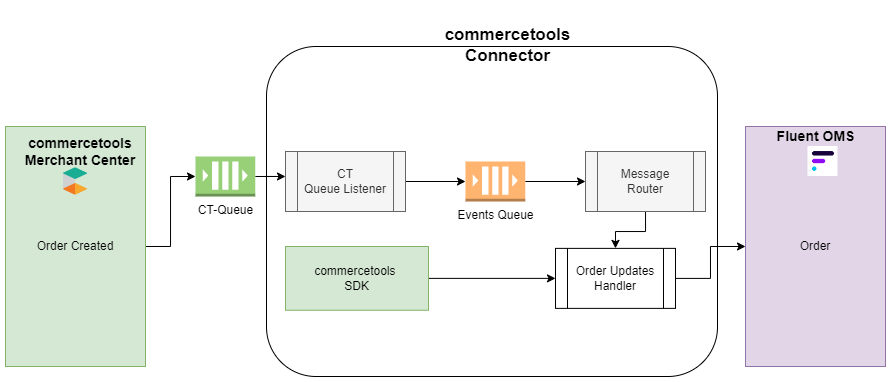
1. Storefront Trigger (Subscription/External Queue)
Order exports follow a real-time event-driven trigger mechanism:- Stage 1 (Subscription): commercetools emits an
`OrderCreated`event. The platform’s Subscription service captures this and publishes it to the`CT-Queue`(e.g., AWS EventBridge or SQS). - Stage 2 (Listener): The
`CT Queue Listener`consumes the message, verifying the event origin, and pushes the message to the internal`Event Queue`for processing.
2. Route Filtering & Message Routing
- Stage 3 (Routing): The
`Message Router`reads the message name (`commercetools.connect.order.create`) and filters based on the`inclusion-filter`property defined in`application-connector.yml`. Only resources matching`ResourceCreated`proceed to the execution layer.
3. Fluent API Delivery (GraphQL Mutation)
- Stage 4 (Handler Execution): The
`OrderCreateHandler`fetches detailed order data (including tax breakdowns and custom fields) from the commercetools SDK. It calculates the`orderType`(HD or CC) based on the shipping method, generates a patterned order number if required, ensures the customer exists in Fluent, and dispatches the`createOrder`mutation.
Data Storage & Schema Mapping
| commercetools Attribute | Fluent OMS Target | Logic/Pattern |
`orderNumber` | `ref` | Auto-generated if blank (e.g., `order-CC20...`) |
`shippingInfo` | `shippingMethod` | Mapped via `fc.connect...shipping-method-mapping` |
`customer` | `customerRef` | Identified/Created in Fluent via GraphQL |
`customFields` | `attributes` | Serialized into Fluent attribute list |
Developer Extension Points
For more details on how to extend please refer to the extend guidelines.1. Message Routing Configuration (`application-connector.yml`)
1fluent-connect:
2  routes:
3    - name: "commercetools.connect.order.create"
4      handler: "OrderCreateHandler"
5      props:
6        query: "ct-order.graphql"
7        mutation: "ct-updateorderNumber.graphql"
8        inclusion-filter:
9 - "ResourceCreated"2. Auto Order Number Creation Logic
1//Auto order number creation logic
2final String orderType = getOrderType(context, order.get().getShippingInfo().getShippingMethod().getKey());
3if (StringUtils.isBlank(orderType)) {
4    throw new UnprocessableMessageException("Order type is missing");
5}
6String orderNumber = order.get().getOrderNumber();
7if(StringUtils.isEmpty(orderNumber)) {
8    orderNumber = generateOrderNumber(orderType, accountReference.getRetailerId());
9    updateOrderNumber(ctApiClient, getQuery(context, "mutation"), order.get(), orderNumber);
10}3. Customer GraphQL Mutation Logic
1//Customer identification/creation logic
2String customerId;
3  if (null == customerQueryData.customer()) {
4      createCustomer(context, accountReference, order.get());
5      customerId = context.ofFluentContext().executeQuery(customerQuery, GetCustomerQuery.Data.class).customer().id();
6  } else {
7      customerId = customerQueryData.customer().id();
8 }4. Custom Message Handler Implementation
1@Slf4j
2@Component
3@HandlerInfo(name = "FluentOrderCreateHandler", description = "Create a order at Fluent OMS")
4public class FluentOrderCreateHandler extends MessageHandler {
5    private static final String ORDER_ATTRIBUTE = "order";
6    // write your logic
7}5. Order Queries and Mutations
1mutation CreateOrder($input: CreateOrderInput) {
2  createOrder(input: $input) {
3      ref
4      id
5      status
6  }
7}1query GetOrder($ref: String!) {
2 order(ref: $ref) {
3 ref
4 id
5 status
6 attributes{
7 name
8 type
9 value
10 }
11 }
12}1query Search($id: String, $orderNumber: String) {
2 search: order(id: $id, orderNumber: $orderNumber) {
3 id
4 version
5 orderNumber
6 totalPrice {
7 type
8 currencyCode
9 centAmount
10 fractionDigits
11 }
12 taxedPrice {
13 totalNet {
14 type
15 currencyCode
16 centAmount
17 fractionDigits
18 }
19 totalGross {
20 type
21 currencyCode
22 centAmount
23 fractionDigits
24 }
25 totalTax {
26 type
27 currencyCode
28 centAmount
29 fractionDigits
30 }
31 }
32 custom {
33 customFieldsRaw {
34 name
35 value
36 }
37 }
38 customer {
39 id
40 email
41 firstName
42 lastName
43 title
44 defaultShippingAddress {
45 phone
46 }
47 defaultBillingAddress {
48 phone
49 }
50 }
51 lineItems {
52 id
53 variant {
54 sku
55 }
56 quantity
57 state {
58 quantity
59 state {
60 id
61 key
62 }
63 }
64 custom {
65 customFieldsRaw {
66 name
67 value
68 }
69 }
70 taxedPrice {
71 totalNet {
72 type
73 currencyCode
74 centAmount
75 fractionDigits
76 }
77 totalGross {
78 type
79 currencyCode
80 centAmount
81 fractionDigits
82 }
83 totalTax {
84 type
85 currencyCode
86 centAmount
87 fractionDigits
88 }
89 }
90 }
91 shippingInfo {
92 deliveries {
93 id
94 custom {
95 customFieldsRaw {
96 name
97 value
98 }
99 }
100 parcels {
101 id
102 trackingData {
103 trackingId
104 carrier
105 provider
106 providerTransaction
107 isReturn
108 }
109 }
110 }
111 shippingMethodName
112 shippingMethod {
113 name
114 key
115 predicate
116 }
117 taxedPrice {
118 totalNet {
119 type
120 currencyCode
121 centAmount
122 fractionDigits
123 }
124 totalGross {
125 type
126 currencyCode
127 centAmount
128 fractionDigits
129 }
130 totalTax {
131 type
132 currencyCode
133 centAmount
134 fractionDigits
135 }
136 }
137 }
138 shippingAddress {
139 title
140 firstName
141 lastName
142 streetName
143 streetNumber
144 additionalStreetInfo
145 postalCode
146 city
147 region
148 state
149 country
150 company
151 department
152 building
153 apartment
154 pOBox
155 phone
156 mobile
157 email
158 fax
159 additionalAddressInfo
160 externalId
161 key
162 }
163 billingAddress {
164 title
165 firstName
166 lastName
167 streetName
168 streetNumber
169 additionalStreetInfo
170 postalCode
171 city
172 region
173 state
174 country
175 company
176 department
177 building
178 apartment
179 pOBox
180 phone
181 mobile
182 email
183 fax
184 additionalAddressInfo
185 externalId
186 key
187 }
188 }
189}1mutation Search($id: String!, $version: Long!, $actions: [OrderUpdateAction!]!) {
2 search: updateOrder(id: $id, version: $version, actions: $actions) {
3 id
4 }
5}
