
OMX Design System Foundations
Essential knowledge
Intended Audience:
Technical User
Authors:
Fluent Commerce, Kirill Gaiduk, Uladzislau Baranau
Changed on:
3 Sept 2026
Overview
The Order Management Experience (OMX) Design System provides guidelines for delivering a user experience tailored to the Omnichannel Order Management space. This article will describe the foundations of the Design System, including color palette and typography which make up the overarching design theme of the Fluent Commerce platform.Key points
- The Fluent OMX Design System is based on Material Design 2, this article covers the exceptions & elements not included in this documentation.
- Learn about the Fluent Commerce color palette & typography through usage examples, recommended practices, and code samples.
Foundations Overview
This section lays down the foundation for the overarching design theme of the Fluent Commerce platform. To create visually clean and user-friendly interfaces, there are recommendations and guidelines on how the overarching Fluent design theme elements, such as Color and typography, should be used.Color Palette
All Fluent Web Apps come with a built-in color palette that can be used for controlling the color system and theming. Any of these colors can be referenced by name wherever a color value is expected.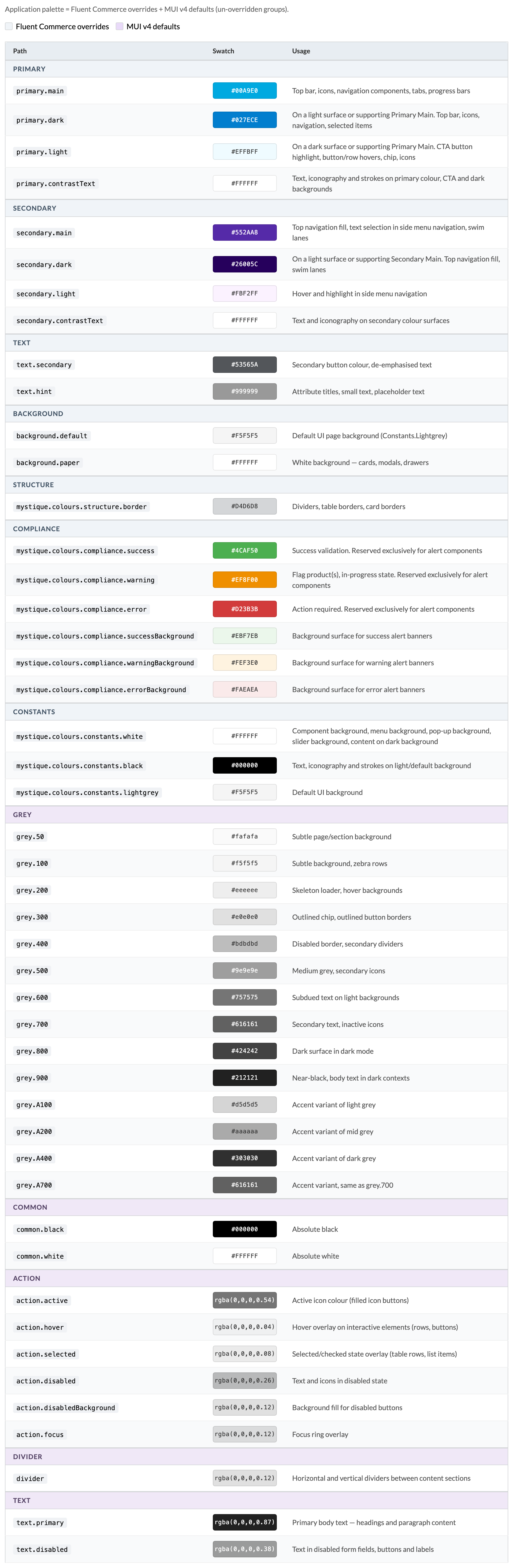
Typography
The OMX Design System provides a set of typographic styles and guidelines for using the font. These styles have been mapped to their usage throughout the platform.1const TypogStyles = (theme: Theme): Record<TypographyVariant, CSSProperties> => ({
2 'heading-1': {
3 fontSize: '20px',
4 lineHeight: '24px',
5 fontWeight: 400,
6 },
7 'heading-2': {
8 fontSize: '20px',
9 lineHeight: '24px',
10 fontWeight: 700,
11 },
12 'heading-3-title': {
13 fontSize: '16px',
14 lineHeight: '24px',
15 fontWeight: 400,
16 textTransform: 'capitalize',
17 },
18 'heading-3-uppercase': {
19 fontSize: '16px',
20 lineHeight: '24px',
21 fontWeight: 400,
22 textTransform: 'uppercase',
23 },
24 'heading-4': {
25 fontSize: '14px',
26 lineHeight: '20px',
27 fontWeight: 700,
28 },
29 'heading-5': {
30 fontSize: '13px',
31 lineHeight: '20px',
32 fontWeight: 700,
33 textTransform: 'uppercase',
34 },
35 'heading-6': {
36 fontSize: '14px',
37 lineHeight: '16px',
38 fontWeight: 400,
39 color: theme.palette.text.hint,
40 },
41 'body-1': {
42 fontSize: '14px',
43 lineHeight: '24px',
44 fontWeight: 400,
45 },
46 'body-2': {
47 fontSize: '16px',
48 lineHeight: '24px',
49 fontWeight: 700,
50 color: theme.palette.text.secondary,
51 },
52 'small-text-1': {
53 fontSize: '12px',
54 lineHeight: '16px',
55 fontWeight: 400,
56 color: theme.palette.text.hint,
57 },
58 'small-text-1-bold': {
59 fontSize: '12px',
60 lineHeight: '16px',
61 fontWeight: 700,
62 color: theme.palette.text.hint,
63 },
64});Fluent Commerce Typography Theme
| Style and CSS | Usage |
| Heading 1fontSize: 20px lineHeight: 24px fontWeight: 400 |
|
| Heading 2fontSize: 20px lineHeight: 24px fontWeight: 700 |
|
| Heading 3 - titlefontSize: 16px lineHeight: 24px fontWeight: 400textTransform: capitalize |
|
| Heading 3 - uppercasefontSize: 16px lineHeight: 24px fontWeight: 400textTransform: uppercase |
|
| Heading 4 fontSize: 14px lineHeight: 20px fontWeight: 700 |
|
| Heading 5fontSize: 13px lineHeight: 20px fontWeight: 700textTransform: uppercase |
|
| Heading 6fontSize: 14px lineHeight: 16px fontWeight: 400color: theme palette text hint |
|
| Body 1fontSize: 14px lineHeight: 24px fontWeight: 400 |
|
| Body 2fontSize: 16px lineHeight: 24px fontWeight: 700color: theme palette text secondary |
|
| Small text 1fontSize: 12px lineHeight: 16px fontWeight: 400color: theme palette text hint |
|
| Small text 1 - boldfontSize: 12px lineHeight: 16px fontWeight: 700color: theme palette text hint |
|



