
Fulfilment Updates - commercetools Connector
Essential knowledge
Intended Audience:
Technical User
Author:
Fluent Commerce
Changed on:
30 June 2026
Overview
Explains how the commercetools Connector tracks line-item fulfillment events from Fluent Order Management to update commercetools. Partners will learn to configure inbound webhooks that update custom metadata containers and individual product states. For the business, this granular sync handles multi-location split quantities seamlessly, providing customers with real-time visibility into each item in an order.Note: This article forms part of the inbound pipeline category, where data flows into the commercetools environment from an external source.Key points
- Core Function & Outcome: You will learn how the commercetools Connector processes asynchronous fulfillment updates from Fluent Order Management to update line-item states and custom metadata objects inside commercetools.
- Two-Stage Validation Framework: Inbound webhooks undergo a mandatory signature and parameter check in the first stage before entering the internal message queue, protecting the system from malformed data payloads.
- Data Enrichment Mechanism: Since incoming webhooks transmit minimal payload data, the connector automatically queries Fluent Order Management to pull the complete context details required to finish processing.
- Flexible Sourcing Support: Out-of-the-box functionality handles both basic single-location fulfillment pipelines and complex multi-location split-quantity scenarios.
- Custom Handler Extensibility: Technical teams can extend the architecture by registering custom message handlers or overriding data-fetching logic to store specialized fields or drive extra business logic inside commercetools.
Data Pipeline Execution
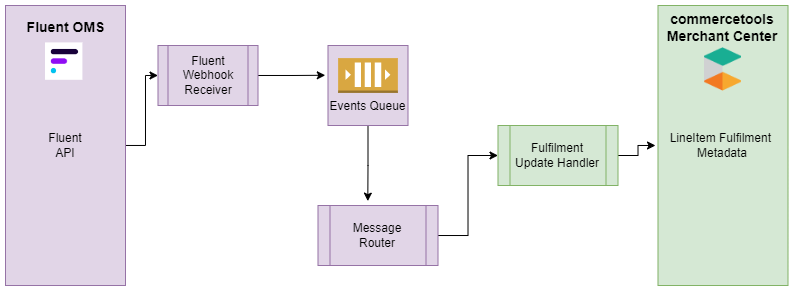
1. Ingestion (Webhook/Batch Job)
Fulfillment state tracking is initiated through a secure, two-stage inbound webhook pipeline:- Stage 1 (Ingestion & Queueing): The integration layer exposes a REST controller endpoint to receive the webhook from Fluent Commerce. The first stage immediately validates the cryptographic payload signature and checks the incoming content to verify that all mandatory parameters are present. If all validation goes well, the request is added to the internal message queue to be processed asynchronously. If verification fails, the connector will return an error to Fluent to signal that it was unable to accept the request.
2. Processing & Payload Extraction
- Stage 2 (Asynchronous Processing): The core queue listener reads the message from the internal staging queue. The message name is key to drive how the message is going to be processed, as these are mapped to specific internal handlers in the commercetools-connector. Partners can utilize this same approach by adding their own custom handlers and enabling the processing of different messages that are specific to their integration end goals.
- Because all inbound webhooks carry minimal information, the commercetools-connector is required to execute an outbound query back to Fluent to fetch extra details in order to complete processing the received message. The connector handles this extraction phase by running a dedicated GraphQL query (
`GetFulfilmentById`) to retrieve rich entity properties, item definitions, and transaction logs.
3. Target State Mapping (commercetools Mutation/Fields)
Once the complete fulfillment dataset is retrieved and compiled, the handler transforms and routes the modifications to the appropriate storefront targets:- Custom Field Mapping: The engine maps incoming data points to custom fields inside commercetools. A custom field label named the Fluent Fulfillment Metadata (
`flFulfilmentMetadata`) is populated as a native JSON object type. - Line Item Status Updates: The line-item fulfillment state values must be mapped directly against matching commercetools Line Item Status keys. Out-of-the-box (OOTB), two different fulfillment scenarios are supported at the line item level:
- Basic Flow: A single complete fulfillment maps uniformly against all the quantities requested in the order for a specific line item.
- Quantity Split Flow: Handles cases where there is a quantity split of requested order line item quantity across different fulfillments based on the fulfillment logic. For example, if quantity $X$ is ordered for product A, and a single store cannot satisfy the order, the system splits the fulfillment between two locations (L1 and L2) which will together fulfill the requested line item quantity ($Y + Z = X$). The fulfillment data will be mapped against the Order item, meaning for a single product there can be multiple separate fulfillment details tracked simultaneously.
Data Storage & Schema Mapping
Fluent Fulfillment Metadata Fields
The connector populates the following fields inside the custom commercetools metadata container:| Description | commercetools Field Name | commercetools Custom Field Identifier |
| Fluent Fulfillment Group Key | flFulfilment | `flFulfilment` |
| Fluent Fulfillment Metadata | flFulfilmentMetadata | `flFulfilmentMetadata` |
| Fulfillment Id | flFulfilmentMetadata.fulfilmentId | `flFulfilmentMetadata.fulfilmentId` |
| Fulfillment Location Ref | flFulfilmentMetadata.fulfilmentLocationRef | `flFulfilmentMetadata.fulfilmentLocationRef` |
| Fulfillment Location Name | flFulfilmentMetadata.fulfilmentLocationName | `flFulfilmentMetadata.fulfilmentLocationName` |
| Fulfillment Status | flFulfilmentMetadata.fulfilmentStatus | `flFulfilmentMetadata.fulfilmentStatus` |
| Fulfillment Quantity | flFulfilmentMetadata.fulfilmentQty | `flFulfilmentMetadata.fulfilmentQty` |
| commercetools Status | flFulfilmentMetadata.ctStatus | `flFulfilmentMetadata.ctStatus` |
Order Item Fulfillment Field Mapping
Individual item fields translate between systems according to the following mapping framework:| commercetools Fields | Fluent Fields | Description / Sample Payload Values |
`Product SKU` | `Product Ref` | Unique item stock reference matching across systems |
`Line Item State` | `Fulfillment Status` | Active processing state mapped to storefront line item states |
`Qty` | `Filled Quantity` | Verified item quantity count packed for transit |
`Fulfillment Metadata` | `Fulfillment Data` | `[{"fulfilmentStatus":"picking","fulfilmentQty":"86","fulfilmentId":"300","fulfilmentLocationRef":"LOC_SYDS","fulfilmentLocationName":"Sydney Store"}]` |
Developer Extension Points
Fulfillment Retrieval Query
The connector executes the following statement to poll Fluent Commerce for detailed fulfillment properties:1query GetFulfilmentById($fulfilmentId: ID!) {
2 fulfilmentById(id: $fulfilmentId) {
3 id
4 ref
5 status
6 type
7 order {
8 id
9 ref
10 }
11 fromAddress {
12 ref
13 name
14 }
15 items(first: 500) {
16 fulfilmentItemEdges: edges {
17 fulfilmentItemNode: node {
18 id
19 ref
20 status
21 requestedQuantity
22 filledQuantity
23 rejectedQuantity
24 orderItem {
25 id
26 ref
27 product {
28 name
29 }
30 status
31 quantity
32 }
33 }
34 }
35 }
36 }
37}Inbound Webhook Payload Schema
The JSON structure pushed onto the internal processing queue follows this baseline model:1{
2 "id": "c321a113-9307-4269-9a91-a2f99cefe07b",
3 "name": "fc.connect.order.webhook.fulfilment-status-update",
4 "accountId": "CNCTDEV",
5 "retailerId": "1",
6 "rootEntityId": "127",
7 "rootEntityType": "ORDER",
8 "rootEntityRef": "CC_G_FROM_POSTMAN_929",
9 "entityId": "91",
10 "entityRef": "cf45b633-d91a-4eb2-84c9-36495dd3fec3",
11 "entityType": "FULFILMENT",
12 "entityStatus": "AWAITING_WAVE",
13 "type": "NORMAL",
14 "attributes": {}
15}
