
Aggregate Inventory Sync - commercetools Connector
Essential knowledge
Intended Audience:
Technical User
Author:
Fluent Commerce
Changed on:
30 June 2026
Overview
Explains how the commercetools Connector synchronizes product availability from Fluent Order Management to commercetools at an aggregate level. Partners will learn to run scheduled batch jobs that push calculated stock balances to specific storefront channels. For the business, treating Fluent as the authoritative source of truth prevents digital overselling and ensures product detail pages display accurate stock numbers.Note: This article forms part of the inbound pipeline category, where data flows into the commercetools environment from an external source.Key points
- Core Function & Outcome: You will learn how the commercetools Connector runs scheduled batch jobs to fetch available product quantities from Fluent Order Management and update aggregate inventory balances within commercetools channels.
- Single Source of Truth: Fluent Order Management serves as the authoritative master environment for tracking, computing, and distributing all aggregate stock positions down to the storefront.
- Scheduled Batch Orchestration: The inventory synchronization pipeline runs via a dedicated batch job handler on a configurable frequency. Out-of-the-box orchestration leverages AWS Event Bridge scheduled triggers deployed via cloud formation templates.
- Custom Handler Adaptability: Technical partners can cleanly alter inventory processing logic or add custom validation metrics by overriding default routing handlers within the standard configuration files.
Data Pipeline Execution
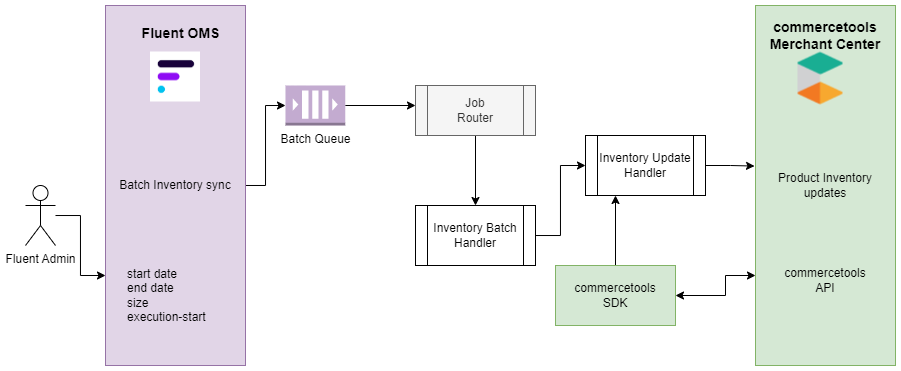
1. Ingestion (Webhook/Batch Job)
The inventory synchronization pipeline runs via a dedicated batch job handler on a configurable frequency. Out-of-the-box orchestration leverages external scheduling systems (such as AWS Event Bridge scheduled triggers) to send a standardized HTTP request to the connector framework:HTTP`PUT https://<domain>/api/v1/fluent-connect/scheduler/add/<fluent-account>/<fluent-retailer>/batch-inventory-sync`This trigger routes execution variables into an internal processing network. The bulk tracking data is funneled into a specialized Batch Queue designed specifically to handle high-throughput aggregate synchronization tasks safely.
2. Processing & Payload Extraction
The internal Job Router evaluates the explicit name of the incoming job payload and forwards it directly to the assigned Inventory Batch Handler class.The handler uses the pre-calculated date ranges provided by the job context to run in delta mode, only fetching items that have changed since the last execution. It dispatches an outbound GraphQL query (`GetAggregateVirtualPositions`) to extract clean availability quantities from Fluent Order Management, filtering records by virtual catalogs, status attributes, and timestamps.3. Target State Mapping (commercetools Mutation/Fields)
Once the aggregate balances are extracted from Fluent, the connector updates the corresponding storefront channels:- Channel Key Matching: Reviews settings defined under the profile name
`fc.connect.commercetools.batch.batch-inventory-sync`to correlate your target storefront channel key (`ctChannelKey`) with the authoritative Fluent virtual catalog reference (`fluentAggregateVirtualCatalogueRef`).
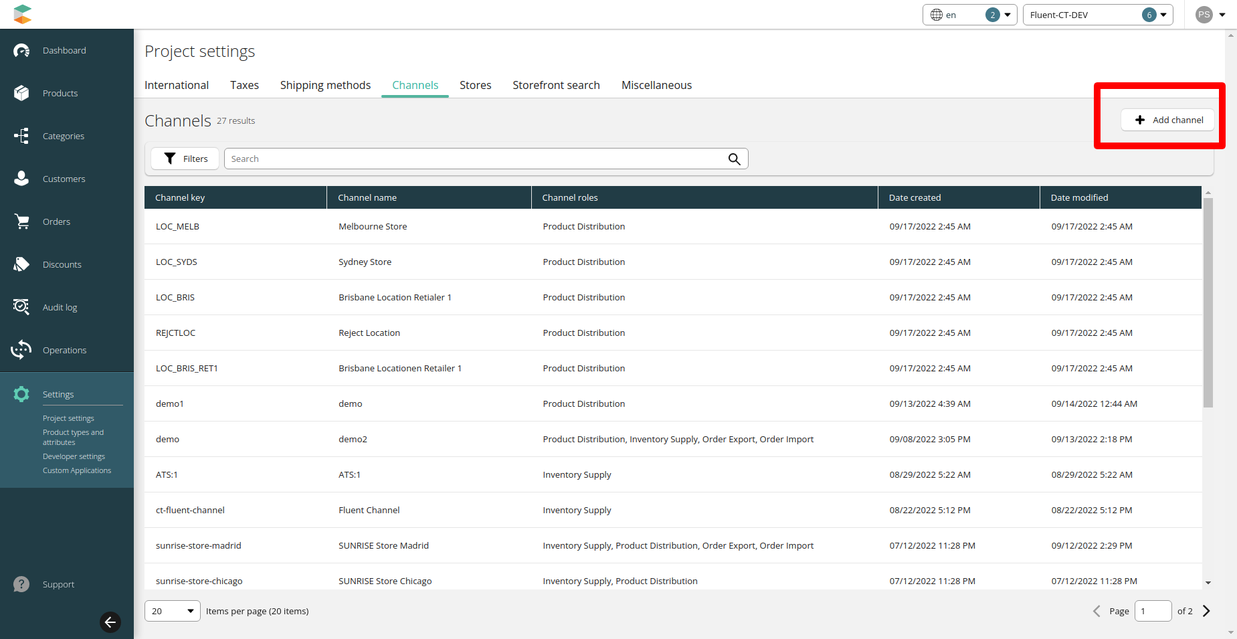
- Inventory Balance Upserts: The connector runs upsert operations to create or update inventory entries within the designated commercetools channel, resetting available-to-sell item counts to align perfectly with master values.
Data Storage & Schema Mapping
Batch Inventory Synchronization Setting Profile
The following schema profile details the structure of an active inventory sync setting and its corresponding runtime parameters:Developer Extension Points
Refer to the customization guidelines for more information.Overriding Existing Route Handlers
To modify the underlying logic of the Inventory Upsert handler, update the configuration parameters inside`application-connector.yml` under the `routes > name > handler` block:
