
SCIM Connector Key Features - Connect Identity Provider
Feature
Changed on:
29 June 2026
Overview
The SCIM Connector links your Identity Provider (IdP) to the order management platform to automate user administration and access governance. Key business outcomes include:- Lower Operational Costs: Automates provisioning, profile updates, and deactivations to eliminate manual administrative overhead.
- Stronger Identity Governance: Establishes your centralized IdP as the single source of truth for user identities to minimize security risks.
- Synchronized Role Mapping: Translates directory positions into context-aware roles across your network to ensure secure, compliant permissions.
How it Works
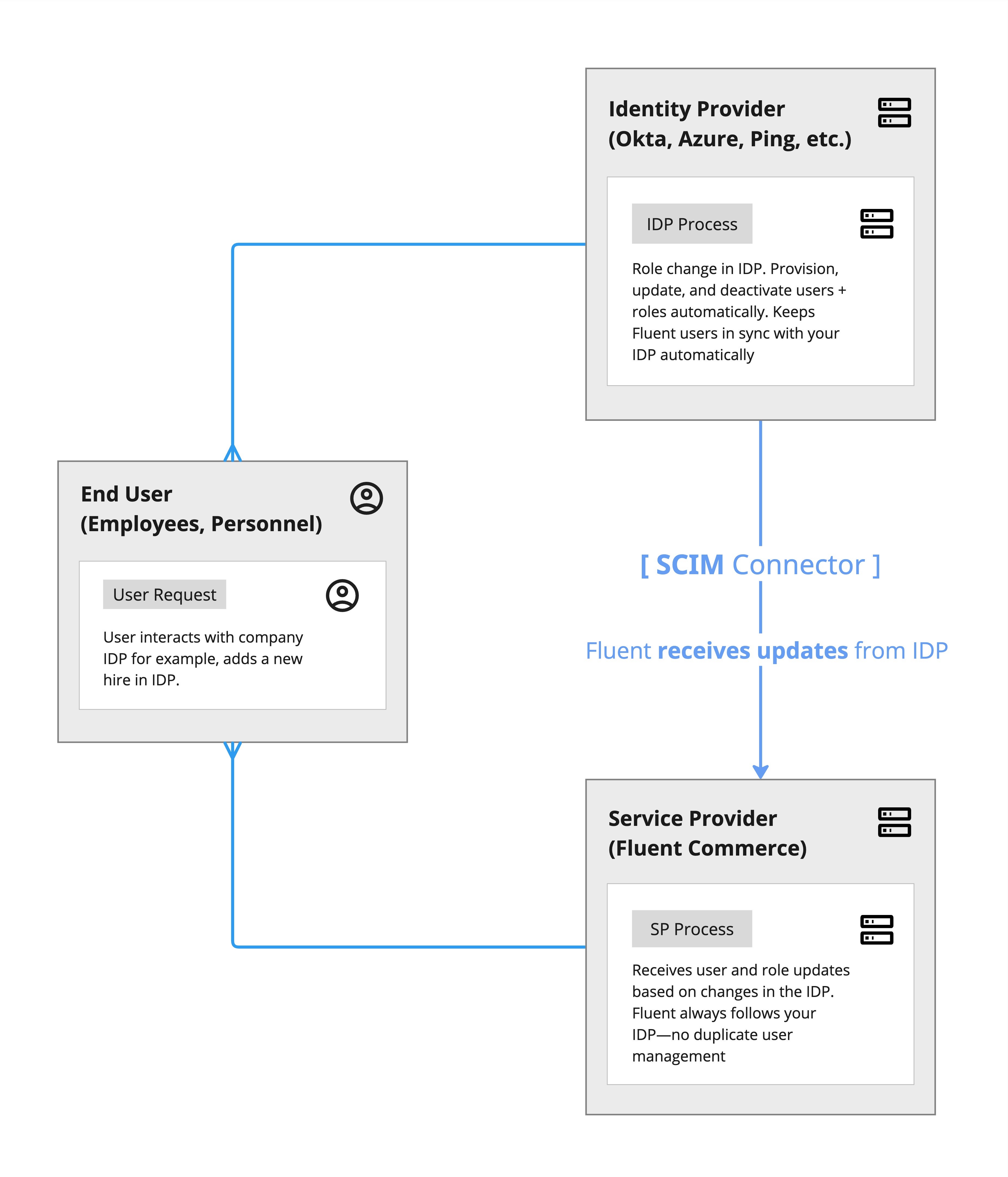
The SCIM Connector creates a secure, standardized bridge between your identity infrastructure and Fluent Order Management, eliminating the need to manually manage independent user credentials.User Lifecycle Provisioning
The platform continuously evaluates incoming directory sync events against strict access governance rules to manage account states:- Account Creation: New users are automatically provisioned with matching access profiles only if they are new to the platform and every role assigned to them within the IdP has a valid, recognized counterpart inside Fluent Order Management.
- Continuous Synchronization: When employee profiles or responsibilities change within your directory, user information and role adjustments push down automatically to update the active account.
- Automated Guardrails: To protect the integrity of your environment, the system strictly blocks account creation or profile changes if a user has no roles assigned in the directory, or if any assigned role cannot be matched to a verified platform permission.
- Cascading Offboarding: User termination or suspension cascades instantly. Deactivating a user within the IdP hides all active roles and sets the user status to Inactive within Fluent Order Management. Completely deleting a user in the directory deactivates the platform account. Any user left with no remaining assigned roles is automatically marked as Inactive.
Group-Based Permission Controls
The connector interprets group memberships within your corporate directory to simplify large-scale employee onboarding and roll alignments:- Inherited Privileges: Adding an employee to a directory group automatically grants them all associated group-level roles in addition to any individual roles assigned to them directly.
- Granular Revocation: Removing an employee from a group strips away those group-specific access rights but leaves their direct, personally assigned privileges completely untouched.
- Group Modifications: Real-time updates to an entire group (such as adding or removing roles, or updating member lists) propagate to all associated users during the next synchronization cycle. Deleting a group removes those group roles from all members while preserving personal account overrides.
App Role Naming Structure
To facilitate automated synchronization, the application roles maintained within your corporate directory follow a standard naming convention that establishes the context, location boundary, and operational authority for the user:`[CONTEXT_TYPE]_[CONTEXT_IDENTIFIER]_[ROLE_OR_LOGICAL_ID]`- Context Type: Defines the scope of the user's authority, restricted to explicit platform tiers such as Account, Retailer, or Agent.
- Context Identifier: Identifies the precise system node. For example, if the type is set to Retailer, this defines the specific Retailer ID; if the type is Agent, it targets a unique physical store location ID.
- Role or Logical Identifier: Represents the exact functional permission or a custom logical directory position that translates into a specific group of platform capabilities.
Dynamic Custom Role Mapping
Organizations can configure custom enterprise directory positions to expand automatically into a collection of multiple target roles within the platform. For instance, assigning a single custom regional supervisor role within your IdP can be configured to automatically provision that user with both inventory management and order optimization privileges.- Precedence of Evaluation: Dynamic translations execute immediately before standard direct naming matches occur, ensuring custom directory labels convert to valid system access rights before updating user files.
- Centralized Logic Control: These operational rules map through standard platform configuration profiles. If no custom rules are defined, the connector skips dynamic conversion and executes direct direct-role mapping.
Who is it For?
- IT Security Managers and Compliance Officers who require a central point of governance to manage corporate access rights, audit employee profiles, and enforce instant offboarding protocols across global commerce tools.
- E-Commerce Operations Directors who want to automate warehouse, store associate, and customer service account creation across thousands of global team members without administrative delays or manual data entry errors.
What Business Problems Does it Solve?
- Eliminates Security Risks: Guarantees that organizational terminations or role reductions cascade instantly into Fluent Order Management, preventing unauthorized backend database access from former employees.
- Streamline Operational Onboarding: Automates account creation and permission scaling for store staff, allowing field associates to access order fulfillment interfaces immediately upon directory activation.
- Reduce Human Errors: Removes the manual overhead, mismatched passwords, and operational friction of creating standalone user accounts across multiple disjointed management screens.
