Preserve Pick Progress During Interruptions in Fluent Store
Use Case
Author:
Garrett Foster
Changed on:
6 Oct 2026
Problem
Store associates use Fluent Store to pick orders in waves. Larger orders often contain 20 to 50 line items, so a single wave can take several minutes to complete. During that time, associates get interrupted: a customer asks for help, or an urgent task sends them to another part of the store.When an associate sets the scanner down, the device logs out and the screen refreshes. Any pick quantities entered for the current wave are lost, and the associate must start the wave again from the beginning.Without a way to keep progress on the device, interrupted picking leads to the following problems:- Lost work. Every pick entered before the interruption disappears, even when most of the wave was complete.
- Repeated effort. Associates must re-scan and re-count items they already picked, which adds time to every interrupted wave.
- Higher risk of pick errors. Restarting a partly picked wave from memory makes it easy to double-count or skip items.
- Costs that grow with scale. A retailer running Fluent Store in 60 stores, with plans to grow to 600, multiplies this lost time across every location and every shift.
 For example, an associate creates a custom wave for an order with three product lines: 3, 5, and 4 units. The associate picks 2 of the first line and 3 of the third, then leaves to help a customer. When the associate returns, the scanner has logged out. After logging back in and opening the wave, every line shows 0 picked, and the associate must count all five units again.
Example
A fashion retailer runs Fluent Store across its store network. A store associate creates a custom wave for a customer order that contains three items:
- running shoes, size 9 (Item A): 3 units
- running shoes, size 10 (Item B): 5 units
- running shoes, size 11 (Item C): 4 units
Solution Overview
A custom Fluent Store component saves pick progress to the device and restores it when the associate returns to the wave. Progress stays on the device and does not need to be sent to the platform until the associate confirms the pick. The associate logs back in, resumes the wave, and continues from the last saved quantity.How It Works at a Glance
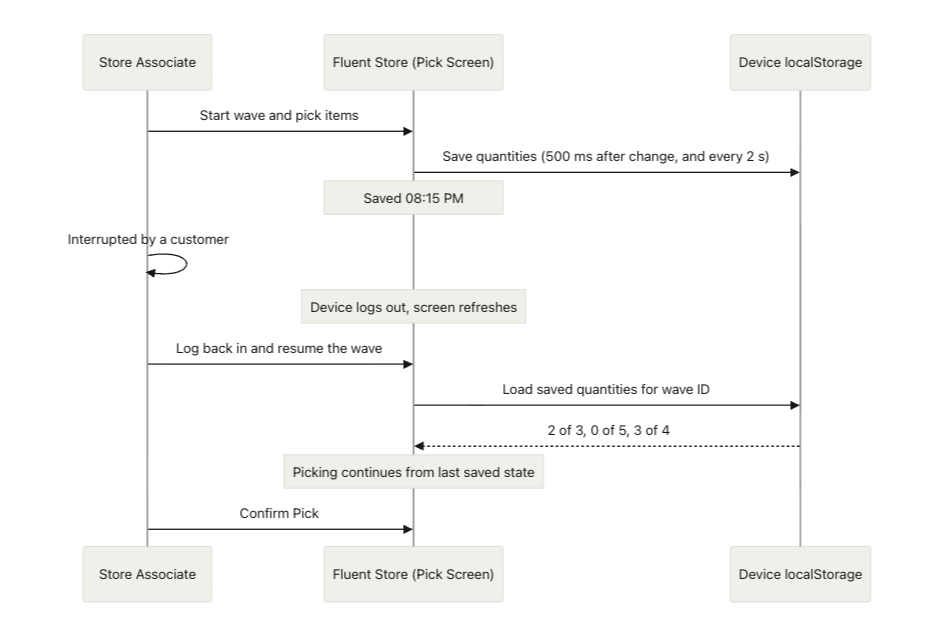
- Save Pick Progress to Local Storage The component extends the pick step of the wave wizard (Step 1 of 3: Pick). It stores the picked quantity for each SKU in the browser's
`localStorage`, keyed by wave ID. Two triggers keep the saved state current:- A save runs 500 milliseconds after each pick change, so the latest scan is captured quickly.
- An auto-save runs on a 2-second interval as a fallback. A save status indicator on the pick screen (for example, Saved 08:15 PM) tells the associate that progress is stored.
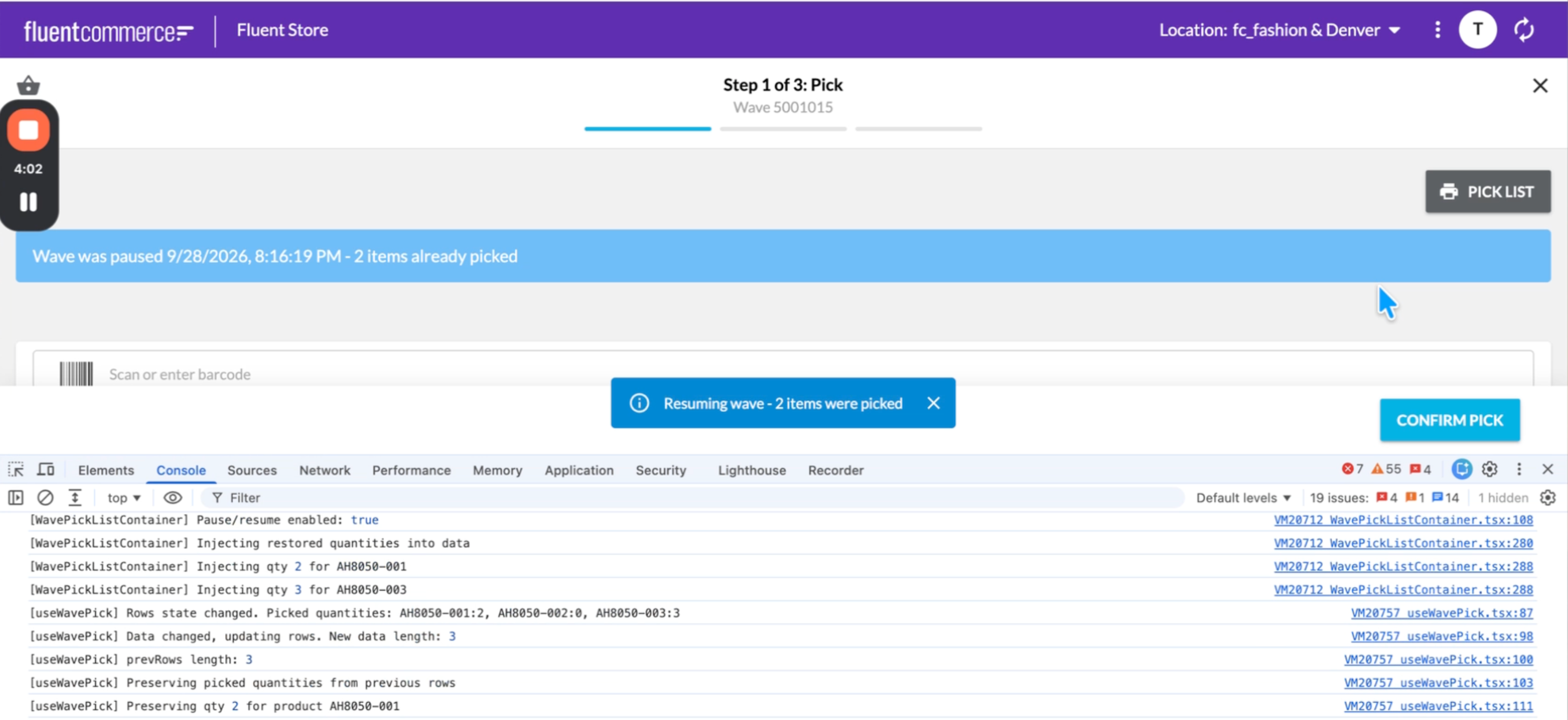
- Restore Progress When the Wave Resumes When the associate opens the wave again from the In Progress Waves tab and selects Resume, the component reads the saved quantities for that wave ID and injects them back into the pick rows. Picked quantities from earlier rows are preserved when the row data refreshes, so the screen shows exactly where the associate left off.
- Confirm Pick as Usual The associate finishes picking and selects Confirm Pick. The standard Fluent Store flow then sends the result to the platform. Local state exists only to bridge the gap between the interruption and the confirmation.
How the Component Was Built with AI Tooling
The developer who built this component is not a dedicated React developer. AI tooling closed that gap and kept the build short:- Claude with Fluent Commerce skills. The developer gave the business requirements to Claude, which used the Fluent Commerce skills to generate the custom component.
- DocSearch through the Fluent Commerce Model Context Protocol (MCP) server. DocSearch gives Claude access to the full Fluent Commerce documentation, the out-of-the-box component reference, and relevant source code. Claude used it to learn how the wizard component behind the pick screen works, without the developer researching it by hand.
- Live debugging with Chrome DevTools. The developer ran Fluent Store in an isolated Chrome session with remote debugging turned on. Claude read the browser console and network activity directly, found problems, and proposed fixes. For example, Claude identified that the save indicator showed only the last write time and could mislead an associate while a change was still unsaved. The fix was a "dirty" flag that shows Saving… until the write completes.
Intended Use
This component targets a specific problem: long pick sessions on shared store devices that log out when idle. It is a proof of concept and the next step is to package it as a reusable Fluent Store extension.Keep the following limits in mind before you use this pattern:- Saved progress stays on one device. An associate who switches to a different scanner does not see the saved quantities.
- The restored screen does not yet show which lines are partly picked and which are fully picked. It shows the saved quantity for each line.
- Local state supplements the platform. It does not replace it. The pick is not recorded on the platform until the associate selects Confirm Pick.
Video Overview
Overview of How to Preserve Pick Progress During Interruptions in Fluent StoreSolution