Implementing Locker Collection
How-to Guide
Extend
Author:
Ashwin Anand
Changed on:
5 Sept 2025
Key Points
- A simple way to illustrate how to enable the locker collection option in the Click & Collect workflow
- Illustrates a way to expose the locker information to the order sales channel via the Fulfilment Options workflow
- Access to the lockers is assumed via the carrier company delivering to the locker location (i.e. there is no hardware integration)
Steps
 The Problem
Retailers are constantly looking for ways to improve their delivery and collection options to their customers, whether it be same/next day delivery or curb side click and collect.Depending upon the product range, enabling customers to collect their orders from lockers is an area that has seen some growth. The reasons could be as simple as additional convenience option for the customer, particularly in densely populated metro areas where locker banks operate 24/7. Another reason could be to increase their customer segment by going into areas where their retail footprint is lower due to the regional locality (i.e. outside of metro areas).By consolidating multiple orders at a single location, lockers improve delivery efficiency, reduce failed deliveries and provide a secure, self-service option that enhances the overall customer experience. This flexible solution not only meets the growing demand for convenience but also helps retailers stay competitive in an evolving market.
Before you begin
Objective:
Locker-Based PickupPrerequisites (Fluent):
- Locker locations (stores) with required location attributes
- Existing network “Click & Collect” (CC_NETWORK)
- Existing “Fulfillment Options” and “Click & Collect” order workflow
Implementation/Configuration Steps:
To implement the physical collection locker system, leverage the existing “Fulfillment Options” and “Click & Collect” order workflows.The “Fulfillment Options” workflow identifies the three nearest plans, options, or stores based on the customer’s address, allowing them to choose one before placing an order. Once the order is placed, the “Click & Collect” order workflow is triggered.1. “Fulfillment options” Workflow Implementation/Configuration Steps:
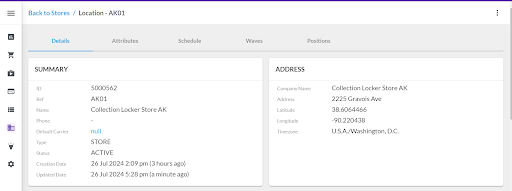
Locker locations (Stores: VR01, VR02, VR03, VR04 & VR05) configuration in the Fluent OMS with required location attributes:
- This configuration represents physical locker locations of type Store in the Fluent OMS web application.
- In the back-end logic, utilise the locker store's parameters like ref, name, address, latitude and longitude to check distances from the address.
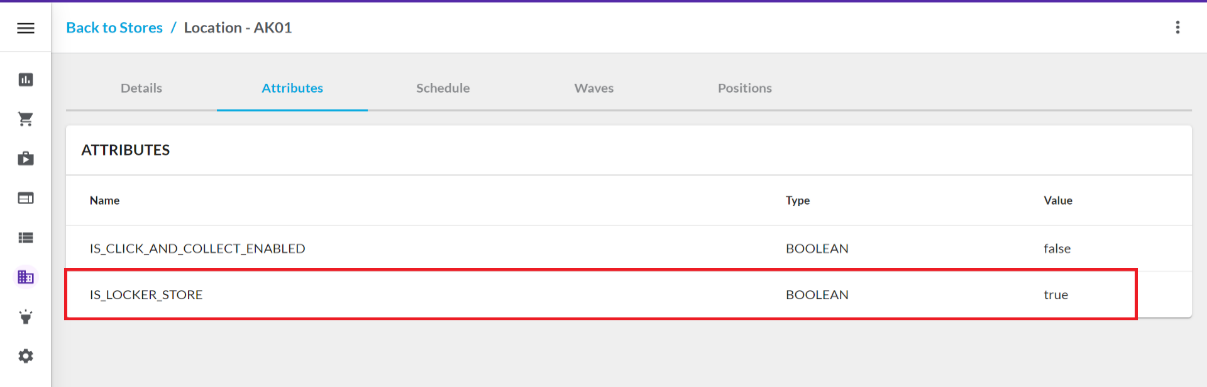
- Location attribute is used to represent the locker store. The attribute name
`IS_LOCKER _STORE`represents the locker store. If the value of such an attribute is`true`, it is treated as a locker store.
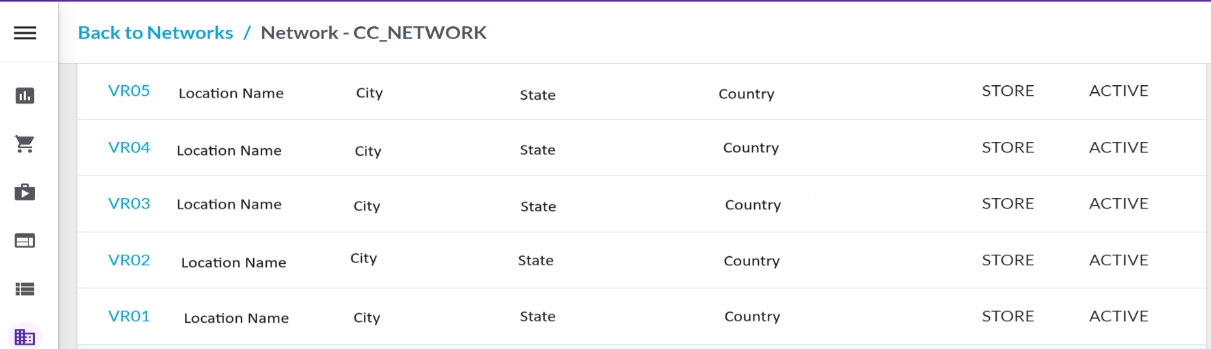
Network configuration in Fluent OMS:
- Utilise the click & collect related network, which is configured within the related workflow.
- In the back-end workflow, the logic accesses the network and the locations within it. Only locations that are part of the
`CC_NETWORK`and have an`ACTIVE`status are considered for the different rules checks of the CC order.
Ruleset related to network (Workflow: “Fulfilment options: Default”):
Code sample: Rule: `GetLocationsForNetworkFO`
Add locker locations (VR01, VR02, VR03, VR04 & VR05) in network (`CC_NETWORK`):
- Only locations that are part of the
`CC_NETWORK`and have an`ACTIVE`status are considered for the different rules checks of the CC order. - The logic employs locker locations (VR01, VR02, VR03, VR04, and VR05) within the
`GetLocationsForNetworkFO`rules’ Java class, utilizing the network specified in the fulfillment option workflow.
Inventory checks (Virtual Position):
- Since most of the business requirements related to locker collection points have no inventory check related constraint, inventory check can be disabled to avoid the stock related checks.
- The code sample below gives the view of how the inventory check is bypassed in such a scenario.
Ruleset related to inventory checks (Workflow: “Fulfillment options: Default”):
Code sample: Rule: `SearchInventoryAtLocationsFO`
Fulfillment Plans:
- From the filtered locations based on all the above-mentioned checks the logic proposes the 3 nearest fulfillment plans/locations from the address so customers can select any of them and place an order.
- Since locker stores serve as collection points without their own inventory, orders for these lockers are fulfilled from the nearest store or location. Therefore, if the fulfillment plan includes locker collection points, those orders are always fulfilled from the stores or locations associated with these pickup points.
- In the back-end logic, the workflow refers to the properties that denote the relation between the locker Pick-up Store ID and their corresponding fulfillment store (where the actual inventory will be fulfilled from). Based on the corresponding tagging to stores, the appropriate locker fulfillment store is assigned to the locker collection location as the fulfillment store.
- So for example, Locker Collection Points: VR01, VR02, VR03, VR04 & VR05 delivery are tagged to
`FULFILMENT_REF = “VC63”`store. Similarly, Locker Collection Points: SR01, SR02 & SR03 delivery are tagged to`FULFILMENT_REF = “SC03”`store for their respective fulfillment.
Ruleset related to fulfillment plans (Workflow: “Fulfillment options: Default”):
Code sample: Rule: `CreateFulfilmentPlans`
2. “Order: Click & Collect” Workflow Implementation/Configuration Steps:
The “Click & Collect” workflow executes when a customer places a CC order. On the eCommerce checkout screen, customers can view three plans or stores as outlined in the fulfillment plans and select one before placing a Click & Collect order. Each plan has a unique plan ID. Fluent Commerce receives the plan ID of the selected location. After the order is placed, it is fulfilled from the fulfillment store associated with the chosen locker location or store.Code sample: Rule:
Add a new ruleset
Ruleset
Code sample: Rule:
Create fulfillment based on the fulfillment plan for the CC order:
- If the fulfillment plan exists and the pickup/collection point is “Locker location/store”:
- If a fulfillment plan exists for the order and the fulfillment location reference in the plan details is a locker location, the order is fulfilled from the locker fulfillment store. For locker orders, the “TO Location” is one of the locker locations (VR01, VR02, VR03, VR04, or VR05), and the “FROM Location” is always “VC63.”
- This ruleset calls the event
`UpdateOrderAttributeForCollectionPoint`as the next ruleset.
Ruleset related to the create fulfillment for CC order (Workflow: “Order: Click & Collect”):
Code sample: Rule: `CreateFulfillmentCC`
Add a new ruleset `UpdateOrderAttributeForCollectionPoint` for the “Order: Click & Collect” Workflow:
- Add the ruleset
`UpdateOrderAttributeForCollectionPoint`to differentiate the locker collection point orders from the other orders. - The order includes an attribute field, and by applying this new rule, a new attribute is added to identify the locker collection point order.
- This rule updates the order attribute for locker collection point orders as below:
`"attributeName": "IS_LOCKER_ORDER", ``"attributeType": "STRING", ``"attributeValue": "TRUE"`
Ruleset `UpdateOrderAttributeForCollectionPoint` (Workflow: “Order: Click & Collect”):
Code sample: Rule: `UpdateOrderAttributeForCollectionPoint`
Conclusion:
- After implementing this feature, new stores can be added and designated as lockers using the location attribute. The attribute
`IS_LOCKER_STORE`is used to identify locker stores, and if its value is set to “true,” the store is treated as a locker collection point. - The “Fulfillment Options: Default” workflow includes a ruleset for the distance radius threshold. Locations within “x” kms from the address are considered for the fulfillment option plan or subsequent checks, allowing for store selection based on proximity.
- From the filtered locations that pass all “Fulfillment Options: Default” workflow checks, customers can view the three nearest fulfillment plans, options, or stores on the front-end screen when placing a Click & Collect order. They can then select one of these options before finalizing their order, ensuring they can pick up their order from the nearest and most convenient locker collection store.
Except as otherwise stated in the Extend Knowledge Content site policy, the content on this page is licensed under the Creative Commons Attribution 4.0 Licence, and any code samples that appear on this page are licensed under the Apache 2.0 Licence, unless any code sample forms part of the Fluent Order Management Platform code. Neither of these licences apply to any content on any other page that can be reached via a link on this page unless otherwise specified on that other page. If you wish to use any of the Extend Knowledge Content, you must do so in compliance with the licenses referred to above and the Extend Knowledge Content site policy, including attribution in the manner set out on this page.