Product Sync - commercetools Connector
Essential knowledge
Intended Audience:
Technical User
Author:
Fluent Commerce
Changed on:
30 June 2026
Overview
Explains how the commercetools Connector exports product catalog data from a storefront to Fluent Order Management. Partners will learn to manage real-time and scheduler-driven synchronization paths using integrated messaging queues and extensible handlers. For the business, this automation removes manual data replication, eliminates discrepancies between channels, and ensures catalog consistency across variant and standard items.Note: This article forms part of the outbound pipeline category, where data flows out of the commercetools environment to an external destination.Key points
- Core Function & Outcome: You will learn how the commercetools Connector manages the export of product catalogs from commercetools to Fluent Order Management, using queue-based routing and handlers to ensure standard and variant structures align.
- Dual Execution Methods: Out-of-the-box (OOTB) functionality provides real-time automatic delta updates via storefront subscriptions alongside scheduled batch pipelines for high-volume historical or complete catalog extractions.
- Extensible Handler Architecture: The message routing framework is completely decoupled. Partners can easily customize data-mapping properties or override standard handler classes using central
`application-connector.yml`configurations.
Data Pipeline Execution
1. Storefront Trigger (Subscription/External Queue)
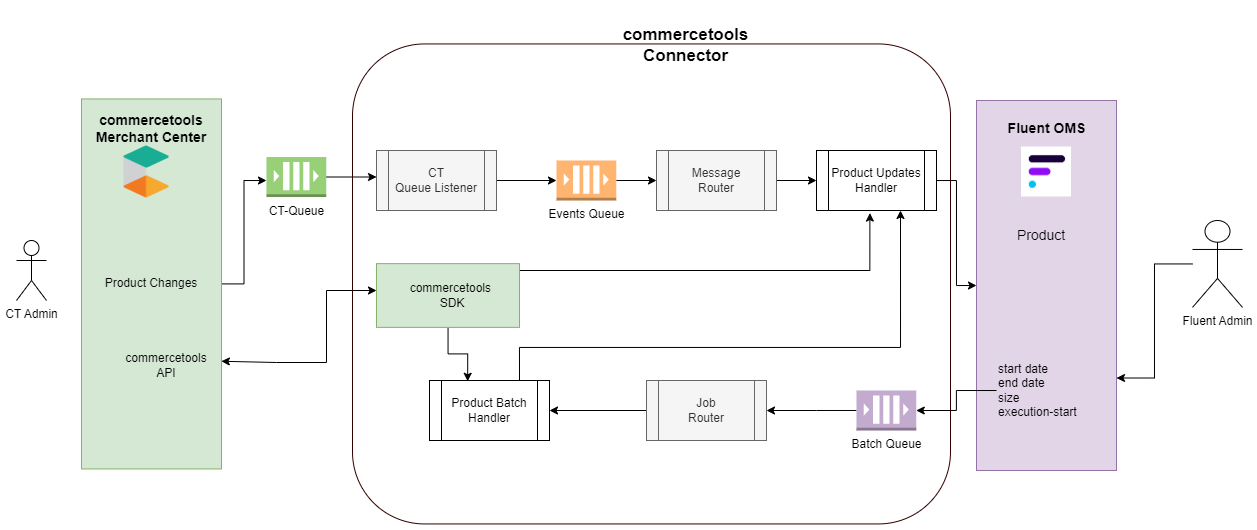
Product catalog exports can be initiated via two distinct operational trigger paths:- Automatic Delta Sync: An automated background synchronization driven by commercetools subscription. Any product creation, modification, or publication event fires a native subscription notice that pushes the payload to an external
`ct-queue`(such as AWS EventBridge or GCP Pub/Sub). - Manual Batch Job: Triggered with the help of an external job scheduler. The number of records pushed depends on the date windows configured within
`Fluent Settings > Product Catalog Sync`. The extension pulls items modified from that designated date until the synchronization starts, implicitly adding categories mapped against those products.
2. Route Filtering & Message Routing
- Queue Ingestion: For automated deltas, the
`CT Queue Listener`class constantly monitors the`ct-queue`and forwards incoming messages directly to the internal Event Queue. - Routing Evaluation: The
`Message Router`reads the message name from the Event Queue and routes it to the designated handler. In the case of standard product changes, the message name resolves to`product`, which dynamically triggers a match against the`commercetools.connect.product.upsert`route inside the`application-connector.yml`file. Bulk batch requests instead route from a Batch Queue down onto a dedicated`Product Batch Handler`.
3. Fluent API Delivery (GraphQL Mutation)
- Handler Processing & Delivery: The
`Product Updates Handler`reads the message data from the internal queue. Based on the unique product identifier, the handler extracts complete variant, image, and price records from the core commercetools SDK. It then transforms and maps the parameters to align with the Fluent data model and pushes the data to Fluent Order Management.
Core commercetools Product API Endpoints
The integration leverages the following endpoints to collect enriched catalog details during pipeline execution:`GET : {{host}}/{{project-key}}/products``GET : {{host}}/{{project-key}}/products/{{product-id}}`
1. Message Routing Configuration (`application-connector.yml`)
Partners can override default handlers or filter incoming message types by adjusting the route definitions:1- route: "commercetools.connect.product.upsert"
2 props:
3 name: "product"
4 inclusion-filter:
5 - "ProductPublished"
6- route: "commercetools.connect.product.deactivate"
7 props:
8 name: "product"
9 inclusion-filter:
10 - "ResourceDeleted"2. Custom Message Handler Implementation
The message handlers are fully extensible. Partners can make the changes as per their requirements. The Connect SDK allows message routing with flexible message handlers to process and transform data moving from a source to a destination. Developers can introduce custom data-mapping adjustments by extending the base`MessageHandler` class within a package residing under the main SDK package directory, for more information on how to customise read the extend guidelines:1@Slf4j
2@Component
3@HandlerInfo(name = "FluentProductUpsert", description = "Upsert a product at Fluent OMS")
4public class <your-handler-class> extends MessageHandler {
5 private static final String PRODUCT_ATTRIBUTE = "product";
6 // write your logic
7}3. Product Message Payload Reference
The following JSON schema demonstrates the structure of a raw message notification pushed onto the`ct-queue` when a product publish event occurs:1{
2 "notificationType": "Message",
3 "projectKey": "fluent-ct-dev",
4 "id": "7591e242-a42a-419c-846c-b12e1596442e",
5 "version": 1,
6 "sequenceNumber": 2,
7 "resource": {
8 "typeId": "product",
9 "id": "dbe774ce-86ae-4709-b7e9-dffb8c51fc7c"
10 },
11 "resourceVersion": 2,
12 "resourceUserProvidedIdentifiers": {
13 "slug": {
14 "en": "product_slug_some"
15 }
16 },
17 "type": "ProductPublished",
18 "productProjection": {
19 "id": "dbe774ce-86ae-4709-b7e9-dffb8c51fc7c",
20 "version": 2,
21 "productType": {
22 "typeId": "product-type",
23 "id": "80037be5-c9aa-4f5d-8ef5-0f8c787c7727"
24 },
25 "name": {
26 "en": "Some Product"
27 },
28 "categories": [
29 {
30 "typeId": "category",
31 "id": "17929883-937e-4885-8ff0-37f6770d16e5"
32 }
33 ],
34 "categoryOrderHints": {},
35 "slug": {
36 "en": "product_slug_some"
37 },
38 "masterVariant": {
39 "id": 1,
40 "sku": "SKU-1",
41 "prices": [
42 {
43 "id": "aa7518be-a9c4-4f08-89d1-cf88f5d0a66c",
44 "value": {
45 "type": "centPrecision",
46 "currencyCode": "EUR",
47 "centAmount": 4200,
48 "fractionDigits": 2
49 }
50 }
51 ],
52 "images": [
53 {
54 "url": "http://my.custom.cdn.net/master.png",
55 "label": "Master Image",
56 "dimensions": {
57 "w": 303,
58 "h": 197
59 }
60 }
61 ],
62 "attributes": [],
63 "assets": []
64 },
65 "variants": [
66 {
67 "id": 2,
68 "prices": [],
69 "images": [
70 {
71 "url": "http://my.custom.cdn.net/variant.png",
72 "label": "Variant Image",
73 "dimensions": {
74 "w": 303,
75 "h": 197
76 }
77 }
78 ],
79 "attributes": [],
80 "assets": []
81 }
82 ],
83 "searchKeywords": {},
84 "hasStagedChanges": false,
85 "published": true,
86 "createdAt": "2022-07-18T03:08:24.738Z",
87 "lastModifiedAt": "2022-07-26T10:48:04.028Z"
88 },
89 "removedImageUrls": [],
90 "scope": "All",
91 "createdAt": "2022-07-26T10:48:04.028Z",
92 "lastModifiedAt": "2022-07-26T10:48:04.028Z"
93}