
Nullable Field Component
UI Component
Changed on:
1 Oct 2025
Overview
The Nullable Field Component provides a simple way to handle fields that need to support both`null` and explicit overrides. It combines a toggle and an input into one reusable component, making it ideal for input types that do not natively support empty values (e.g., 'number', 'integer', 'int', 'select', 'boolean').When the toggle is OFF, the field is treated as `null`. When the toggle is ON, the field accepts and sends an explicit value.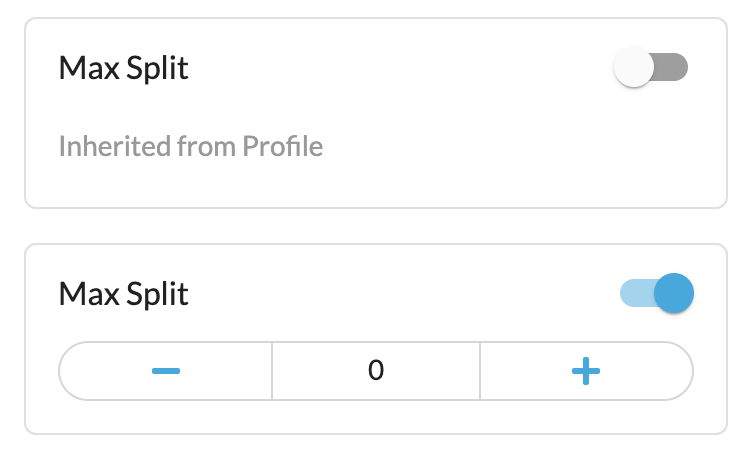
| Plugin Name | Core |
|---|
Alias
fc.field.nullable
Detailed technical description
The Nullable Field Component combines a toggle and an input field to manage values that may either be explicitly set or left empty (
`null`):- Toggle OFF (disabled): Sends an empty (
`null`) value. - Toggle ON (enabled): Sends the entered value as an explicit override.
- Initial State (when receiving a value):
- If a value exists (edit mode) → toggle automatically ON and value displayed.
- If no value is provided → toggle defaults to OFF.
Properties
| Name | Type | Required | Default Value | Description |
| extensions | `Extensions` | Yes | None | Defines properties of the inner field rendered inside the nullable wrapper. |
Extensions
| Name | Type | Required | Default Value | Description |
| component | `string` | Yes | None | Defines the input component inside the field (e.g., 'integer', 'select'). |
| description | `string` | No | None | Message shown when the component is OFF (e.g., “No override set”). |
Configuration example
1{
2  "overrides": {
3    "maxSplit": {
4      "component": "fc.field.nullable",
5      "extensions": {
6        "component": "integer",
7        "description": "i18n:fc.sourcingProfileDrawerButton.defaultValue.description"
8      }
9    }
10  }
11}Version History
Recommended Placement
Use the Nullable Field Component for fields that:
- Need to support both an empty (
`null`) state and an explicit value. - Are based on types that cannot normally represent emptiness (e.g., 'number', 'integer', 'int', 'select', 'boolean').
- Require a clear distinction between “no value provided” and “a specific value entered.”
