
Area Chart Wrapper
UI Component
Changed on:
2 July 2024
Overview
An area chart wrapper that converts data from Metrics API to chart-readable format.| Plugin Name | Inventory |
|---|
Alias
fc.chart.area.wrapper.feed
Detailed technical description
Area Chart Wrapper is used in the Feeds Dashboard
Properties
| Name | Type | Required | Default | Description |
| chartContainerConfig | `ChartContainerConfig` | no | 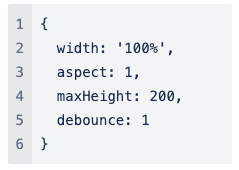 | The property allows charts to adapt to the size of the parent container. One of the props width and height should be a percentage string. |
| dataSource | `string` | yes | none | A string that defines a path to GraphQL data. |
| path | `string` | no | none | A string that defines a path to the data in the chart data. |
| tooltip | `boolean` | no | none | Enables tooltip visibility. |
| legend | `boolean` | no | none | Enables legend visibility. |
| cartesianGrid | `CartesianGrid` | no | none | Whether the component should render graph lines. |
| XAxis | ` Axis` | yes | none | X-axis, which corresponds to the data. The property is used for the tiny axis configuration. |
| YAxis | ` Axis` | no | none | Y-axis, which corresponds to the data. The property is used for the tiny axis configuration. |
| title | `string` | no | none | Chart card title. |
| width | CardWidth (`"quarter"` / `"third"` / `"half"` / `"two-thirds"` / `"full"`/ `number` (1-12)) | no | ‘full’ | Define the width of the card on a 12-column grid. You can use the named widths for readability or numbers directly. On mobile devices, all widths will automatically change to 12 for the best responsive experience. The default is "full" and will take up the full width of the containing component. |
| noCard | `boolean` | no | none | If set to `true`, you can use the component without a card background. |
| Name | Type | Required | Default | Description |
| width | `string/number` | no | `100%` | The percentage value of the chart's width or a fixed width. |
| aspect | `number` | no | `1` | Width/height. If specified, the height will be calculated by width/aspect. |
| maxHeight | `number` | no | `200` | The maximum height of the container. |
| height | `string/number` | no | none | The percentage value of the chart's width or a fixed height. |
| minWidth | `number/string` | no | none | The minimum width of the container. |
| minHeight | `number/string` | no | none | The minimum height of the container. |
| debounce | `number` | no | `1` | If specified, a positive number, debounced function will be used to handle the resize event. |
| Name | Type | Required | Default | Description |
| strokeDasharray | `string` | yes | none | The pattern of dashes and gaps used to paint the lines of the grid. |
| Name | Type | Required | Default | Description |
| tickLine | `boolean` | no | `true` | If set false, no axis tick lines will be drawn. |
| axisline | `boolean` | no | `true` | If set false, no axis line will be drawn. |
Configuration example
1{
2  "component": "fc.chart.area.wrapper.feed",
3  "props": {
4    "dataKey": "value",
5    "width": 6,
6    "noCard": true,
7    "YAxis": {
8      "label": "i18n:fc.inventory.feeds.dashboard.area.chart.updates",
9      "padding": {
10        "top": 10
11      },
12      "tickLine": false,
13      "axisLine": false
14    },
15    "XAxis": {
16      "label": "i18n:fc.inventory.feeds.dashboard.area.chart.time"
17    },
18    "tooltip": true,
19    "chartContainerConfig": {
20        "height": 170,
21        "maxHeight": 170
22        },
23    "dataSource": "inventoryFeedsFiltered"
24  }
25}Version History
Recommended Placement
None
