1 AWSTemplateFormatVersion: "2010-09-09"
2 Description: "Fluent Account Connectors deployment"
3
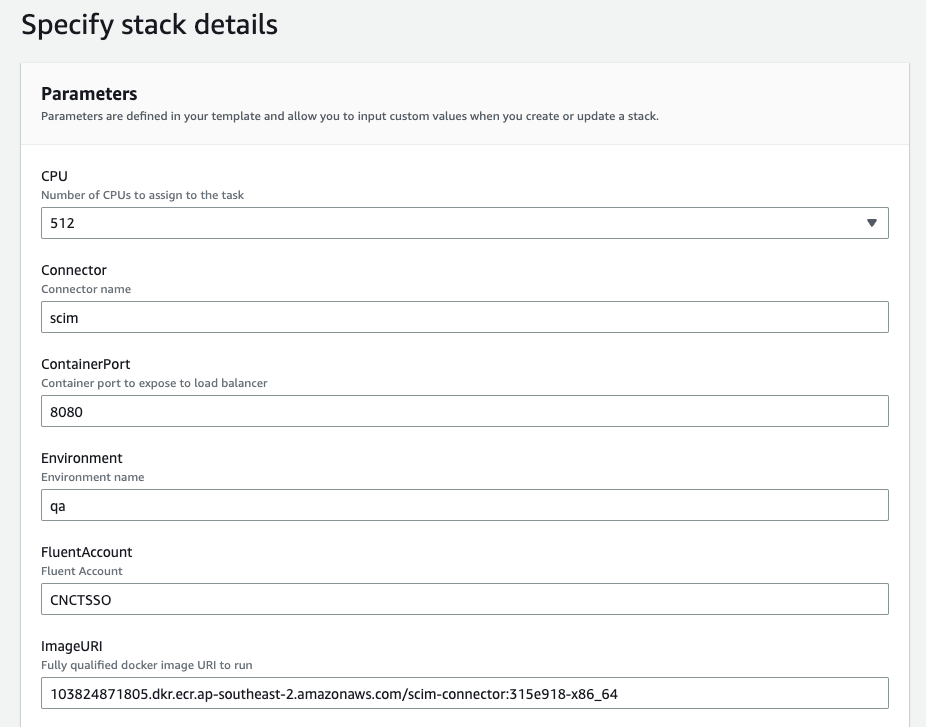
4 Parameters:
5 Connector:
6 Description: "Connector name"
7 Type: String
8
9 Environment:
10 Description: "Environment name"
11 Type: String
12 Default: test
13
14 FluentAccount:
15 Description: "Fluent Account"
16 Type: String
17 Default: CNCTSSO
18
19 ImageURI:
20 Description: "Fully qualified docker image URI to run"
21 Type: String
22
23 CPU:
24 Description: Number of CPUs to assign to the task
25 Type: Number
26 Default: 512
27 AllowedValues:
28 - 256
29 - 512
30 - 1024
31
32 Memory:
33 Description: Amount of memory to assign to the task in GB
34 Type: Number
35 Default: 1024
36 AllowedValues:
37 - 512
38 - 1024
39 - 2048
40 - 3072
41
42 ContainerPort:
43 Description: Container port to expose to load balancer
44 Type: Number
45 Default: 8080
46
47 MinCapacity:
48 Type: Number
49 Default: 1
50
51 MaxCapacity:
52 Type: Number
53 Default: 6
54
55 VpcId:
56 Description: VPC Id
57 Type: AWS::SSM::Parameter::Value<String>
58
59 VpcCidr:
60 Description: VPC CIDR Block
61 Type: AWS::SSM::Parameter::Value<String>
62
63 PublicHostedZoneName:
64 Description: Public hosted zone (domain name)
65 Type: AWS::SSM::Parameter::Value<String>
66
67 PublicHostedZoneId:
68 Description: Public hosted zone id
69 Type: AWS::SSM::Parameter::Value<String>
70
71 PublicSubnets:
72 Description: Public Subnet IDs
73 Type: AWS::SSM::Parameter::Value<List<String>>
74
75 PrivateSubnets:
76 Description: Private Subnet IDs
77 Type: AWS::SSM::Parameter::Value<List<String>>
78
79 Mappings:
80 RegionMap:
81 us-east-1:
82 RegionCode: use1
83 us-east-2:
84 RegionCode: use2
85 us-west-1:
86 RegionCode: usw1
87 us-west-2:
88 RegionCode: usw2
89 af-south-1:
90 RegionCode: afs1
91 ap-east-1:
92 RegionCode: ape1
93 ap-south-1:
94 RegionCode: aps1
95 ap-northeast-1:
96 RegionCode: apne1
97 ap-northeast-2:
98 RegionCode: apne2
99 ap-northeast-3:
100 RegionCode: apne3
101 ap-southeast-1:
102 RegionCode: apse1
103 ap-southeast-2:
104 RegionCode: apse2
105 ap-southeast-3:
106 RegionCode: apse3
107 ca-central-1:
108 RegionCode: cac1
109 eu-central-1:
110 RegionCode: euc1
111 eu-west-1:
112 RegionCode: euw1
113 eu-west-2:
114 RegionCode: euw2
115 eu-west-3:
116 RegionCode: euw3
117 eu-south-1:
118 RegionCode: eus1
119 eu-north-1:
120 RegionCode: eun1
121 me-south-1:
122 RegionCode: mes1
123 me-central-1:
124 RegionCode: mec1
125 sa-east-1:
126 RegionCode: sae1
127
128 Resources:
129 ALBSecurityGroup:
130 Type: AWS::EC2::SecurityGroup
131 Properties:
132 GroupName: !Sub "${Connector}-${Environment}-connectors-alb-sg"
133 GroupDescription: !Sub "${Environment} ${AWS::Region} ${Connector} connector load balancer Security Group"
134 VpcId: !Ref VpcId
135 SecurityGroupIngress:
136 - IpProtocol: tcp
137 FromPort: 443
138 ToPort: 443
139 CidrIp: 0.0.0.0/0
140 Tags:
141 - Key: Name
142 Value: !Sub "${Connector}-${Environment}-connectors-alb-sg"
143 - Key: Region
144 Value: !Ref AWS::Region
145
146 ConnectorSecurityGroup:
147 Type: AWS::EC2::SecurityGroup
148 Properties:
149 GroupName: !Sub ${Environment}-${Connector}-connectors-sg
150 GroupDescription: !Sub "${Environment} ${AWS::Region} ${Connector} connector Security Group"
151 VpcId: !Ref VpcId
152 SecurityGroupIngress:
153 - CidrIp: !Ref VpcCidr
154 Description: "oms connectors access"
155 FromPort: 443
156 ToPort: 443
157 IpProtocol: -1
158 Tags:
159 - Key: Name
160 Value: !Sub "${Connector}-${Environment}-connectors-sg"
161 - Key: Region
162 Value: !Ref AWS::Region
163
164 LogGroup:
165 Type: AWS::Logs::LogGroup
166 Properties:
167 RetentionInDays: 7
168 LogGroupName: !Sub "/${Connector}/${Environment}/connectors"
169
170 LoadBalancer:
171 Type: AWS::ElasticLoadBalancingV2::LoadBalancer
172 Properties:
173 Name: !Sub "${Connector}-${Environment}-connect-alb"
174 Scheme: internet-facing
175 SecurityGroups:
176 - !Ref ALBSecurityGroup
177 Subnets: !Ref PublicSubnets
178
179 Certificate:
180 Type: "AWS::CertificateManager::Certificate"
181 Properties:
182 DomainName:
183 Fn::Sub:
184 - "${Connector}.${RegionCode}.${Environment}.${PublicHostedZoneName}"
185 - RegionCode: !FindInMap [RegionMap, !Ref AWS::Region, RegionCode]
186 ValidationMethod: DNS
187 DomainValidationOptions:
188 - DomainName:
189 Fn::Sub:
190 - "${Connector}.${RegionCode}.${Environment}.${PublicHostedZoneName}"
191 - RegionCode: !FindInMap [RegionMap, !Ref AWS::Region, RegionCode]
192 HostedZoneId: !Ref PublicHostedZoneId
193
194 RecordSet:
195 Type: AWS::Route53::RecordSet
196 Properties:
197 Name:
198 Fn::Sub:
199 - "${Connector}.${RegionCode}.${Environment}.${PublicHostedZoneName}"
200 - RegionCode: !FindInMap [RegionMap, !Ref AWS::Region, RegionCode]
201 Comment: !Sub "Alias for connectors endpoint of ${Connector} in ${AWS::Region}"
202 Type: CNAME
203 HostedZoneId: !Ref PublicHostedZoneId
204 TTL: 60
205 ResourceRecords:
206 - !GetAtt LoadBalancer.DNSName
207
208 HttpsTargetGroup:
209 Type: AWS::ElasticLoadBalancingV2::TargetGroup
210 Properties:
211 Name: !Sub ${Connector}-${Environment}-https-tg
212 HealthCheckPath: /actuator/health
213 HealthCheckPort: !Ref ContainerPort
214 HealthCheckIntervalSeconds: 60
215 HealthCheckTimeoutSeconds: 2
216 HealthyThresholdCount: 2
217 UnhealthyThresholdCount: 5
218 Port: 443
219 Protocol: HTTP
220 TargetType: ip
221 TargetGroupAttributes:
222 - Key: deregistration_delay.timeout_seconds
223 Value: "60"
224 VpcId: !Ref VpcId
225
226 HttpsListener:
227 Type: "AWS::ElasticLoadBalancingV2::Listener"
228 Properties:
229 LoadBalancerArn: !Ref LoadBalancer
230 Protocol: HTTPS
231 SslPolicy: ELBSecurityPolicy-TLS-1-2-2017-01
232 Port: 443
233 Certificates:
234 - CertificateArn: !Ref Certificate
235 DefaultActions:
236 - Type: "forward"
237 TargetGroupArn: !Ref HttpsTargetGroup
238
239 ECSCluster:
240 Type: AWS::ECS::Cluster
241 Properties:
242 ClusterName: !Sub "${Connector}-${Environment}-connectors-cluster"
243
244 TaskExecutionRole:
245 Type: AWS::IAM::Role
246 Properties:
247 RoleName: !Sub "${Connector}-${Environment}-connectors-task-execution-role"
248 AssumeRolePolicyDocument:
249 Version: 2012-10-17
250 Statement:
251 - Effect: Allow
252 Principal:
253 Service:
254 - ecs-tasks.amazonaws.com
255 Action:
256 - "sts:AssumeRole"
257 ManagedPolicyArns:
258 - arn:aws:iam::aws:policy/service-role/AmazonECSTaskExecutionRolePolicy
259
260 TaskRole:
261 Type: AWS::IAM::Role
262 Properties:
263 RoleName: !Sub "${Connector}-${Environment}-connectors-task-role"
264 AssumeRolePolicyDocument:
265 Version: 2012-10-17
266 Statement:
267 - Effect: Allow
268 Principal:
269 Service:
270 - ecs-tasks.amazonaws.com
271 Action:
272 - "sts:AssumeRole"
273 Policies:
274 - PolicyName: !Sub "${Connector}-${Environment}-connector-logs"
275 PolicyDocument:
276 Version: 2012-10-17
277 Statement:
278 - Effect: Allow
279 Action:
280 - "logs:CreateLogGroup"
281 - "logs:CreateLogStream"
282 - "logs:PutLogEvents"
283 - "cloudwatch:PutMetricData"
284 Resource:
285 - "*"
286 - PolicyName: !Sub "${Connector}-${Environment}-connector-cfn"
287 PolicyDocument:
288 Version: 2012-10-17
289 Statement:
290 - Effect: Allow
291 Action:
292 - "cloudformation:DescribeStacks"
293 Resource:
294 - "*"
295 - PolicyName: !Sub "${Connector}-${Environment}-connector-secrets"
296 PolicyDocument:
297 Version: 2012-10-17
298 Statement:
299 - Effect: Allow
300 Action:
301 - "secretsmanager:GetResourcePolicy"
302 - "secretsmanager:GetSecretValue"
303 - "secretsmanager:DescribeSecret"
304 - "secretsmanager:ListSecretVersionIds"
305 - "secretsmanager:CreateSecret"
306 - "secretsmanager:DeleteSecret"
307 Resource:
308 - !Sub "arn:aws:secretsmanager:${AWS::Region}:${AWS::AccountId}:secret:*"
309
310 - PolicyName: !Sub "${Connector}-${Environment}-connector-sqs"
311 PolicyDocument:
312 Version: 2012-10-17
313 Statement:
314 - Effect: Allow
315 Action:
316 - "sqs:*"
317 Resource:
318 - !Sub "arn:aws:sqs:${AWS::Region}:${AWS::AccountId}:*"
319 - PolicyName: !Sub "${Connector}-${Environment}-container-access"
320 PolicyDocument:
321 Version: 2012-10-17
322 Statement:
323 - Effect: "Allow"
324 Action:
325 - "ssmmessages:CreateControlChannel"
326 - "ssmmessages:CreateDataChannel"
327 - "ssmmessages:OpenControlChannel"
328 - "ssmmessages:OpenDataChannel"
329 Resource: "*"
330
331 TaskDefinition:
332 Type: AWS::ECS::TaskDefinition
333 Properties:
334 Family: !Sub "${Connector}-${Environment}-connector"
335 Cpu: !Ref CPU
336 Memory: !Ref Memory
337 NetworkMode: awsvpc
338 ExecutionRoleArn: !GetAtt TaskExecutionRole.Arn
339 TaskRoleArn: !GetAtt TaskRole.Arn
340 RequiresCompatibilities:
341 - FARGATE
342 ContainerDefinitions:
343 - Name: connector
344 Image: !Ref ImageURI
345 Essential: true
346 PortMappings:
347 - ContainerPort: !Ref ContainerPort
348 Environment:
349 - Name: FLUENT_CONNECT_MOCK_ACCOUNTID
350 Value: !Ref FluentAccount
351 - Name: CONNECTOR_NAME
352 Value: !Ref Connector
353 - Name: SPRING_PROFILES_ACTIVE
354 Value: !Ref Environment
355 - Name: REGION
356 Value: !Ref AWS::Region
357 - Name: AWS_SECRETSMANAGER_DEFAULT_CONTEXT
358 Value: application
359 - Name: AWS_SECRETSMANAGER_FAIL_FAST
360 Value: false
361 - Name: AWS_SECRETSMANAGER_PREFIX
362 Value: /fc
363 - Name: AWS_SECRETSMANAGER_ENABLED
364 Value: true
365 - Name: MANAGEMENT_METRICS_EXPORT_CLOUDWATCH_ENABLED
366 Value: true
367 - Name: MANAGEMENT_METRICS_EXPORT_CLOUDWATCH_NAMESPACE
368 Value: !Sub "fc-scim-${Environment}"
369 LogConfiguration:
370 LogDriver: awslogs
371 Options:
372 awslogs-group: !Ref LogGroup
373 awslogs-region: !Ref AWS::Region
374 awslogs-stream-prefix: connectors
375
376 ECSService:
377 DependsOn:
378 - HttpsListener
379 Type: AWS::ECS::Service
380 Properties:
381 ServiceName: !Sub "${Connector}-${Environment}-connectors"
382 Cluster: !Ref ECSCluster
383 TaskDefinition: !Ref TaskDefinition
384 EnableExecuteCommand: true
385 DesiredCount: 1
386 DeploymentConfiguration:
387 MinimumHealthyPercent: 100
388 MaximumPercent: 200
389 EnableECSManagedTags: true
390 LaunchType: FARGATE
391 HealthCheckGracePeriodSeconds: 120
392 LoadBalancers:
393 - TargetGroupArn: !Ref HttpsTargetGroup
394 ContainerPort: !Ref ContainerPort
395 ContainerName: connector
396 NetworkConfiguration:
397 AwsvpcConfiguration:
398 AssignPublicIp: DISABLED
399 SecurityGroups:
400 - !Ref ConnectorSecurityGroup
401 Subnets: !Ref PrivateSubnets
402 PropagateTags: SERVICE
403
404 ScalingPolicy:
405 Type: AWS::ApplicationAutoScaling::ScalingPolicy
406 Properties:
407 PolicyName: "connectors autoscaling policy"
408 PolicyType: TargetTrackingScaling
409 ScalingTargetId: !Ref AutoScalingTarget
410 TargetTrackingScalingPolicyConfiguration:
411 DisableScaleIn: False
412 PredefinedMetricSpecification:
413 PredefinedMetricType: ECSServiceAverageMemoryUtilization
414 ScaleInCooldown: 300
415 ScaleOutCooldown: 120
416 TargetValue: 60.0
417
418 AutoScalingTarget:
419 Type: AWS::ApplicationAutoScaling::ScalableTarget
420 Properties:
421 MinCapacity: !Ref MinCapacity
422 MaxCapacity: !Ref MaxCapacity
423 ResourceId: !Sub
424 - service/${ClusterName}/${ServiceName}
425 - ServiceName: !GetAtt ECSService.Name
426 ClusterName: !Ref ECSCluster
427 ScalableDimension: ecs:service:DesiredCount
428 ServiceNamespace: ecs
429 RoleARN: !Sub "arn:aws:iam::${AWS::AccountId}:role/aws-service-role/ecs.application-autoscaling.amazonaws.com/AWSServiceRoleForApplicationAutoScaling_ECSService"
430
431 ApiConnection:
432 Type: AWS::Events::Connection
433 Properties:
434 AuthorizationType: BASIC
435 Description: !Sub "Connection to ${Connector} ${Environment} connector endpoint"
436 AuthParameters:
437 BasicAuthParameters:
438 Username: admin
439 Password: "pass"
440 InvocationHttpParameters: {}
441
442 RuleTargetRole:
443 Type: AWS::IAM::Role
444 Properties:
445 RoleName: !Sub "${Connector}-${Environment}-invoke-api-destination"
446 AssumeRolePolicyDocument:
447 Version: 2012-10-17
448 Statement:
449 - Effect: Allow
450 Principal:
451 Service:
452 - events.amazonaws.com
453 Action:
454 - "sts:AssumeRole"
455 Policies:
456 - PolicyName: !Sub "${Connector}-${Environment}-invoke-api-destination"
457 PolicyDocument:
458 Version: 2012-10-17
459 Statement:
460 - Effect: Allow
461 Action:
462 - events:InvokeApiDestination
463 Resource:
464 - !Sub "arn:aws:events:${AWS::Region}:${AWS::AccountId}:api-destination/*"
465
466
467
468
469 Outputs:
470 ConnectorsPublicURL:
471 Description: "The public URL of the connectors endpoint"
472 Value:
473 Fn::Sub:
474 - "https://${Connector}.${RegionCode}.${Environment}.${PublicHostedZoneName}"
475 - RegionCode: !FindInMap [RegionMap, !Ref AWS::Region, RegionCode]
 Download the Connector YAML "connectors.yaml"
 After successfully deploying the stack, you can get the public endpoint by going to the “Outputs” tab on the stack. It will be listed next to “ConnectorsPublicURL” logical resource name.
