
commercetools connector - Location Sync
Feature
Changed on:
31 Jan 2024
Overview
A Location is any place where an order can be fulfilled and/or collected by the customer. Locations can include a physical store, warehouse, drop ship vendor, lockers or third-party collection points. Locations will be synced from Fluent to commercetools. The existing entity in commercetools for Fluent location is Channel.How it Works
The location will be synced from Fluent to commercetools via a job. The job will consist of a timestamp parameter to be set in fluent Settings. On behalf of setting values ie. dates, and props such as network, commercetools channel details will get created/updated in the merchant center.`Setting Name: fc.connect.commerce-tools.batch.batch-location-sync`1{
2 "previousEndDate": "2022-10-20T04:12:44.707061681",
3 "props": {
4 "fluentNetworkRef": "BASE_1"
5 },
6 "lastRun": {
7 "param": {
8 "start": "2022-10-19T04:12:45.104341414",
9 "end": "2022-10-20T04:12:44.707061681",
10 "props": {
11 "fluentNetworkRef": "BASE_1"
12 }
13 },
14 "jobStart": "2022-10-20T04:12:44.615441435",
15 "jobEnd": "2022-10-20T04:12:44.737175454",
16 "status": "SUCCESSFUL"
17 }
18}Location update specification
A GraphQL request looks like shown below:1query GetLocations($after: String, $first: Int, $updatedOnFrom: DateTime, $updatedOnTo: DateTime) {
2 locations(after: $after, first: $first, updatedOn: {from: $updatedOnFrom, to: $updatedOnTo}) {
3 locationEdge: edges {
4 locationNode: node {
5 ref
6 name
7 supportPhoneNumber
8 createdOn
9 updatedOn
10 type
11 status
12 openingSchedule {
13 allHours,
14 monEnd,
15 monStart,
16 tueEnd,
17 tueStart,
18 wedEnd,
19 wedStart,
20 thuEnd,
21 thuStart,
22 friEnd,
23 friStart,
24 satEnd,
25 satStart,
26 sunEnd,
27 sunStart
28
29 }
30 attributes {
31 name
32 type
33 value
34 }
35 primaryAddress {
36 street
37 city
38 state
39 postcode
40 country
41 region
42 latitude
43 longitude
44 timeZone
45 }
46 networks( first:100) {
47 networkEdge: edges {
48 networkNode: node {
49 ref
50 }
51 }
52 }
53 }
54 cursor
55 }
56 pageInfo {
57 hasNextPage
58 }
59 }
60}Location Sync scenarios
There are two scenarios for sync locations:- Full & Partial sync
- Full & Partial sync should be implemented using a setting in the Fluent configuration interface, commercetools connector fetches all Fluent locations modified since chosen data against the mapped network
- Delta sync
- Delta sync can be executed daily on the desired frequency and it fetches all Fluent locations modified since the last sync.
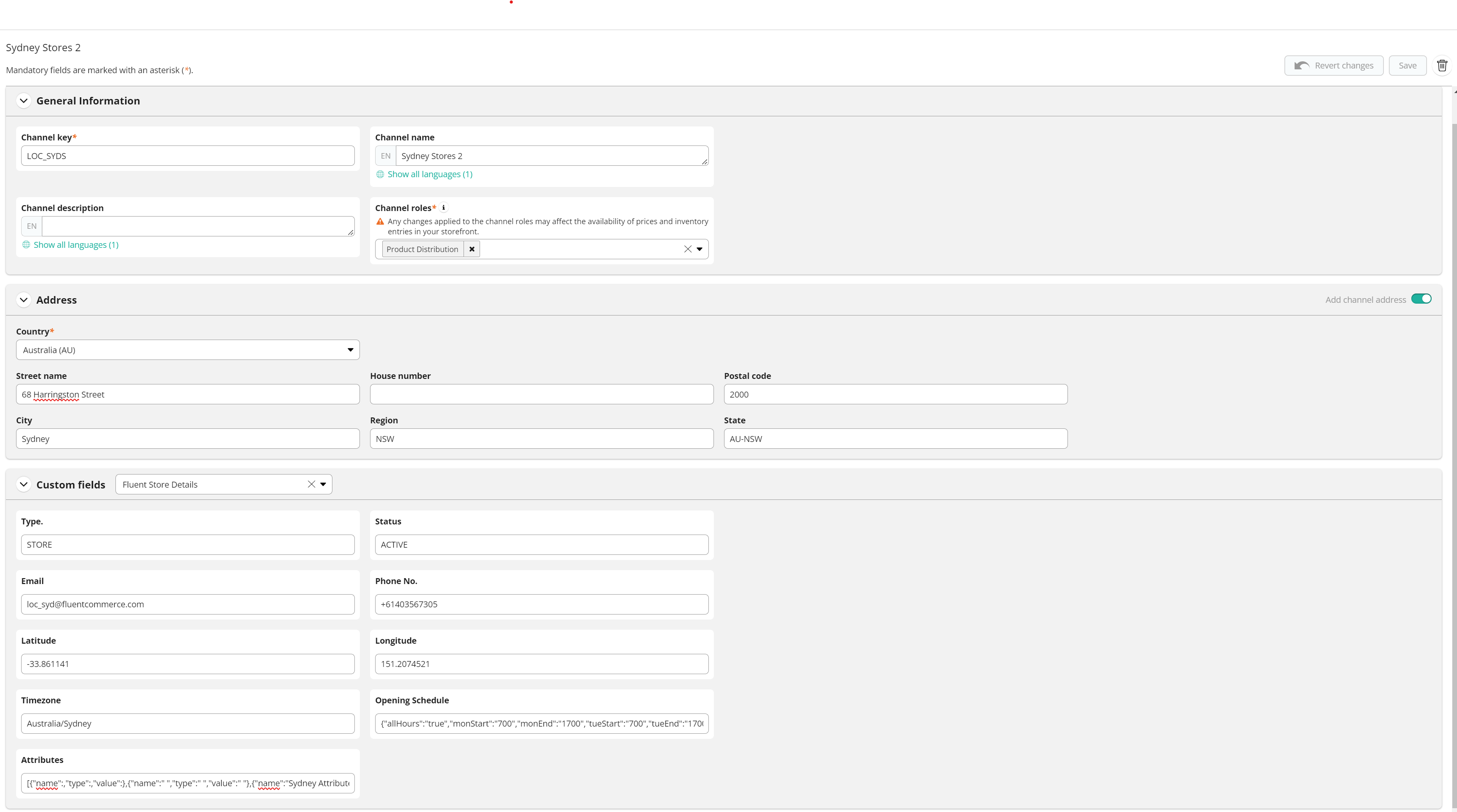
Fields Mapping
The below fields will need to be created and mapped in commercetools to keep all data coming from Fluent| Fluent Field Name | commercetools Field Name | commercetools custom field identifier |
| Ref | Channel Key | |
| Store Name | Channel Name | |
| Phone | Phone No. | flStorePhoneNo |
| User Email | flStoreEmail | |
| Type | Type | flStoreType |
| Status | Status | flStoreStatus |
| Address Line 1 | Street Name | |
| Address Line 2 | City | |
| Address Line 3 | State | |
| Address Line 4 | Postal Code | |
| Address Line 5 | Country | |
| Latitude | Latitude | flStoreLatitude |
| Longitude | Longitude | flStoreLongitude |
| Timezone | Timezone | flStoreTimezone |
| Opening Hours | Opening Schedule | flOpeningSchedule |
| Attributes | Attributes | flStoreAttributes |
