This lesson covers key operational activities in Fluent Commerce, including Plugin Management, Workflow Versioning, and Audit Events. You’ll learn how to manage Fluent plugins, version workflows, and utilize audit events to debug and analyze processes within the Fluent platform.
Key points
Plugin Management: Upload, activate, and manage plugin versions via Plugin API.
Workflow Versions: Submit, view, and retrieve versions for effective workflow management.
Event Categories: Includes snapshots, rulesets, rules, actions, and exceptions.
Event Viewing: Access audit data via Event API, Event Search, or Fluent OMS Activity tab.
An introduction: Activities
In this lesson, we'll talk about some activities and tasks that may need to be undertaken from an operational point of view as part of Fluent application support and maintenance. Topics in this lesson include:
Plugin Management
Workflow Versioning
Audit Events
Plugin Management
Plugins are separately built artifacts containing one or more rules that can be uploaded and installed into the Fluent Workflow Framework to be used during workflow execution.For a Developer or a Technical Lead, some common plugin management tasks include:
Uploading plugins
Activating plugins
Viewing the active/inactive version of plugins
Checking which version of the plugin is active
Rolling back/forward between the previous and new versions
Retrieving all the rules that are currently available in an account
Managing custom rules on custom plugins
Using the Plugin API
The Plugin API provides methods for uploading, installing, and viewing Plugins.Here's a quick look at the API:Next, we look at the operations of the Plugin API.With the Plugin API, you can conduct the following operations:[GET] - returns the list of all rules that are active in an ACCOUNT
Authentication: Required
Permissions: PLUGIN_VIEW permission required for the ACCOUNT context.
[GET] / {bundleName}/status - returns the upload/installation status and other metadata of the specified plugin bundle. Only bundles that belong to the logged-in account can be viewed:
Authentication: Required
Permissions: PLUGIN_VIEW permission is required for the ACCOUNT context.
Responses: Response Content Type - application/json
Before we look at the activities that surround workflow versions, let's understand what Workflow Versions are.Within the Fluent Platform, all workflows are versioned. Any modification of an existing workflow by a Retailer automatically creates a new version.Here are some things to remember about workflow versions.
A major version represents a major change in the flow, such as adding a new state transition and new business logic.
A minor change involves changing parameters, such as changing the email template for customer notifications or updating the expiry time of articles.
Workflow Versioning Update: Ensuring Data Integrity
For a major update, to maintain data integrity, an entity instance executing within a workflow will continue executing within the same major workflow version, even if a newer version exists. New entity instances will be executed within the new version of the workflow. However, for a minor release, all entities will use the new minor version.
Okay, now that we've discussed Workflow versions, let's discuss the tasks and activities surrounding them.
Activities
Here are some activities that can be carried out around Workflow Versions:
Submit a new version of the workflow
Check what different workflow versions exist
Get an extract of all the workflows that are currently available
Go back and retrieve a particular workflow version
The Workflow API supports the following operations:[PUT] - used for uploading a new workflow
Orchestration Audit Events record what has happened during orchestration processing. They are essentially a log of all activities for a particular entity and contain information valuable for determining what and how an entity was processed through a workflow. They also provide the most useful mechanism for debugging orchestration issues.There are 3 different ways to view audit events:
Event API (e.g. using Postman)
Event Search (see Insights in Fluent OMS web app)
Activity tab (inside Order detail view in Fluent OMS web app)
Audit Events are automatically generated by the Workflow Engine and include a number of categories that define what the audit event is about. Audit Event categories:Snapshot — This event prints out a snapshot of the orchestrated entity at the time the event is triggered inside of the Workflow Engine.
Why is it useful? : To see the state of the entity before the process is executed.
Ruleset — For each and every ruleset executed within a process, a RulesetAudit event is created.
Why is it useful?: To trace the workflow path taken by the entity during that event or process.
Rule — For each and every rule executed within a ruleset, a RuleAudit event is created
Why is it useful? : To traceall rules executed in sequence within a process and determine what the last rule executed was in the case of an exception or interruption in processing. It can also be used to capture an audit of each entity's status change or webhook sent by filtering to those rules.
Action — An ActionAudit event is created for each action produced from a Rule.
Why is it useful? : To validate if an expected Action was produced during processing.
Exception — An Exception Audit event is written whenever an exception is thrown from a Rule, back into the Workflow Engine.
Why is this useful? : To debug 'what exception has occurred' and 'why'. More importantly, it will log the stack trace of the exception. Therefore, it's important for Rule writers to make sure the real source exception is thrown or included as the cause of the exception being thrown from the Rule.
Additionally, the Log Actioncreates a custom Audit event. This is useful for Rule developers to provide additional audit information to the Audit log that is not included in the system-generated audit events.
Single Log Action Per Rule: Include All Relevant Details
Only one single log action is produced per rule, so Rule developers should ensure they include all relevant information in a single Log Action.
Audit Event Structure
Like any Event, the Audit Event contains context information such as the Root Entity and Entity type, status, and ID / Ref. It also includes a timestamp, which is useful for reporting and analyzing processing and fulfillment times. Additional information is written in the Event Attributes array.

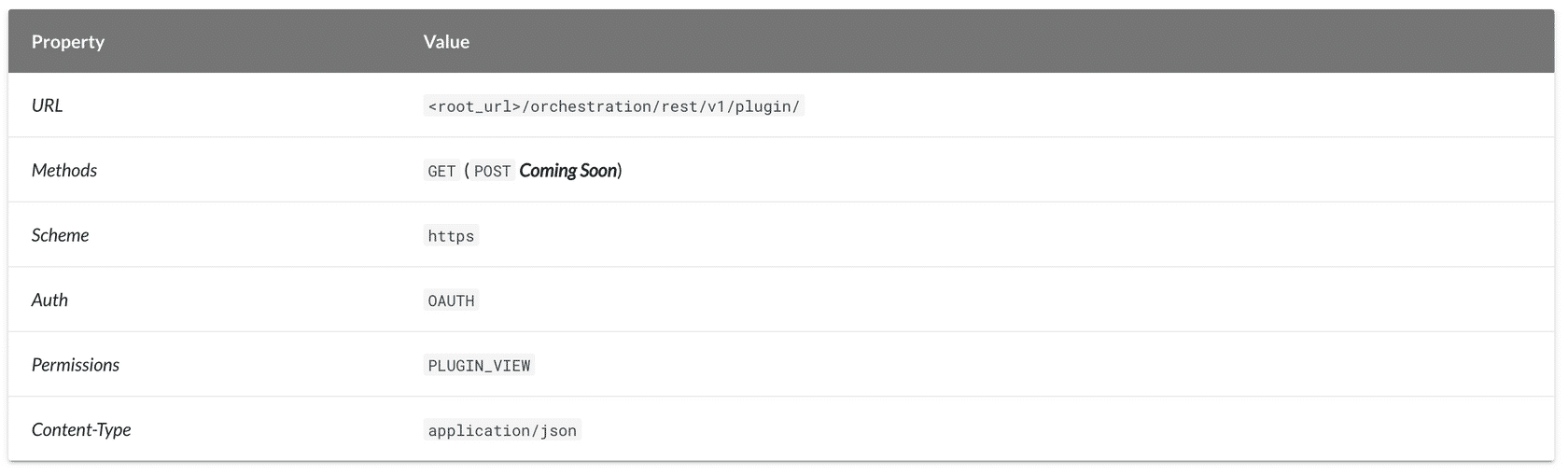 Next, we look at the operations of the Plugin API.With the Plugin API, you can conduct the following operations:[GET] - returns the list of all rules that are active in an ACCOUNT