- Get Started
- Functionality
- Learning
- Extension
- Dev Tooling
- APIs
- Releases

Docs
Changed on:
1 Oct 2025
`exactSearch: true`, strict case-sensitive matching). The output format is configurable via the `type` property, returning either an array of strings (`text`, default) or an array of numbers (`number`).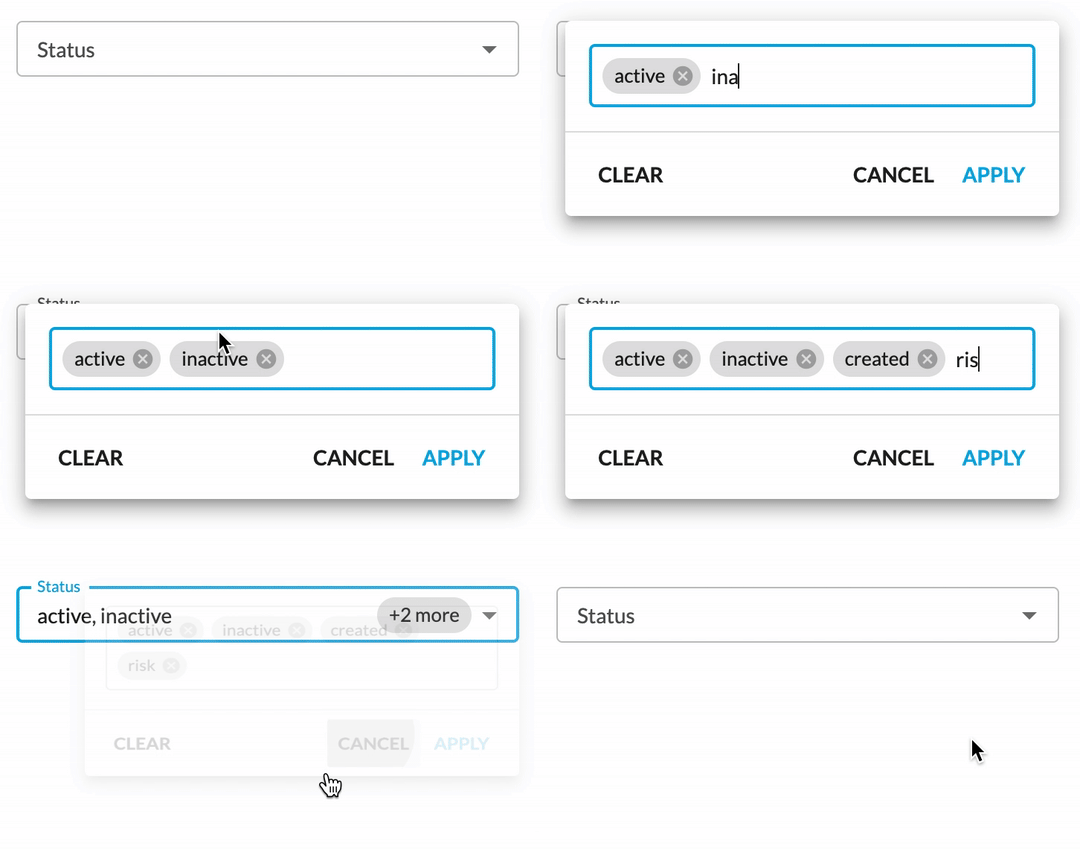
| Plugin Name | Core |
|---|
fc.field.multistring
`exactSearch`).Clicking the input activates the component, allowing users to enter values and interact with the following elements:`visibleItemsThreshold` property to limit displayed chips before collapsing excess into a dropdown.`exactSearch: true`): Enforces strict, case-sensitive matching.`type = text` (default) → component output is an array of strings.`type = number` → component output is an array of numbers, ensuring proper type conversion and validation for numeric-only values.`type = number`) are automatically rejected, preserving data integrity.| Name | Type | Required | Default Value | Description |
| exactSearch | `boolean` | No | `false` | Defines search behavior. When set to `true`, the component enforces exact, case-sensitive matching for search terms. When `false` (default), it allows partial matches (context search). |
| visibleItemsThreshold | `number` | No | 2 | Specifies the minimum number of items to display in the input as a positive integer. |
| type | `text | number` | No | `text` | Determines the output format of the component: • `text` → returns an array of strings • `number` → returns an array of numbers |
1{
2  "descendants": [
3    {
4      "component": "fc.filterPanel",
5      "props": {
6        "allowReadWriteUrlParams": true,
7        "overrides": {
8          "status": {
9            "component": "fc.field.multistring",
10            "label": "fc.gql.status.label",
11            "exactSearch": true,
12            "visibleItemsThreshold": 3
13          }
14        }
15      }
16    }
17  ]
18}See previous versions
Copyright © 2024-2026 Fluent Retail Pty Ltd (trading as Fluent Commerce). Unless otherwise expressly stated in a current written agreement with Fluent Commerce or any of its affiliates or on any single page of the docs.fluentcommerce.com site, use of the materials on this site is strictly limited to viewing by individuals over 18 years old for legitimate commercially appropriate reasons; and any downloading, copying or other actions or uses of any kind or by any means of the materials on this site, including by artificial intelligence tools, is strictly prohibited. All other rights reserved.
