- Get Started
- Functionality
- Learning
- Extension
- Dev Tooling
- APIs
- Releases

Docs
Author:
Yulia Andreyanova
Changed on:
12 Dec 2025
Copyright © 2024-2026 Fluent Retail Pty Ltd (trading as Fluent Commerce). Unless otherwise expressly stated in a current written agreement with Fluent Commerce or any of its affiliates or on any single page of the docs.fluentcommerce.com site, use of the materials on this site is strictly limited to viewing by individuals over 18 years old for legitimate commercially appropriate reasons; and any downloading, copying or other actions or uses of any kind or by any means of the materials on this site, including by artificial intelligence tools, is strictly prohibited. All other rights reserved.

 Add the Component Skeleton to the Manifest
`fc.field.filterComplex` component in the manifest. Include properties for filters, queries, and configurations:1{
2 "component": "fc.field.filterComplex",
3 "label": "Product filter",
4 "extensions": {
5 "filtersSource": "",
6 "query": "",
7 "variables": {},
8 "overrides": {},
9 "searchItemConfig": {},
10 "chipItemConfig": {},
11 "onChangeValues": {},
12 "mode": "single",
13 "exclude": []
14 }
15}`query` and `variables` to retrieve the desired data. This enables the component to fetch entities dynamically.1"extensions": {
2 "query": parse(gql`query products($products_ref: [String!], $products_name: [String!], $productCatalogue: String!) {
3 variant: variantProducts (ref: $products_ref, name: $products_name, catalogue: {ref: $productCatalogue}) {
4 edges {
5 node { ref name attributes { name value } }
6 }
7 }
8 standard: standardProducts (ref: $products_ref, name: $products_name, catalogue: {ref: $productCatalogue}) {
9 edges {
10 node { ref name attributes { name value } }
11 }
12 }
13 }`),
14 "variables": {
15 "products_first": 100,
16 "productCatalogue": "{{productCatalogue}}"
17 },
18}`exclude` property. The `overrides` property can be used to customize field types, labels, and order.1"extensions": {
2 "overrides": {
3 "name": {
4 "sortPrefix": 1
5 },
6 },
7 "exclude": [
8 "createdon",
9 "updatedon",
10 "type",
11 "status",
12 "gtin",
13 "summary",
14 "productcatalogue"
15 ]
16}`wildcardFilter` property inside a field’s override, you can fine-tune how filter input is translated into search patterns:`prefix: true` → allow leading wildcard (`%value`)`postfix: true` → allow trailing wildcard (`value%`)`prefix: false` & `postfix: false` → exact match`undefined` → treated as false (no wildcard)1{
2 "extensions": {
3 "overrides": {
4 "name": {
5 "extensions": {
6 "wildcardFilter": {
7 "prefix": false,
8 "postfix": true
9 }
10 }
11 }
12 }
13 }
14}`wildcardFilter` property is evaluated before the account-level wildcard configuration.Configure Selection Behavior`mode` and `selectionLimit` properties.1{
2 "extensions": {
3 "mode": "multiple",
4 "selectionLimit": 5
5 }
6}`mode` property controls how many items a user can select. When set to `single`, only one item can be chosen, and the selected value is returned as a string. When set to `multiple` (the default), users can select multiple items, and the output is returned as an array. The `selectionLimit` property, which only applies when `mode` is `multiple`, restricts the number of selectable items to a specified maximum (e.g., 5 means users can choose up to five items).Set Modal Size and Layout Columns`modalDimension` and `displayColumns` to configure the filter modal layout.`modalDimension`: This controls the modal size. It accepts `small` (the default) or `medium`. This is useful when you expect longer labels or want more visual breathing room.`displayColumns`: This setting defines the number of columns for the field layout. Set it to `2` or `3` to group more fields horizontally, making better use of screen space.1"extensions": {
2 "modalDimension": "medium",
3 "displayColumns": 2
4}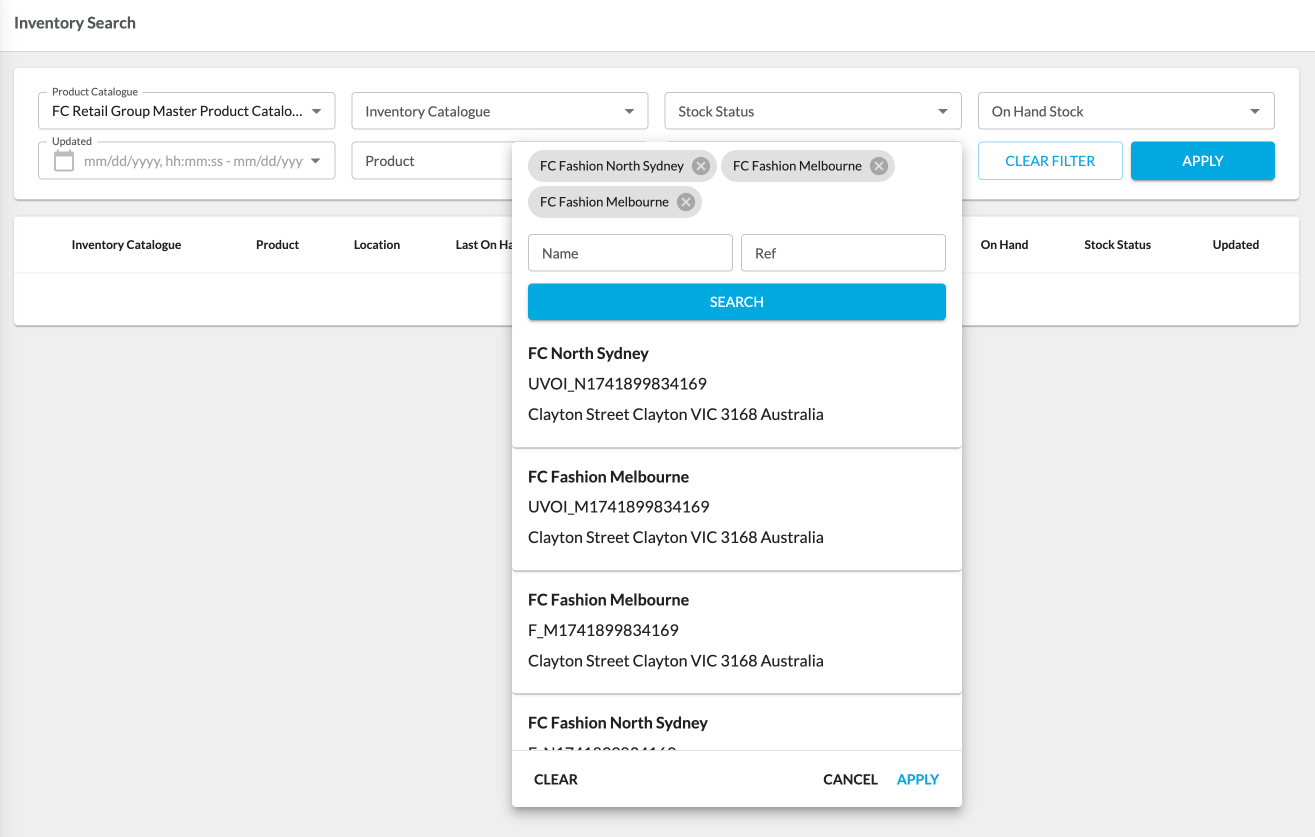 Display Search Results
`searchItemConfig` property.1"extensions": {
2 "searchItemConfig": {
3 "component": "fc.card.product",
4 "props": {
5 "title": "{{node.name}}",
6 "cardImage": {
7 "imageUrl": "{{node.attributes.byName.imageUrl}}"
8 },
9 "attributes": [
10 {
11 "value": "{{node.ref}}"
12 }
13 ]
14 }
15 },
16}`chipItemConfig` property to define how selected items are displayed in the filter’s modal window. This configuration can include additional query and variable properties to specify a GraphQL query for preselected items. For instance, the filter panel might supply a list of references already selected without opening the complex filter. If these properties are not defined, the main query will be used by default.1"extensions": {
2 "chipItemConfig": {
3 "label": "{{node.name}}",
4 "query": parse(gql`query products($products_ref: [String!], $products_name: [String!]) {
5 variant: variantProducts (ref: $products_ref, name: $products_name) {
6 edges { node { ref name }}
7 }
8 standard: standardProducts (ref: $products_ref, name: $products_name) {
9 edges { node { ref name } }
10 }
11 }`),
12 "variables": {
13 "products_first": 100,
14 },
15 },
16}`chipItemConfig` property. This behavior is managed through `onChangeValues`.The `onChangeValues` property defines how selected values are mapped to query variables, ensuring that the correct data is sent to the backend when filters are applied.The `outputTemplate` property specifies how a field’s value is transformed before being passed to the backend. It is required when the backend expects a format other than a simple string or array of strings, such as an object or an array of objects. This mechanism ensures compatibility with backend requirements and removes the need for additional client-side transformation logic.1{
2 "extensions": {
3 "onChangeValues": {
4 "value": "node",
5 "outputTemplate": "{\"ref\": \"{{node.ref}}\"}"
6 }
7 }`fc.field.filterComplex` component:1"productRef": {
2 "component": "fc.field.filterComplex",
3 "label": "Product filter",
4 "extensions": {
5 "query": parse(gql`query products($products_ref: [String!], $products_name: [String!], $productCatalogue: String!) {
6 variant: variantProducts (ref: $products_ref, name: $products_name, catalogue: {ref: $productCatalogue}) {
7 edges {
8 node {
9 ref
10 name
11 attributes {
12 name
13 value
14 }
15 }
16 }
17 }
18 standard: standardProducts (ref: $products_ref, name: $products_name, catalogue: {ref: $productCatalogue}) {
19 edges {
20 node {
21 ref
22 name
23 attributes {
24 name
25 value
26 }
27 }
28 }
29 }
30 }`),
31 "variables": {
32 "products_first": 100,
33 "productCatalogue": "{{productCatalogue}}"
34 },
35
36 "modalDimension": "medium",
37 "displayColumns": 2,
38
39 "searchItemConfig": {
40 "component": "fc.card.product",
41 "props": {
42 "title": "{{node.name}}",
43 "cardImage": {
44 "imageUrl": "{{node.attributes.byName.imageUrl}}"
45 },
46 "attributes": [
47 {
48 "value": "{{node.ref}}"
49 }
50 ]
51 }
52 },
53
54 "chipItemConfig": {
55 "label": "{{node.name}}",
56 "query": parse(gql`query products($products_ref: [String!], $products_name: [String!]) {
57 variant: variantProducts (ref: $products_ref, name: $products_name) {
58 edges {
59 node {
60 ref
61 name
62 }
63 }
64 }
65 standard: standardProducts (ref: $products_ref, name: $products_name) {
66 edges {
67 node {
68 ref
69 name
70 }
71 }
72 }
73 }`),
74 "variables": {
75 "products_first": 100
76 }
77 },
78
79 "onChangeValues": {
80 "value": "node.ref",
81 "variableName": "products_ref"
82 },
83
84 "exclude": [
85 "createdon",
86 "updatedon",
87 "type",
88 "status",
89 "gtin",
90 "summary",
91 "productcatalogue"
92 ],
93
94 "overrides": {
95 "name": {
96 "sortPrefix": 1,
97 "extensions": {
98 "wildcardFilter": {
99 "prefix": false,
100 "postfix": true
101 }
102 }
103 }
104 }
105 }
106}